Category: Reading Room

  • How church website design documentation (doesn’t) get done

    At some point, some savvy steward in a church raises the question “What happens if our all-knowing, über church web design geek leaves? We should have them teach us how it works.” At which point even more hilarity ensues as the following process begins innocently enough in the form of an ‘educational’ ad-hoc Internet committee meeting:

    1. Committee chair: brings the ‘how the church website design works meeting’ to order
    2. Pastor/staff member: sheepishly asks the webmaster how the blessed thing works
    3. Church webmaster: disdainfully glares at the council members … wondering why no one else has read the WordPress Codex
    4. Committee meeting: sound of crickets chirping can heard in background
    5. Adjacent hallway: little kids gather hoping to snarf down a left-over donut when the meeting adjourns
    1. Committee chair: passes a note to pastor to ask a specific question on a specific aspect of the website
    2. Pastor/staff member: sheepishly asks the webmaster how a specific element of the website design works
    3. Church webmaster: disdainfully glares at the council members … visibly upset how badly everyone missed the point of everything
    4. Committee members: the webmaster berates them, in between insults throwing off valuable nuggets of technical information
    5. Adjacent hallway: little kids waiting outside the door for left-over donuts begin to cry
    1. Committee chair: collect the valuable nuggets, knowing they are the only reliable technical information they’ll ever receive
    2. Pastor/staff member: sheepishly ducks out into the hallway claiming to want to calm down the crying kids
    3. Church webmaster: disdainfully glares at the council members … moodily awaiting next question …
    4. Committee members: try like dickens to weave together the informational nuggets dispensed in between insults into something enlightening and technically accurate
    5. Adjacent hallway: enraged parents of crying children begin to gather with torches and pitchforks
    1. Goto step 6 until church webmaster is summarily ex-communicated

    Here’s my point:

    To my beloved church website design gurus out there, please spare yourself the shame of said scenario and either install a and/or sign-up with wiki service. Then when you have a spare moment, document some of the things you do.

    The wording may not be perfect but it’s enough of a start that would allow others less … how shall we say … technically adept but more gifted in word-smithing to collaborate said documents into perfection.

    As I’ve noted before, WikiSpaces is free (and easy), so you have no excuse – other than wanting to spread His love and your knowledge through the ministry of disdainful glares.

    Credits:

    Today’s silly scenario was inspired by the following post on Jeff Atwood Coding Horror blog entitled
    How to Write Technical Documentation.’

  • Craigslist Down proves the need to plan for failure

    What does the PG&E induced craigslist outage have to do with your church or charity website? How about a reminder of the tired but true adage that reads ‘Those who fail to plan, plan to fail.’ Specifically using mysqldump, crontab and perhaps ftp or rsync to insure you’re data isn’t dead in the water when your host goes down.

    • One of the big advantages of running a web services company out of the San Francisco area is that you’re located where the majority of action is – at least in the U.S.
    • One of the big disadvantages of running a web services company out of the San Francisco area is that when the Bay area takes a power hit – you’re down with the best of them.

    This power-packed paragraph from the Boston Herald exemplifies the scope of the situation:

    Cool black light, or dim bulb? You decide with your plan of attackAT&T Park, home of the Giants, was also affected hours before a scheduled night game. Six Apart Inc., a blog-hosting service, said its sites began failing shortly before 2 p.m., and the company sent an e-mail to customers blaming the city’s “power issues.” Several other Internet sites with San Francisco offices had problems, including Craigslist, Technorati, Yelp, Red Envelope and CNet. It was unclear whether the problems were related to the outage.
    Now while I suspect the ‘big guys’ have contingency plans to quickly relocate had this been a long-term failure, I also speculate that your church and/or charity’s emergency plans may not be so robust as to handle something such as a hosting provider that goes belly-up due to either natural and/or financial disasters.

    That said, there are some no-cost, low-bandwidth solutions are already available to those of you opting to manage your site’s content on a LAMP platform using an application such as WordPress or Drupal.

    Here’s all you need to cook-up your own recipe for success:

    • putty for shell access to your website/host
    • access to the mysqldump command
    • optional access to the gzip command
    • your database username
    • your database password
    • your database server name
    • optional access to the crontab utility

    So if nothing else, with the above you could set up a nightly job that backs up and then gzips your database all in one fell swoop:

    $ mysqldump -uMYSQLUSERNAME -h localhost -pMYSQLPASSWD wp_MYDB | gzip -9 > wp_MYDB-db.sql.gz

    This approach is of course not without its downside, specifically:

    • you could be potentially overwriting a good backup with a corrupted data backup
    • you still have your backup on a server that could go down
    • you have no real report as to the validity of the backup

    Instead, it’s probably advisable to create a script and/or perhaps write a PERL program to enhance this process to:

    1. first grandfather the last good archive backup
    2. then archive the last good backup
    3. then add a date stamp to the file
    4. then make a copy of a successful backup to another location
    5. finally, email you and/or log the results

    But who as time to write a script you ask? Well, fear not, one of the reasons I’ve filed this article under ‘resource filled’ is because I found a wonderful little service entitled: the FTP backup script generator.

    You simply enter the parameters, it generates a script that you then copy and paste onto your system – then crontab to run on a nightly basis.

    And if that doesn’t float your boat, here are a few other articles on the topic of how to use crontab, MySql and FTP or rSync to keep your data safe and sound now matter how badly the power fluctuates about your backup-savvy server.

    • NixCraft – How to backup MySQL databases, web server files to a FTP server automatically
    • How to have automatic backups of your mySQL database – ThemeBot
    • How To Forge: Create Incremental Snapshot-style Backups With rSync And SSH
    • MySQL backups using mysqldump by CrazyToon
    • Peter’s Blog: rSync articles by tag
    • Automated Backups on Tiger Using rsync – O’Reilly MacDev Center
    • VoorBurg: Backup script for Linux using tar and find
    • How to backup your MySQL tables and data every night using a bash script and cron – CGI Interactive
    • Old Guy’s Scripts: MySqlDump database backup script

    I know we’re all busy, and I said, this approach is a mere pittance in light of true disaster recovery. That said, it is up to make sure you have at least taken the above precautions … and from there add more points and detail … for as it is written (with apologies to the inspirational text of Romans 10):

    How can they restore the data without knowing how?
    And how can they know how without having practiced?
    And how can they practice without someone teaching them?
    And how can someone teach without documentation?
    As it is written, “How beautiful are the webmasters who have planned ahead!”

  • Simpsonized Server Unavailable – an unsuccessful lesson in success

    Late last week, several national newspapers and e-zines published several stories about a silly little promotion for an upcoming, onscreen ‘Homeric’ tale : SimpsonizeMe.com. Unfortunately those coming late to the party may have to wait a bit as the popularity of this interactive Flash-based toy created enough buzz and traffic to crush the server on which it was hosted.

    I write quite a bit about planning contingencies for failure, but I think the quick little lesson here is to also have in your back pocket an alternative route for popularity.

    A bit rarer a problem with church and charity web sites, but here are five things the ‘Simpsonize Me’ server failure teaches us consider regarding the management of successful web sites in order of magnitude:

    1. more monthly bandwidth – is a measure of data transfer, the trick here is to increase your monthly allotment ahead of time so you’re not paying a penalty premium when you get pounded
    2. a dedicated server – a type of Internet hosting where the client leases an entire server not shared with anyone, before your hosting provider kicks you off for hogging all the shared resources
    3. server farm – a collection of computer servers to accomplish server needs far beyond the capability of one machine
    4. load balancing – a technique to spread processing between many computers, which is another way to maximize multiple machines
    5. throttled input – last resort, but a cut-off point where your server nicely but firmly says “no mas

    Point is: be like Ned and not like Homer – plan ahead – or at least have a clue of what to do if things become wildly successful.

    Some articles to read while the computing crew at Burger King figure out how best to deal with the new found popularity their ‘Simpsonize Me’ game has garnered:

  • How to test your site across multiple browsers

    Before you write a single line of HTML, before you render curved menu tabs using CSS, before you Flashinate your users with slideshows … remember one thing: unless you’re designing a church website for a bunch of over-clocked, Mac-inspired, graphic artists then your users’ browsing platform, configuration and/usage isn’t the same as yours. Probably not even close.

    My apologies for the artistic license applied to FTPOnline author Terrence O’Donnell who quoted, David S. Platt, president of Rolling Thunder Computing as saying:

    “Unless you’re writing programs for a bunch of burned out computer geeks, your user isn’t you. … This is very hard to get through somebody’s head; it’s very hard to get rid of this notion that what you like your user is going to like … Again, your user is not you”

    Yet both statements ring true. Let me spell that out in case you didn’t the gist of what I said the first two times, this time in the logical stylings of modus tollens:

    1. If your users were exactly like you, they’d configure their computer exactly like you
    2. Your users are not exactly like you
    3. Therefore, your users do not own a computer configured exactly like yours

    Putting this logical truth into action, we are faced with the dilemma:

    If my users are not me, and their configuration not like mine, how do I insure my users’ browser renders my church’s web site similar to mine?

    Good question, glad you asked – especially as the answer is easy as cake:

    • Test, testing, and yet more testing. In this case, testing across as many browser platforms as possible.

    How do I cross-browser test thee you ask? Let me count the ways:

    • The hard wayinstall and manage multiple operating systems with multiple browsers, made a bit easier via commercial products such as VMWare or MS Virtual PC.
    • The even harder way – download and install as many browsers as you can, mangling your registry (for those on Windows) as often as you need, making sure you have a Mac and Linux imbued buddy do the same on theirs.
    • The easy way – let someone else sweat the details by employing a software as a service offering which usually requires you submit your URL, select the target browsers, and asks for an email address it can use to notify you when all the screenshots are done and are available online.

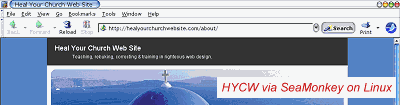
    Yes, the hard ways are arguably less expensive – provided you either want to put your development platform through all that, or have the spare machines and bandwidth available , but the easy way does get the job done for you just as fast, often with results shareable with the rest of your crack development team located anywhere on the planet. Just like I’m about to share some screenshots of this site with you:
    See Screenshots of HYCW on via SeaMonkey 1.1.2 on PLD Linux

    For those who’d rather work the smart-n-easy way, here are some services you might want to consider:

    BrowserCam
    a Screen Capture Service lets you submit multiple URL’s, choose the browsers and operating systems you want to see, and in about a minute returns screen captures of your webpage loaded in the different browsers and operating systems you selected. It costs $19.95 for one day, $59.95 for a month, $399.95 for a year, $999.95 for priority/premium service per year
    BrowsrCamp.com
    A place to test your websites on the MacOSX platform. $3 for 2 days testing, $7 for a week, $19 for a month, $99 for a year.
    BrowserPool
    a service for testing different browsers on a number of Mac, Windows and Linux platforms. About $40.41 (29.99 Euros) per month for 40 hours testing per month, about $471.50 (350 Euros) per year for 40 hours testing per month.
    BrowserShots
    a free open-source online service created by Johann C. Rocholl. When you submit your web address, it will be added to the job queue. A number of distributed computers will open your website in their browser. Because it’s free, there the results aren’t instant
    IE NetRenderer
    allows you to check how a website is rendered by Internet Explorer 7, 6 or 5.5, as seen from a high speed datacenter located in Germany. Just type in a URL in the field above and try it out – it’s free!
    iCapture
    a free, user-supported service developed by Dan Vine that captures and displays your web site using OS X 10.4.8 and Safari 2.0.4 (419.3)
    ieCapture
    a free, more user-supported service developed by Dan Vine that captures and displays your web site using Microsoft Internet Explorer, versions unknown at this time as the queue seems hours longin rendering
    SiteVista
    See how your entire pages look in a wide range of different web browsers, at different screen resolutions, and different color depths. You receive two screen captures for each test – one of the browser window. $9 for one day of 25 tests, $19 for week of 100 tests, $29 for a month of unlimited tests, $299 for a year. A test is one screenshot/per browser.

    Personally, I’d strongly recommend either BrowserCam or SiteVist as if they’d offer a 501(c) price tier … though I did find IENetRenderer and BrowserShot got enough of the job done provided I didn’t try test against all browsers during peak times. Still, you most certainly get what you pay for in this arena.

    All that said, I know some of you propeller-headed geeks out there are just champing at the bit to shoot your foot clean off … so here are a few other related articles I visited while putting this post together:

    • Link Thumbnail – a little javascript to see your site on some popular browsers
    • Taming Your Multiple IE Standalones – mangling your registry for fun and profit
    • SiteWizard – How to Check Your Website with Multiple Browsers on a Single Machine (Cross-Browser Compatibility Checking)
    • IEs4Linux is the simpler way to have Microsoft Internet Explorer running on Linux (or any OS running Wine).
    • BrowserTesting – an incutio.com discussion on ‘How do you test in many browsers?’
    • Cross browser testing using VMWare’s MultiBrowser Appliance.

    Got another service or product to suggest? Share the love, leave a comment and let us know.

  • Note to Dr. Nielsen – quality is everyone’s job

    Today’s Alertbox entitled ‘Should Designers and Developers Do Usability?’ Jakob Nielsen asserts “Having a specialized usability person is best, but smaller design teams can still benefit when designers do their own user testing and other usability work.”

    How do I disagree with thee, let me count the ways … modus ponens style:

    1. good quality is everybody’s job
    2. good quality includes good usability
    3. therefore good usability is everyone’s job

    In other words, despite the good efforts of the good doctor, the more people on your church or charity’s web development team who understand usability the better.

    Sure, not everyone has to have the same level of expertise, but said expert should conduct periodic tutorials for staff and lay persons on small, 15 minute-a-piece topics such as:

    • defensive design
    • how usability increases page delivery
    • usability features built into WordPress
    • useful usability URLs online

    If you’re reading this, I suspect you are that expert – or at least know whom he or she is.

    That in mind, what have you done to infuse the quality of usability not only in terms of web site design, but in building your church’s “institutional memory?”

  • 10 blogging mistakes pastors & laypersons should avoid

    Scenario – church uber geek gets the pastor all hooked-up with WordPress with Google Analytics. No long afterwards, pastor begins to pontificate like Spurgeon (or at least Phil Johnson). After a month, both geek-boy and the pastor are shocked to find out that the site averages 0.75 visits a day, with a bounce rate of 95%. What happened?

    I think a good number, specifically 10, of the reasons are best summed up by Jason Kaneshiro in his Webomatica post entitled “Ten Blogging Mistakes I’ve Made,” where he writes:

    “After several long months of blogging with steadily increasing results, I’ve encountered some bumps along the road. I thought I’d post some mistakes that I now regret and am working to rectify in my quest to improve this blog. Save yourself some pain and frustration: avoid doing these things; I wish I had!”

    I’ve modified his list a bit for application (and relevence) to your church and/or charity’s website – but here they are in no particular order of preference:

    1. Getting hung up on high-tech instead of compelling content;
    2. Assuming Google will do all of your site’s ‘networking’ and ‘advertising’ for you;
    3. Shoot-off-mouth first, ask questions later;
    4. Shotgun topics – too many points (pellets) in one post;
    5. Anemic headlines that have no zing;
    6. Ignored or devalued commenters and their input;
    7. Shotgun categories – not taking control of your niche of expertise;
    8. Assumed it would be easy;
    9. An ugly URL that is hard to remember (lest spell)
    10. Know-it-all-itis

    My personal favs of the above enumeration is anemic headlines and shotgun topics & categories … and with apologies to Kaneshiro, I’ll add one more to his most excellent list:

    1. poorly constructed exceprts and/or lead paragraphs.

    Three things I keep repeating here, and will continue to repeat:

    • People don’t read the web, they scan it;
    • Aggregators and search engines index and list titles and excerpts (or lead paragraphs where excerpts aren’t present) – write to that;
    • We cannot serve two (or more) masters – write to a single topic, if you have more, post more tomorrow.

    What about you, any other suggestions on how to drive in traffic through compelling, well-focused content?

  • Conversion Goals part ‘Duex’ – 1st impressions count!

    “It is vitally important that the first contact someone has with our church is a positive one. Andy Stanley says it this way, “Your sermon starts in the parking lot.” As more and more people begin their search for a church by looking online, the “sermon” could very well start with your church’s Web site. When I look at your church’s Web site, I can immediately tell you a lot about your church, your values, your mentality, your approach, and whether or not I’d want to be a part.” – Todd Rhoades, MondayMorningInsight.com

    Let me translate the above quote for those of you who still think a long animated Flash splash page leading to a huge image of your church’s empty parking lot is the way to go …

    … as more and more individuals shop for church homes online, the greater the risk your church runs into never seeing them visit if your church website sucks!

    Jesus saved me, the rest of you are going to h-e-double tooth picksYeah, pretty brutal – but enough of the ‘meme’ that God content is important, that aesthetics aren’t important.

    If you pull into the church parking lot and you’re greeted by a smelly, un-bathed, 3x-large individual wearing a dirty medium sized t-shirt and speedos, that the former reads in between the filth and holes reads “Jesus Saved me, the rest of you are going to H-E-Double Tooth Picks!” .. I’ll guarantee a majority of you will spend some quality family time at the local Perkins or Waffle House that morning.

    Same is true with the internet.

    If you have a web site that looks like you don’t care about their needs – then individuals seeking a new church home, or a conversion-conversion experience will go some place that does look like they care. It is that simple. Or as Rhoades writes:

    ‘Researchers in Canada have shown that the snap decisions Internet users make about the quality of a Web page have a lasting impact on their opinions. According to a nature.com article, “Web Users Judge Sites in the Blink of an Eye,” by Michael Hopkin’

    In other words solve their problems; don’t show off your fancy-schmancy solutions. Solving their needs is as simple and common sense as making the following information easy to find, read and render in print:

    • Church denomination
    • Geographic location
    • Days and times of services and studies
    • What stuff you have for their kids
    • Example sermons that show you’re not some slathering cult
    • Smiling, inviting faces instead of stony facades
    • Email contact
    • Phone number

    Yeah, you’d think the above list is obvious … but in the next few weeks, we’ll be referring back to this article as I show yet more good examples of bad church web design by well meaning webmaster type individuals who don’t have a clue as to what the conversion goals are for their cool church web site.

    Oh yeah, and a super-huge hat-tip and ‘terima kasih banyak-banyak‘ to one of my Malaysian friends: Wilful Sunflower for forwarding this article/link – keep’m coming folks!

  • The (Not-so) Nice and the Nasty, E-Mail Lists Surge in Usage

    “For increasing numbers of people and neighborhoods, I-saw-it-on-the-Listserv has become the new I-heard-it-on-the-grapevine … including some truly nasty spats … thanks in part to the faceless nature of e-mail communication … well that and some of the egos involved in some churches, charities and other community organizations.”

    In an article by Steve Hendrix of the Washington Post entitled “Offering Both the Nice and the Nasty, E-Mail Lists Surge in Usage” the author asserts, correctly in my humble opinion, that:

    “The use of free group lists for mass e-mails, a mainstay of neighbor-to-neighbor communication for more than a decade, continues to climb steadily as more newcomers sign on and longtime users add additional groups to their routine.”

    At least that’s how I’ve found it in both the neighborhood in which I live, and for my last church – where we leveraged the free listservs available with our domain hosting package, built right into the control panel.

    I mean, what are the choices – semi-public BBS’ that are prone to spam and hacking by nere-do-wells – or subscribe and opt-out by email lists whose recipients, threads and distribution are easy to create and maintain?

    Then again, while operationally optimal over an electronic bulletin board, there is that sticky little communal issue that is not as easily moderated on a mailing list – an issue again well stated by the Mr. Hendrix:

    ‘From “seeking vacuum repairman” to “another mugging near metro” to “your charcoal smoke is making me sick,” subject lines — and the messages they contain — have become rich, varied, sometimes maddening veins of neighborhood gossip.’

    Or with apologies to the Apostle Paul:

    “Besides that, they learn to be idlers, going about from post to thread, and not only idlers, but also gossips and busybodies, saying what they should not.”

    My suggested solution to this issue is to avoid general gossip by having well focused email groups whose primary purpose is tied into the operational aspects of your church, charity or other community organization. Such as:

    • hand bell choir
    • ladies Bible study
    • men’s breakfast
    • youth group events

    Notice that not only are the above suggestions specific to a group, but to the major activity associated with said group.

    This way, if one runs into the “… truly nasty spats … thanks in part to the faceless nature of e-mail communication …” as mentioned in the aforementioned article.

    How about you, what’s in your group’s listserv? Please, share some experiences and suggestions.