Category: Reading Room

  • RSS in Plain English – a how-to video by Turtle Interactive

    Tim Bednar over at Turtle Interacvie writes:

    “There are two types of Internet users, those that use RSS and those that don’t.”

    I’ve been saying this for years … which is why Tim has graciously produced a wonderful weekend video to instruct those wandering in the syndication wilderness how they can save time, lose 20 pounds, take 4 inches off their waist and look 10 years younger using RSS.

    Well okay, I exaggerated, so I’ll let Tim’s words describe what the real deal is:

    This video is for the people who could save time using RSS, but don’t know where to start.”

    Still, I coulda used the 10 years younger thing. Perhaps the next video? Either way, once you’ve been a hearer of Tim’s words, I’d suggest be a doer and add his feed to your aggregator. I know I am!

  • If a picture worth 10,000 words …

    If the old adage that picture is worth 1,000 words is true, then so too perhaps it is true that a web sitemap is worth 10,000 words. At least that is the premise identified and explained by Jason Withrow in his 2004-but-still-relevant post entitled ‘Site Diagrams: Mapping an Information Space.’

    So much good is already said in this article, it’s hard to add anything that can’t be better stated by some selective quotations … the trick is to think “my congregation” every time the author cites “my audience:

    “To successfully communicate the characteristics of an information space, I needed an approach for creating easily understood diagrams. To be useful to my audience, the diagrams must communicate the ‘big picture’ of the website to stakeholders, while providing enough detail to be useful for the development team.”

    Interestingly enough, I both agree and disagree with this article. Meaning, the author argues that by providing a visual representation of the Web 1.0 file/folder model, we provide quick information to users in a Web 2.0 era of search-engine driven navigation.

    Thing is, so many of our Church users rock like it is 1995 that I can’t argue with Mr. Withrow when he writes:

    “Understanding the structure of an information space for a website boils down to the following questions:

    • What is the information structure?
    • How do I visually represent that structure?
    • What relationships exist among the web pages?
    • How are those page relationships represented?”

    Yeah, kinda hard to argue the above, especially as Google Lab has given us a SiteMap Protocol accompanied with a SiteMap Generator, etc …

    Yeah, kinda hard to argue with that sorta success! Only question left is, where to put the rendering (psst: this is your cue to comment)?

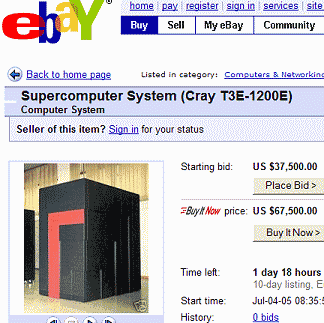
  • Ultimate Church Webserver : Cray T3E-1200E

    Forget everything I’ve ever said about beowulf clusters, I’ve changed my mind and am namin’ and claimin’ this e-Bay offering of a Cray T3E-1200E Supercomputer System as any good word-o-faith disciple would. Sure, my faith is weak for prayin’ for a ‘used‘ system, still this bad-boy was installed in 1999 and used until October 2004, when Cray personnel de-installed the system under contract with the direction that the system would be re-installed.

    The Cray T3E-1200E™ system was the first supercomputer to sustain one teraflop (1 trillion calculations per second) on a real-world application, boasts of 30GB of total memory, delivers peak performance of 134 Gflop/s and requires the installation services of a plumber.
    the ultimate church web site server

    Talk about thinking big – imagine all the church parking lot problems and webistes we could handle with this monster!

  • What we can learn from Michael Dell’s $99.5M purchase of Red Hat debentures

    What can we learn from Michael Dell’s $99.5M investment in Red Hat? Personally what I walk away with is a sense of bewilderment. Not that anyone would spend so much on such an excellent operating system, but that Red Hat would spend so much time creating a paragon of usability and accessibility in the form of their corporate website and not keep their news pages up-to-date; and forget to take advantage of free advertising in the form of a syndication feed.

    snips from Red Hat's home and news pages

    From time-to-time I’ve received some grief for being too blog-centric when it comes to church web sites, but I think as we hurtle down the road to mega churches in a media-frenzied, instant news world, we should take note of Red Hat’s glaring omission and avoid doing likewise.

    Consider this, Red Hat has a website that would probably make nearby native Mark Pilgrim giddy with ‘Dive Into Accessibility‘ glee. It’s clean, it’s colorful, it’s all CSS and all usable – heck I’d even bet the farm that it’s data-driven. So why not then create a simple RSS or Atom feed of news items the Red Hat new page? This would give people the opportunity to auto-discover them via their aggregators – and search engines an additional point of entry.

    Similarly on your church websites, if you’re posting recent events and sermons as a means of providing continually changing compelling content – and I hope you are – then you need to make sure to take full advantage of the rapid infusion of aggregators into everything from ipods to browsers. Considering the relatively low-cost of as creating a simple syndication feed and embedding an alternate content link tag on all of your church website’s pages, what have you got to lose? Consider what you’re losing by not doing this!

    Anyway, that’s my ‘content is king’ lesson and/or ‘substance over style’ sermon from the real World today. What are your thoughts?

  • What is RSS?

    The United Church is the largest Protestant denomination in Canada offering not only a rich history, but one of the easiest to understand answers to the question: “What is RSS?

    I gotta tell ya folks, there are nominal denominational websites and then there are definitive denominational websites. United-Church.ca falls into the latter category. Accessible, informative, internationalized, usable, easy-to-navigate. Good stuff, and worth exploring in greater details (hint, hint).

    But for today, let’s just look at their not-so-geek description of RSS … and how they are consumed:

    RSS (Really Simple Syndication) is a format for delivering summaries of frequently updated website material such as news releases and other announcements, forthcoming events and programs, etc.

    Many news and advocacy sites syndicate their content as RSS feeds in a data format known as XML that a RSS reader (also known as “news aggregator”) interprets and displays.

    An aggregator is a software program similar to a web browser that lets you read the headlines from many sites at one time. You simply plug in the web address (URL) of the RSS file you want, such as one of the United Church of Canada feeds …

    For many of you into blogging the above definition is nothing new, but for those of you whose church website development comes along more traditional lines, what this all means more and more individuals are not visiting your website to see what is new, but are instead using aggregators to inform them when a site is updated and with what. If it helps, you can think of RSS aggregators in the same way described by Jonathan Dube of Poynter Online: “Your own personal Web butler.”

    If you’re still not convinced that your church website needs to syndicate then my suggestion is that you take advantage of any one of a number of client-based aggregators such as FeedDeamon and NewsGator, or equally useful web-based aggregators such as BlogLines.

    What you’ll see is that without actually visiting the site, you can keep track of literally hundreds of sites simultaneously. Hopefully once you see how this can and is changing the face of how we track online information, want to do is figure out how to syndicate your pastor’s sermons, the weekly newsletter and/or your events calendar.

    When that happens, hopefully by then I’ll have an article on how to do this. In the meantime, if you’ve got some ideas or questions along these lines, leave a not in love. And please, no wise-cracks about me acknowledging the fact that there are Canadian Christians – with good websites even!

  • The 11 Immutable Laws of Internet Branding

    The 11 Immutable Laws of Internet BrandingIf one of your New Year’s Resolutions is to read a self-help book then look no further than Al and Laura Ries’ “The 11 Immutable Laws of Internet Branding.”

    Yes it is out of print, but you can buy it used – or do what I did, rented it on Audio Cassette for two 2 hour car drives. I didn’t agree with all of it, but there’s lots of useful information and concepts that apply to how and why your church website is an entirely different kettle of fish than your church’s hardcopy newsletter and/or on-air radio ministry.

    In the mean time, I’d like to extend a healthy and prosperous 2005 to all of the HYCW cult members (and members to be). May all your pages Google and may all your links optimize to the top.

    P.S. it also appears the authors (father and daugther) have put out an updated version entitled “The 22 Immutable Laws of Branding” … I’m linking up the audio version because it’s something you can listen to on and off … over and over again as you drive to work (or church).

  • How to Make (friendlier) a Pop-up Window

    Popups are the spawn of satan … in fact say so much in ‘the Book‘ … most of the time. Like medicinal marijuana for terminally ill cancer patients who have an adversion to morphine, pop-ups do have some rare, legitimate utility for things like calendar widgets for date-related form entries and/or disclaimer type information. Which is why I’ve linked an article by Elise Bauer entitled “How To Make a Pop-up Window” that shows how to do it right – especially for those of us who like to right click.

    Sometimes you might want to link to a popup window from your Movable Type weblog. For example you can make your About page a popup instead of a separate page. Although using the target=”blank” attribute in a hyperlink can generate a new page, using javascript commands for popups will give you more control over the appearance and location of the popup.

    Can I have an ‘Amen!?’ Or at least a partial head knod, for while I’m no fan of the target=”_blank” attribute, I do like the idea of giving the users more control of their destiny when it comes to popup windows. This is especially true for those of us slugging it out with the way ASP.Net uses, or should I say abuses Javascript to launch popups and other such controls.

    If you’re not sure what I mean you can view a popup of my very first post/press release one of two ways.

    • Left click on it and you get a popup
    • Right Click on it and you can open a new browser Window (or tab for you hip, cool FireFox users)

    It is the ability to right click and do things like open window, tabs, create bookmarks and/or save linkable content that makes Elise’s example so valuable — at least to me — of course your mileage may vary.

  • Mr. Zeldman meet Mike Boyink, one of ‘The New Samaritans’

    During my short career as an opera singer in NYC, I lived by some hard and fast rules; one of these personal mandates being:

    “Avoid singing for free, and under NO circumstances should you pay to sing.”

    Why – that is why pass on some opportunities to “showcase” my talents merely because of money? Because it was my experience that those of us who were paid, even just a modest honorarium, were invariably treated better than those who weren’t; while those who paid to “showcase” their talents were routinely treated like crap.

    After reading Jeffrey Zeldman’s post entitled “The New Samaritans,” and the Wired Magazine article on which the post was based “Changing the Face of Web Surfing,” I wonder sometimes if those of us who provide free web design services for churches wouldn’t get a bit more respect if we didn’t send said charities a bill for our services?

    The Odeon Saga

    Consider the case cited both by Zeldman and Wired of Matthew Somerville, an Oxford University math graduate who out of frustration redesigned the website Britain’s Odeon cinema chain – gratis. In fact, this free work was so stellar that Zeldman wrote:

    “Mr Somerville did Odeon a favor by solving some of the site’s worst problems …”

    How did Odeon respond to not having to spend thousands of dollars to enlist a top-notch ‘do-over’ firm such as 37Signals? Again quoting Mr. Zeldman:

    “As it turns out, Odeon has hired a consultancy that specializes in the very work Mr Somerville did free.”

    Ridge Point

    Now if this sounds vaguely familiar to some of you, it is because it smacks of a similar treatment Mike Boyink received after volunteering $7,500 worth of billable hours to develop one of the premier church websites on the Internet; Ridge Point Community Church.

    Here’s a very quick chronology for those of you unfamiliar with the story:

    • November 10, 2003 – After 18 months of work, Mike Boyink announces a pMachine-driven redesign of the Ridge Point Community Church website.
    • April 14, 2004 – Pastor Jim Liske announces that “The internet is always changing and Ridge Point is changing its website to include everything the old one had and more! After the changeover occurs, you will need to re-register on the site.Translation: Ridge Point decides to shelf the Boyink/pMachine design in favor of a Braunius/e-zekiel design whose sense and sensibility is best described by Tim Bednar in his “Open Letter to Pastor Jim Liske of Ridge Point Church.”
    • June 4, 2004 – Pastor Jim Liske announces a return to the Boyink/pMachine design.

    Having gone through a similar situation myself, NOT at Redland where I’m currently blessed with a VERY grateful and gracious staff, but at my prior church, I can understand “shock and sadness” expressed by Mr. Boyink. I also understand why Mike, like myself, opted to take his talents elsewhere.

    What Would Zeldman Do?

    Realizing that those us who donate our time and skill to our church’s websites are not in it for Earthly rewards or recognition, and taking into account scenarios such as the Somerville/Odean and/or the Boyink/RidgePoint redesigns in mind, the killer question for this weekend’s discussion is: “what would you do in a similar situation?

    For example, would you send the church a bill, which upon its receipt, you’d show up at the church office with a rubber stamp and mark the bill “Paid In Full?” Or would quietly you stick it out, even if it meant dealing with type A++ ministers with a penchant for micro-management?

    It’s the weekend, let’s discuss: