Author: meandean

  • 8 more love notes from my mailbag – mostly great questions

    Now I know how Santa feels – as my mailbox is getting stuffed with comments, questions and yes, a few complaints. So “once more into the breach” … answering excellent questions, re-posting useful commentary, and responding to spammers with the attention they so richly deserve.

    From the “most useful comment” category …

    … we have this tip from JT in response to my post entitled ‘5 Simple Security Tips for the WiFi-ing Road Warrior:’

    On (3) “Surf Encrypted”, the easy way to GMail securely online is to save the secure link to GMail in your bookmark, and enter it when you browse from a public-access terminal.

    The secure link is https://mail.google.com. Of course the only difference is the ’s’ after ‘http’. If you’re already logged in, adding in this ’s’ at the top and pressing enter will do the trick also.

    Excellent advice for you missionaries seeking secure email while in the field.

    From the “speaking of email” category …

    Cinthia P. asks:

    Can I use the email addresses provided by members as part of contact information for church communications without asking them specifically for each use?

    I think the best answer for this question can be found in my post entitled ‘The CAN SPAM Law and your church’s email distributions‘ where you’ll see that while some may debate specific usage – all can agree that you really should provide each recipient with an easy opt-out solution for all communications.

    That said, if you’re worried about specific use, then do what some online and offline registrations do and offer multiple check boxes – one per usage type (e.g. newsletter, product announcements, event notifications, etc …). It probably also doesn’t hurt to publish a ‘Privacy Statement‘ that explains the extent to which a members contact information will be used.

    From the “most encouraging comment” category …

    I happened across your site and have enjoyed reading a few of the articles … so many of the scenarios make me chuckle … I think the articles on this site have given me a little lift …

    Thank you Carol from carricdesign.com, knowing we’re serving great people like you makes it all worthwhile!

    From the “please don’t spam the Dean” category …

    I dunno why, but the following folks feel they need to use the comment form to send me entire sermons preaching doom-n-gloom, soliciting ‘donations’ and/or attempting to sell me Jesus junk:

    bcgblessed@yahoo.com, churches_save_property@hotmail.com, mneese@aol.com, jlarsensd@gmail.com, socalboarderdude@gmail.com, jackelmore@insightbb.com

    From the “pictures from Petra club” category …

    Just wanted to let you know that I have a bunch of pictures of Petra and Jordan from a trip I took a little over a year ago …

    Thank you Josh Byers (.com) for sharing! Excellent pictures I’ll be linking to blogJordan.com very soon!

    From the “interesting question” category …

    Bill J. ponders:

    Should a Christian owned business operate by the same web principles as a church? or do the rules change in a “for profit” business verses a “non-profit” entity? As a Christian business owner I am seeking direction in this area. Thank you.

    Wow, this probably deserves its own post, but for now, my initial thought is that while the operations of both entities are bound by Biblical principals – the business models are different enough to justify differing approaches based on the conversion goals of each.

    From the “holy Scripturizer plug-in for MoveableType” category …

    Aliotsy writes that:

    I’ve been looking for your Scripturizer plugin for Movable Type. I see that you’ve switched to WordPress — is the MT version no longer available?

    Hmmm … it’s available but it appears WordPress 2.3 ate it! I will get it back online this weekend – thanks for the heads-up and apologies for the inconvenience!

    From the “holy Scripturizer plugin for WordPress” category …

    Jon Davies informs me that:

    It’s *really* nice to know that there’s someone else out there wanting to make church websites half decent. I dug up your site cause I’ve got a 2-line patch for the holyscripturizer which fixes incorrect detection of things like “Children Act 1989” as a ref to Acts 198. Where would you like me to send it?

    While Scott informs me:

    I fixed the WP Holy Scripturizer plugin so the that icon now works in 2.3 – email me and I’ll pop the updated file as an attachment.

    Hi Jon and Scott, apologies for the late response, but there are two efforts (forks) listed on the WordPress website that would probably enjoy your enhancements at:

    From the “But wait there’s more!” category …

    Yes, there’s more email I’ll be following-up in the next day or three, including

    • discussions on pictures, privacy and security
    • perhaps a quick overview of online registration solutions
    • a need to update my post on blogging as a church CMS solution on the cheap
    • requests for a critique of their church’s website; and
    • someone REALLY mad at me for critiquing their church’s site

    I also think it’s about that time of year I get rolling with my 12 days of Jesus Junk postings as well.

    Again, keep them comments and questions coming – if it keeps up at this pace I think I’ll need to begin podcasting once a week to keep everyone up-to-date – especially myself.


  • Does XML have a future on the web?

    I’m attending the XML 2007 Conference in Boston – sitting in on a plenary session entitled “Does the XML have a future on the web?” What I hope to share with you is a debate between two interesting and intriguing trains of thought for consideration of publishing not only your church’s website, but also sermons, Bible Studies, weekly calendars and other information your charitable organization needs to distribute.

    Doug Crawford of YahooOne one side, sporting the bearded guru’s view, is Doug Crockford of Yahoo whose response to the insecurities of HTML, Jason and DOM – and whose apparent frustration with XML’s built-in hostility towards traditional programming and database management – has given us the specification known as JSON or JavasScript Object Notation.

    C. M. Sperberg-McQueenIn the mustache only camp is C. M. Sperberg-McQueen, a member of W3C technical staff who asserts that since the Web is for everyone, and because loose coupling and multiple format distribution from a single source are more desired than “fashion” and “delivery speed” that XML will only die when … and I quote “… rip it out of [his] cold dead hands.

    After both individuals gave their opposite opinions – with some in-the middle interjection by Michael Day of YesLogic – what ensued was some impassioned questions from those attending the conference. The responses by both Mr. Crawford and Sperberg-McQueen were equally animated.

    Mostly what I heard from the floor was frustration over the complexity of XML. Crockford took that opportunity to point out how JSON more closely reflect the programmer’s perview. I agree. Sperberg-McQueen pointing out how now modern day browsers now support XHTML + XSLT. I’ll add to this that one only need visit a FeedBurner RSS feed to see this in action.

    When I posed my question how all this fits in to the Software as a Service paradigm, Mr. Crockford enumerated all of the insecurities of AJAX that have become a concern for many developing online applications in an enterprise architecture. Sperberg-McQueen jabbed back with JSON’s eval equates to an equally insecure solution (to XML). Neither answered my question “what do I tell my clients who tell ask me ‘why don’t I go out and get Web 2.0’ … as if it is a product I can purchase off-the-shelf?”

    Neither really answered the question – because the real problem with both JSON and XML as I see it are FREE TOOLS that make it mindlessly easy for the average church secretary to publish a sermon. The same frustration I heard/felt with many of the developers in the audience.

    More later, but feel free to pitch in with your opinions.

  • How categorizing information enhances church website conversion goals

    Not everyone enters your church through the front door, neither does everyone first visit your organization’s website comes via your carefully crafted home page. The question is, once these search-engine driven seekers find your site through such pages, are they encouraged and equipped to continue browsing your domain?

    Conversion Goals

    First things first, remember what the conversion goals are for your church or charity website. For those who are new here, conversion goals are actions in which we would like visitors to engage. I’ve got an entire category myself dedicated to this topic, but for those in a hurry, here are some examples of the type of desired actions I’m talking about:

    • visit a Sunday Service
    • register for a Wednesday night dinner
    • sign-up for the email newsletter
    • download and/or print a sermon
    • request a call

    Information Hierarchy

    Grouping your organizations information is one good way to offer visitors the ability to easily “drill down” into areas that interest them. While the structure of each church and/or charity’s information architecture varies, here’s a suggest list of main categories with which can be customized to suit your organization’s needs:

    • About Us – could include links to a staff page, the terms of use, how to join, and/or church history data
    • Events – abstracts into links into more detail, links to a calendar page, perhaps a place to offer RSS and ICAL linkage
    • Directions – with Google maps and other goodies, here’s a place to offer content that drives in searches by location
    • Ministries – more on this in a moment, but mostly links into individual pages describing ministries the church offers
    • Resources – a link to sermons, podcasts, useful URLs, photo galleries, steps to Peace with God

    White Space is your Friend

    The nice thing about breaking-up your site into main categories is that you can at first have a single “category” page to provide overviews that lead into sub pages of specificity as individual topics within the category become better defined online.

    Put another way, don’t use the categories to create big, huge, monoliths of information that require 15 page scrolls get to the good stuff at the bottom. Instead, as each item becomes better defined by your web team – sub pages are spawned off to contain concise individual chunks of information on specific topics. A good example of this could be your “ministries page” which at first starts out as a single definition list, then evolves into the following sub pages:

    • Children’s Ministry
    • Missions
    • Music
    • Sunday School
    • Youth

    Navigation Theme

    I’ve seen some church websites – actually I’ve seen too many – where each “category” has a different navigation theme. While this may (or may not) make sense to someone visiting through the home page, it can cause confusion with a first time visitor coming in through something like your “directions” and/or “ministries” page. Some quick ways to remedy this are:

    • pick and stick to a main navigation menu throughout every page on your website
    • provide sub navigation by broad category that enables users to “drill down” into specific topics
    • make sure page titles match main menu navigation choices
    • make sure page sub titles match sub menu navigation choices
    • don’t get cute with the menu names, church speak only creates unnecessary barriers (not to mention page maintenance issues for the developer in the future)

    Room for Growth

    As one can see, there are several advantages to building one’s site around a well-defined organization architecture. Here are a few that come to mind:

    • works well with most CMS and blogging systems
    • popular sub-categories can be easily elevated into main categories, such as sermons
    • categories can themselves become “landing pages” or portals into the website
    • information along a specific interest can be aggregated in its own RSS feed
    • individual pages/articles can be farmed out across many individuals – reducing the need for one person to maintain a large site all on their own

    Class dismissed! Now go visit my Jordanian journey post to see what I look like 100lbs lighter, atop the foothill that hold the Monastery at Petra or what I’m calling ‘Dean’s day at Al Deir.’

  • 5 Simple Security Tips for the WiFi-ing Road Warrior

    As I travel to the Hashemite Kingdom next week, there are at least 5 simple things I can do to make my WiFi experiences a bit more secure. So can you, here’s how:

    During my upcoming journey to Jordan, I’ll have ample opportunities to consume the culture on a variety of levels – including the ever growing WIFI connections that now abound in the Hashemite Kingdom. This in turn will give any nere-do-wells an opportunity to consume my personal and private information; if not zombie-fry my laptop altogether. And while I believe there is no such thing as total mobile security – there are ast least 5 simple things I can do to inconvenience the lesser-determined bad-guys to the point they move onto the guy computing next to me waiting for the airplane to board.

    1. Connect Securely

    How do you know you’re securely connected to the wireless router at your favorite coffee shop? Simple, you have inconvenience the barista or the hotel staff for a WEP, or even more secure, WPA key to access the Internet.

    Yes, yes, yes, I know, WEP stinks in comparison to WPA, none-the-less, better a little hassle than to sign away one’s identity and security by confirming to use a ‘wide-open’ network.

    2. Tunnel Safely

    The problem with seeking out a WPA-PSK encryption is that many times, it just isn’t available. Merchants provide WiFi hot-spots as a competitive draw. It loses its return on investment if they find themselves busier teaching wireless laptop connectivity than selling biscotti.

    For those who don’t mind taking security matters into their own hands – or at least putting them into the hands of 3rd parties who provide VPN services; some for free. Here is a short list in alphabetical order:

    And for those on the road a lot, you might want to check to see if your hot-spot access service such as Boingo, iPass or TMobile/HS provides secure software.

    3. Surf Encrypted

    Many of us who buy stuff online already know to look for that little encryption lock in the status bar of our browser. However, have you considered looking for it when you login to an online email service?

    How about when you use the same password you use for everything when you login to a blogging service or bulletin board?

    Again, in cases where you are at the mercy of a service provider not offering secure logins and transactions, there are some not-so-stupid browser tricks you can employ – provided you have the right browser.

    For example, while gMail does provide a secure login, it does not provide encryption when I’m emailing you about my upcoming trip to Jordan. Same too when I blog this post using Google Docs.

    Fortunately, I use FireFox, which in turn allows me to plug-in the Customize Google extension, which in turn allows me to check an option to “Secure (switch to https).” Voila!

    Similarly, I Pidgin-Encrypt my instant messaging (not to be confused with the actual IM Pidgin Client, though the two are related).

    If I must to FTP, then I use SSH File Transfer Protocol (SFTP) – and when possible – using an encrypted zip file. Yes, I’m aware the PKZip password protection is inherently weak, but it’s stronger than nothing.

    4. Password Strongly

    All the security in the world won’t help me if I use the same password for everything, and that password is something relatively easy to guess or crack. For example … a login of ‘dean’ and password of ‘peters’ I would think would take even the lames of script kiddie all of 5 seconds to figure out.

    If you can’t figure out how to create a memorable but strong password, fear not. There are plenty of online services. Here are 3 that didn’t ask me who I was before generating some solutions:

    5. Speak Nothing

    Having spent some time with a top-secret security clearance, I know what the phrase “need to know” means:

    • the best way to keep a secret is not to tell anyone;
    • failing that, only tell the secret to those who must know;
    • never write anything down;
    • shred everything; and
    • trust no one.

    So asides from keeping our ‘yaps shut’ – this also means

    • turning off any file, printer and/or other fun network sharing;
    • turning on any firewall, spyware and anti-virus detection; and
    • depending on your operating system and configuration, shutting down open ports.

    Yeah, that last one is not too easy, but I figure if you’re savvy enough to run a server, you’re savvy enough to know you’ve got some entry ways your firewall may not catch (for the rest of you, just make sure your firewall application is running).

    Conclusion

    I know this last bit sounds a bit blunt – especially for those of you working with churches, charities and missions – especially that last point.

    But the last thing we need is to have our personal lives, our ministries and/or our livelihoods imperiled by an ever constant swarm of sinners who would think nothing of emptying out your bank account, ruining your retirement fun, and tapping out your travel funds to fun places like Jordan.

    Better to remain a little bit paranoid about private information so you can keep you mind on publicly pronouncing the good news that is Christ crucified and Christ resurrected.

  • Messin’ with Petra or my Google Maps of Jordan

    For the two or three of you wondering why I haven’t been writing with as great a frequency as I should, it is because I’ve been busy preparing for my blog-tour of Jordan.

    This includes quite a bit of time preparing Google maps of some of the locations – and their associated history and Biblical citations – I’ll be blogging about. For example, below is an annotated map of Petra that includes links to my über-secretive wiki no one else is supposed to know about until the trip:

    Remember, blogJordan.com is supposed to be a secret, so if I catch you linking it … well let’s just say … I might have to return the volume with a hit generating reciprocal link.

    You’ve been warned. I mean it, I’ll put the car over right here!

  • How to use gmail aliases to send yourself text notifications

    Sending custom SMS text notifications to your cell phone has never been easier – thanks to 2 nifty gmail features. By combining filtering with gmail’s ability to add aliases to your existing gmail account, you can now have notifications of events, reservations, auctions, school closings and anything other text message you can send to your cell phone via email. It’s simple, here’s how:

    1. login to your gmail account (like say, gmailaccountname)
    2. click on the ‘settings’ menu on the upper right hand corner of your browser’s screen.
    3. click on the filters tab
      image identifying screen elements mentioned in steps 2 through 4
    4. click on the hyperlink that reads “create new filter”
    5. in the text box labeled “TO ” enter your gmail address + an alias, like so:
      gmailaccountname+alias@gmail.com
      image identifying screen elements mentioned in steps 5 through 6
    6. click on the “next step” hyperlink
    7. click on the check box labeled “Forward it to”
    8. enter your SMS phone number in the text box labeled “Forward it to” for example:
      9195551212@messaging.sprintpcs.com
      image identifying screen elements mentioned in steps 7 through 9
    9. click on the button entitled “create filter”
    10. use your newly created gmailaccountname + alias address as needed (e.g. gmailaccountname+ebay@gmail.com).

    Example

    This coming November I’ll be on a Biblical press tour of Jordan (see blogJordan.com for more details). I won’t have a phone, but I will have a wireless air card courtesy of the good folks at Ziad (formerly Fastlink). And since my schedule is not my own, I will be using email to send my wife a text message to let her know both of my whereabouts; and when to let my daughter know when to get to mommy’s PC for some kissy-huggy Skype sessions. Imagine doing the same on while you’re on a 2 week mission trip to Indonesia or Mexico (only contacting your wife, not mine).

    It’s simple, let’s say my daughter’s email address is PrincessPepperDoodle@gmail.com. Using the steps above, I establish a filter that forwards any email addressed to PrincessPepperDoodle+BlossomVonYumYum@gmail.com to mom’s Verizon-served cell phone at 9195551212@vtext.com

    Now some of you are saying “hey, but can’t you do the same thing filtering on the subject line?” Yes you’re right, but what about notifications from services that send you email whose subject lines you can’t control – or from friends who can’t remember to type in the super-special subject line you seek as easily as they can add your aliased email to their address book? Here’s are three examples that speaks for themselves:

    • PrincessPepperDoodle+ebay@gmail.com
    • PrincessPepperDoodle+calendar@gmail.com
    • PrincessPepperDoodle+basecamp@gmail.com

    Caveats

    As with any such solution, there’s always the downside. No exception here as I see four:

    1. Message Size – Most mobile services have significant limitations on the size of the message sent. What I’ve discovered that, at least for my carrier, that’s okay as the merely truncate the message down to the first 128 characters. I can live with that. Your mileage may vary.
    2. Cost of promiscuous text – Please, please, please don’t run off trying this solution until you’ve first checked the cost of text messaging for your mobile phone service. If you’re looking at $0.20 a message, then you may want to either pass on this solution, or reserve it for only the most dire of occasions.
    3. Lack of Throttling – This is somewhat based on my concerns over cost – what happens if either a vendor or an auction goes crazy? What mechanisms do I have to put limits on inbound messages from a sender gone wild?
    4. Overzealous spam filtering – Some subject lines and or domains may cause an important message to get caught in gmails awesome spam filter.

    All of these concerns aside, I still use the ‘wifey+daughter daddy is out of the country communications solution‘ described above.

    Conclusion

    The point is, by combining gmail filtering with + aliasing with your mobile carrier’s SMS services email address, you can begin to receive text message notifications of the emails important to you. I’ve provided an abbreviated list of some of the more popular SMS email address of your carriers below:

    AT&T
    phonenumber@txt.att.net
    Alltel
    phonenumber@message.alltel.com
    Nextel
    phonenumber@messaging.nextel.com
    QWest
    phonenumber@qwestmp.com
    Sprint
    phonenumber@messaging.sprintpcs.com
    T-Mobile
    phonenumber@tmomail.net
    Verizon
    phonenumber@vtext.com
    Virgin Mobile UK
    phonenumber@vxtras.com
    Virgin Mobile USA
    phonenumber@vmobl.com

    If your carrier wasn’t listed above – or even if it was – please, again, I implore you to FIRST CHECK with your mobile service as to the cost of receiving SMS messages. It could be that a run-away e-bay bid could cost you more in text messaging than you save on the auction.

    Then again, it could all be worth it when it comes to keeping one’s family and/or congregation aware of what you’re up to while feeding the hungry, healing the sick and tending to the in needy in far away places – like Jordan.

  • Bad church web design poster 0004 – Mission Statements (suck)

    Programmer guru Joel Spolsky reminds us that usability tests often demonstrate that very few users read the words you put on screen. Couple this the fact that 1-in-3 users are un-churched, and I’d venture to say that Nielsen is right – just about nobody reads nuthin’. Instead like wild animals, they just hunt it, scan it, and categorize it in their pretty little pumpkin heads and move on.

    Or as the good Dr. writes in his latest alert box entitled “Blah-Blah Text: Keep, Cut, or Kill?“:

    Introductory text on Web pages is usually too long, so users skip it. But short intros can increase usability by explaining the remaining content’s purpose.

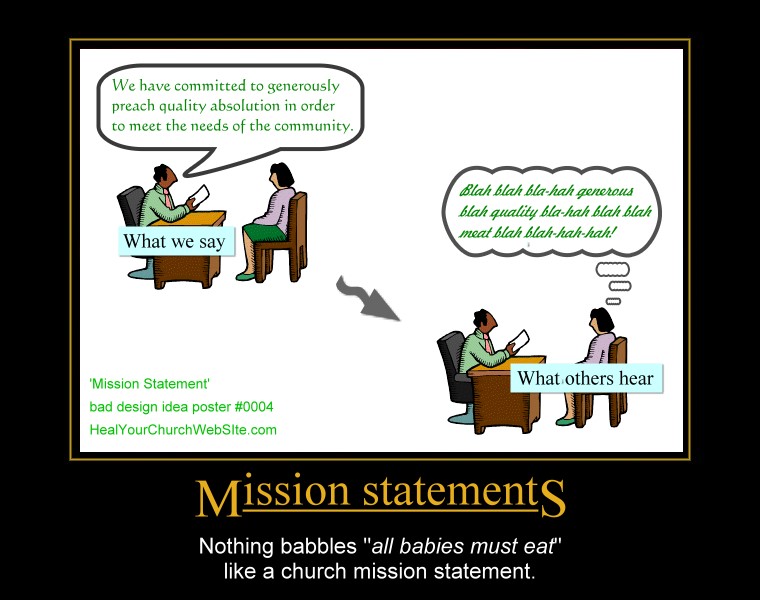
    Which all leads me to yet another addition to our growing gallery of bad church website design posters, this one entitled “Mission Statements:”

    For those of you who didn’t figure out that clicking on the thumbnail above gets you to ‘the big picture,’ – this poster basically preaches a lesson shouted from the mountain tops by Father Flanders that asserts:

    “[Mission statements] should be abolished because every Mission Statement ever written can be summarized in four words — ‘All babies must eat.’”— Vincent Flanders, author of Son of Web Pages that Suck

    Or to paraphrase Coding Horrors’ Jeff Atwood – replacing the term user and software to our advantage:

    My intent is not to make fun of [church goers and/or seekers], but to illustrate that there are far more effective ways to communicate with your dog. Essentially, any time you’re asking [a visitor of your church website] to make a choice they don’t care about, you have failed the [visitor]. Well designed [church websites] takes care of “[Christianese or church-speak ]” all by itself, and leaves the [seeker] free to worry about things relevant to the [information they seek].

    And for you fans of Gary Larson’s Far Side who recognize the inspiration for my poster, Mr. Atwood also has in the same article I just mis-quoted, an example of “what we say to dogs … vs … what they hear.

    Once again, as a living reminder of not-so-intuitive design, you click on the small poster to see the full-sized version, but please, no hot-linking without providing a link back here to the article – not just the pix.

  • 10 Things an Effective Church Website can do for You

    As I peruse the great cloud of witlessness that is the Body online, I find one of the primary problems afflicting many sites is vision. That is I often find those responsible for delivering the goods don’t really see their site as much more than an online color brochure. As a result, more often than not, very little staff and/or funds are allocated to the church’s web presence past the server, the domain name and perhaps a content management service.

    In no particular order, I’d like to offer 10 real-world examples you can expand your church and/or charity’s impact by expanding your vision past mere ‘brochureware.’ A list that perhaps will come in useful the next time individuals in the ways and means committee seek to slash your web site’s funding.

    1. Reach New Residents

      I actually like new resident door hanger campaigns, especially those that offer a slice of pie and/or a free Wednesday night dinner. An ideas I got from my last church who had such a program entitled ‘People Involved in Evangelism’ or P.I.E. … hmmmm … pie …. but I digress.

      Having a well-indexed, search-engine friendly website goes one step further in bringing those new residents to your doorstep … in some cases, even before they move to town.

    2. Convert Seekers

      Perhaps one the strongest arguments I can make for providing the text of your sermons online is how such materials can draw-in those seeking God’s answers to life’s questions.

      Even in cases where said individual came in casually and unintentionally through something of relevance that caught their eye while primarily searching for something else.

    3. Build the Body Online

      By adopting a blog-centric approach to sermons and events you can easily and electronically inform the right hand of what the left hand is doing; and visa-versa.

    4. Maximize Press and Ad Campaigns

      Sometimes you only have a six second soundbite to get your church’s name, slogan and/or domain out into a newspaper, magazine or radio station.

      In those cases, leverage your website to provide all the additional fun, times, maps & directions, costs and pictures that can’t be printed in a single line of newsprint.

    5. Save on Printing and Postage

      By utilizing email lists, RSS deeds and other online tools, your church and/or charity can become better stewards of congregational contributions by dispensing such information online.

    6. Minimize Dead Ends

      By having an informative and complete church website that clearly represents your organization’s purpose and personality – you can reduce and/or eliminate time spent on leads whose interests are better served within the arms of some other congregation.

    7. Communicate Across Boundaries

      By taking advantage of both an effective website and a variety of web-based office and/or presentation applications – boundaries such as differing operating systems and/or geography are easily overcome.

      Similarly, there are mind-mapping and crowdsourcing tools that can be leveraged to encourage thinking that’s not only outside-the-box, but also doesn’t all have to happen within the 4 walls of your brick-n-mortar buildings.

    8. Reduce Staff Support Loads

      While I believe that every church website should make it easy and inviting to call anytime – having an up-to-date calendar of events can help minimize the number of ‘just calling to are what time it starts’ calls that can nickle and dime away your church staff’s effective work hours.

    9. Support Lay Ministries

      Consider utilizing class curriculum tools such as Moodle to support Bible studies. Along with that, give that hard-working 20% a break from having to physically attend each and every meeting by using cool communication tools such as WiPeer to hold web-based meetings and/or webinars.

    10. Gauge Relevant Interests

      By implementing and monitoring statistical tools such as google analytics and the now free FeedBurner you can track which aspects of your church website are effective and which require a but more healing.

      I’d also suggest adding a separate site tracking mechanism to content-rich areas of your website so you can easily which sermons and/or Bible studies are hot versus those that are not.

    Point isn’t to freak-out already overwhelmed church webmasters, pastors and laypersons by enumerating all the things your church website doesn’t have …

    … but rather to get churches and ministries of all sizes to realize that our ministries have been provided several new tools over the past couple of years that properly leveraged can enhance our efforts and enable our volunteers to better fulfill the Great Commission to which we are all called.

    Agree? Disagree? Leave a comment in love.