Month: May 2007

  • Who is my IP Neighbor? And just what is his domain up to?

    Who is my (IP) neighbor? And what how their domain impacting our shared server, and their potential spammage impacting email via our our shared IP address? Find out why this is important, and how a visit to an online reverse IP domain discovery tool may be in your immediate future.

    Many church and charity web sites cannot afford the high cost, risk and labor associated with running their own dedicated server to host their web presence. Instead, they either opt for a Software as a Service solution where they buy into a pre-canned content management system, or they use a variety of content delivery tools such as WordPress, FrontPage, DreamWeaver, Arachnophilia, etc.. to creat custom content that is hosted by services such as DreamHost, 1and1, HostingMatters, etc …

    For those of you in the latter camp, you’re more than likely to have your custom content hosted on a “shared” or “virtual” web hosting service. This is a form of web hosting service where costs are defrayed by providing multiple domains their own instance of a web server software application on a single physical server. In many cases, and unless purchased as part of the solution, multiple domains also share IP addresses.

    While this communal arrangement this does provide some outrageously economic web hosting solutions – it is not without it’s downsides, including the fact that you may be sharing a server and/or an IP address with an idiot neighbor whose activities can negatively impact your web delivery as follows:

    • create bandwidth logjams due either due to run-away processes and/or heavy traffic that the neighbor really should be hosting on a dedicated server
    • create bounced or banned email as their spammage has caused your shared IP address to be placed on a Real Time Black Hole list (a.k.a. DNS Blacklist ).

    For those of you who suspect this is happening to you and/or are just curious as to who your neighbor is, there are services out there that provide a listing of the domains sharing your IP address.

    My personal favorite is one entitled the myIPNeighbors reverse IP domain check.

    What I like most about it is their legitimate use of frames to display the domains names in a left-column menu, displaying the front page of each domain as you click on the menu names.

    Just be aware (read warned) that you may be shocked by what you see – as not all neighbors are as Christ-centric as yours.

  • Blogging your studies and sermon using Google Docs

    This scenario sound familiar: your pastor nicely insists you publish his sermons online, but sends you his work in MS Word files that were converted via an old version of WordPerfect for Windows. Yeah, talk about cruft! Fortunately, I think Google may have an affordable and easy answer for all parties involved in this processing paradigm; it’s called Docs & Spreadsheets.

    Leveraging a webblog application or a blogging service as a low-cost, low-bandwidth content management system for a church web site is solid solution – provided you can get church staff and volunteers to submit content. Yeah, the devil is always in the details ain’t it?-)

    That’s the problem I ran into at my last church. The sermons were the killer content that not only reached site conversion goals of getting local individuals into the pews – but also had a global appeal to pastors and seekers world wide. Problem was, the pastor was stuck in one of the early offerings of WordPress for Windows which made categorizing and posting said content a bit of an uphill climb in terms of online content management that included the following steps:

    1. pastor writes sermon in WordPerfect using a home spun outline format (markup) provided by the web servant
    2. pastor saves sermon as MS Word and emails it to the web servant
    3. web servant spends 30 minutes to 2 hours cleaning up breakages to the home spun outline format
    4. web servant submits RTF file to a Perl program specifically designed to slice, dice and post and catalog the sermon in a standardized format that is both print and search-engine friendly
    5. web servant pleads with pastor to change word processors and/or learn how to blog
    6. cycle repeats itself every week

    Had I been able to offer a no-to-low cost online document collaboration system, which is what one gets with Google Docs & Spreadsheets – then I think I could have gotten said pastor over the pain factor involved with changing one’s writing tools. All he would need to do is learn how to use the online editor and either hit the share or the publish button.

    Personally, I would have preferred the share button so I could go in and double check things – perhaps remove some personal references to members of the congregation, perhaps run the spell check and/or make other minor tweaks that make the sermon more search engine centric.

    This way I only have to set-up the Google Doc’s Publish to Blog XML-RPC settings in one place and as depicted in the screenshot below:

    Note how I opted for the MetaWeblog API as opposed to the MoveableType API as instructed by Google’s “Click Here for Yours” instructions – this is because I like to have the title of the Google document appear on the blog as well.

    Then I hit the publish button, perhaps login to the blog to make any other adjustments, or perhaps just spend the rest of my lunch hour eating lunch!-)

    Your mileage may vary … though I’d be interested if you also have a similar success story/solution.

    And yes, this post was created and published using Google Docs (& Spreadsheets).

  • Why your cool church web site needs (the new) Google Analytics

    Back in November of 2005, Google release Analytics, a high popular and free service to help you measure the effectiveness of your church web site. Yesterday, at the Emetrics Summit in San Francisco, Brett Crosby and Jeff Veen announced a re-factored version of Google Analytics that is more accessible and easier to use; begging the question – why haven’t you plugged this service into your church or charity’s web presence?

    So what’s different?

    • Email and export reports: Schedule or send ad-hoc personalized report emails and export reports in PDF format.
    • Custom Dashboard: No more digging through reports. Put all the information you need on a custom dashboard that you can email to others.
    • Trend and Over-time Graph: Compare time periods and select date ranges without losing sight of long term trends.
    • Contextual help tips: Context sensitive Help and Conversion University tips are available from every report.
    • Report Finder Tool: will help you see where data from the previous interface is located within the new version

    So what does it look like?

    Here’s a thumbnail of a screenshot of the dashboard:

    Screenshot of the Google Analytics Dashboard

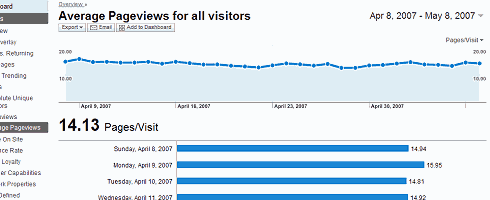
    I’ve also got partial screenshots of the Average Pageviews and Traffic Sources Overview pages for your viewing pleasure.

    So what’s in it for me?

    How about a nice, clean customizable and centralized heads-up display that presents the data that is important to you in a way you can understand it, share it, and customize it so you can make informed decisions about what works on your church website and what doesn’t.

    In other words, find out why your church website succeeds or fails in its goals to:

    • communicate your organizations’s personality and purpose
    • field better search engine optimization of your pastor’s sermons/studies
    • to get seekers and/or new neighbors in the door through compelling content
    • to get your lay ministries participating online by finding out what works and what doesn’t

    So what do I do next?

    If you’re not familiar with Google Analytics, I’d suggest starting with their demo page, and then work your way over the Analytics product page.

    For those of you who’ve been either using or aware of this service, I’d suggest perhaps adding the Google Analytics Blog to your aggregator.

    Old salt or newbie, keep in mind a few these factors as you visit the new version (demo):

    • The new version works best with Flash 7 or higher – if you don’t have it, you can get it at Adobe.com.
    • Google Analytics now uses the same geo-data source as AdWords, therefore, map and geo-location report results may vary slightly between the previous interface and the new interface (For those of you with filters designed for geo-data, you may want to verify the results and edit if necessary).
    • Limiting the Available Reports for a profile by specifying which Report Dashboards and Report Categories are available has been removed from the product in favor of the new customizable Google Analytics dashboard.
    • The ability to limit the availability of data within a certain profile for certain users (through removing those users from the profile instead of via email scheduling).

    So what!? Big deal?! Why Bother?!

    I know you’re busy, but if the above information isn’t enough to light a fire under you to figure out how to plug in this service to let your church, charity and/or community’s web light shine, then perhaps this paraphrase based upon Matthew 5:14-16 will help put it in a context that is meaningful to you:

    14 “You are the light of the world. A city set on a hill cannot be hidden. 15 Nor do people light a lamp and put it under a basket, but on a stand, and it gives light to all in the house. 16 In the same way, let your light shine before others, so that they may see your good works and give glory to your Father who is in heaven.

    Put another way, no matter how ‘cool’ your church web site may be, if you don’t know what a bounce rate is – let alone your church web site’s bounce rate – then you need to get busy with adding Google Analytics to measure the effectiveness of your organization’s web presence.

  • The (Not-so) Nice and the Nasty, E-Mail Lists Surge in Usage

    “For increasing numbers of people and neighborhoods, I-saw-it-on-the-Listserv has become the new I-heard-it-on-the-grapevine … including some truly nasty spats … thanks in part to the faceless nature of e-mail communication … well that and some of the egos involved in some churches, charities and other community organizations.”

    In an article by Steve Hendrix of the Washington Post entitled “Offering Both the Nice and the Nasty, E-Mail Lists Surge in Usage” the author asserts, correctly in my humble opinion, that:

    “The use of free group lists for mass e-mails, a mainstay of neighbor-to-neighbor communication for more than a decade, continues to climb steadily as more newcomers sign on and longtime users add additional groups to their routine.”

    At least that’s how I’ve found it in both the neighborhood in which I live, and for my last church – where we leveraged the free listservs available with our domain hosting package, built right into the control panel.

    I mean, what are the choices – semi-public BBS’ that are prone to spam and hacking by nere-do-wells – or subscribe and opt-out by email lists whose recipients, threads and distribution are easy to create and maintain?

    Then again, while operationally optimal over an electronic bulletin board, there is that sticky little communal issue that is not as easily moderated on a mailing list – an issue again well stated by the Mr. Hendrix:

    ‘From “seeking vacuum repairman” to “another mugging near metro” to “your charcoal smoke is making me sick,” subject lines — and the messages they contain — have become rich, varied, sometimes maddening veins of neighborhood gossip.’

    Or with apologies to the Apostle Paul:

    “Besides that, they learn to be idlers, going about from post to thread, and not only idlers, but also gossips and busybodies, saying what they should not.”

    My suggested solution to this issue is to avoid general gossip by having well focused email groups whose primary purpose is tied into the operational aspects of your church, charity or other community organization. Such as:

    • hand bell choir
    • ladies Bible study
    • men’s breakfast
    • youth group events

    Notice that not only are the above suggestions specific to a group, but to the major activity associated with said group.

    This way, if one runs into the “… truly nasty spats … thanks in part to the faceless nature of e-mail communication …” as mentioned in the aforementioned article.

    How about you, what’s in your group’s listserv? Please, share some experiences and suggestions.

  • ‘Bab’tist Church, or FrontPage Conspiracy? You decide!

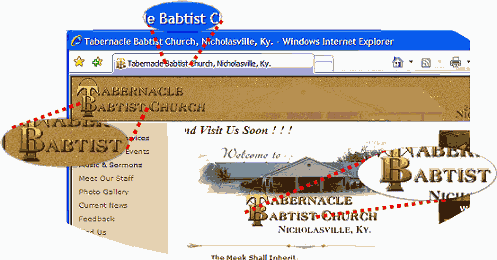
    Baptist is a term describing a tradition within Christianity that takes its name from the conviction that followers of Jesus Christ should be immersed in water as a visible and public display of their faith. I’m not sure what a ‘Bab’tist is.

    Hey folks, what do you think a seeker new to town is going to think when they visit this web site for “Tabernacle Babtist Church, Nicholasville, Ky?”

    Tabernacle Babtist Church, Nicholasville, KY

    Below is a list of a few more church web sites where the [title] and/or [h1] tags are similarly afflicted:

    Interestingly enough, I determined that more than one of the sites cited above were rendered using FrontPage. Coincidence or conspiracy? Hmmmmmm …