Tag: social media

  • Social Media is for engaging in dialogs, not a platform to pound the pulpit!

    Dear social media friends & circles, if you use Facebook & Google+ as you would a blog, then don’t get upset if I ‘defriend’ & ‘uncircle’ you.

    A Failed Social Media Strategy

    Last night I ran out of patience with an individual on Google Plus (G+), who though they meant well, were entering a series of multi-paragraph posts on their stream, with quotes, photos and all.

    • Basically, they were treating G+ like a blog.

    As Annoying as this was on my laptop, I ignored the situation. However, spending time on my new Samsung Droid Charge, I found right flicking finger blistered beyond belief as I had to page past several screens of this user’s tomes to see what anyone else was doing.

    As soon as I ‘uncircled’ them, my GPlus mobile user experience went from ARGH to Aaaahhhh.

    I’ve had similarly ‘defriend’ some on  Facebook as well, though for the most part, only in those cases, I’ve basically start out by ‘hiding’ all posts by an overzealous associate before going with the nuclear option.

    And for what-its-worth, I make good use of gmail’s filtering capability for spammy newsletters that don’t respect the ‘unsubscribe’ option hey offer.

    So what’s in it for me?

    So what can we learn from the above kvetch-fest? Plenty, glad you asked.

    Whether you engage in social media for personal fulfillment or as part of a larger digital marketing strategy, the point of social media is to ENGAGE others IN a DIALOG.

    If you want to get all preachy and pound the pulpit and/or go all prose on your organizations next big shindig, then may I recommend some of the following tactical approachs?

    • create a killer blog post to present your idea or event;
    • give the blog post a ‘pheromone infused’ title;
    • make sure the 1st paragraph has ‘crack-like’ compelling content;
    • add #hashtags to your blog post’s tags;
    • using the above, create a magnetic 100-120 character meme/excerpt to post on Facebook, G+, Twitter, LinkedIn, etc …; and
    • now go take a look at your work on a variety of platforms (mobile, laptop, tablet, etc …), and tweak those that appear annoying, ill formatted and/or ineffective.

    Finally, and more important than any of the above — make sure to follow-up with folks who post comments, re-tweet and/or reach-out to you based on your awe-inspiring words of wisdom.

    Bottom Line

    So here’s my call to action:

    • use blogs for providing compelling content;
    • use social media to engage others in dialog;
    • develop a tactical approach that uses the right tool for the job for your digital marketing strategy; and
    • have a digital marketing strategy.

    Agree, disagree, have an opinion? Why not force me to practice what I preach and leave a comment?

  • Digital Marketing is about Vision, Strategy, Tactics and Activity – in that order

    Digital Marketing is about Vision, Strategy, Tactics and Activity – in that order

    Successfully marketing your church or charity in the digital domain is more than adding a “Like Button” to your blog.

    Social media icons galore!I’ve become aware of this after the popularity of my “Facebook Like Button Plugin for WordPress.”

    In the past year, I’ve received a number emails requesting features and implementation requests that seem to think that this Facebook service can solve all their social media marketing needs.

    So it pains me when I have to reply with a ‘no’ to some very nicely worded requests.

    I generally spare such a request of the technical limitations of Facebook’s API. I also spare them the bitter reality that there is no “magic bullet” when it comes to digital marketing.

    So to make up for the latter omission, I’ve written below what I believe it takes for a church or charity to survive their drive along the information highway – specifically in terms of online outreach and ministry:

    1. Vision;
    2. Strategy;
    3. Tactics; and
    4. Activities

    … in that order.

    Problem is, most organizations I’ve seen fail on the web do so because they jump into activities without understanding that success needs to have:

    • measurable objectives;
    • focused, targeted audiences;
    • feasible short, medium and long term plans; and
    • return on investment.

    I’ll blog later about these “haves” in a future post. For now, let’s define what I mean by Vision, Strategy, Tactics and Activities … in that order.

    Vision:

    1. Grow organization that …
    2. … serves their local community of Lutherans …
    3. … by feeding their faith; and…
    4. … equipping them to feed others.

    Strategy:

    1. Bring in more visitors.
    2. Get visitors to become members.
    3. Get members to become active participants.
    4. Get active participants to become evangelists.

    Tactics:

    1. Attracts more visitors through popular digital venues.
    2. Provide online content that allow visitors to comfortably explore your organization.
    3. Provide online tools that help members plug-in to programs and collaborate.
    4. Provide online training and services that help evangelists get the word out.

    Activities:

    1. Get the sermons, lessons online, videos and photos onine; and track it all with Google Analytics.
    2. Create a community presence via a Facebook and/or LinkedIn group, and don’t forget Disqus.
    3. Integrate tools such as BaseCamp for program management and Google Apps for document processing.
    4. Enlist tools such as SurveyMonkey and MailChimp to equip individuals in the field.

    If you’re finding that your organization is not getting anything but a passing interest from your online activities, then why not take a step back and consider the above?

    If you still feel that a rocking WordPress theme for your church website is the key to your organization’s digital marketing management, then I’d ask you to consider what measurable results you received from similar efforts in the past?

    As always, comments, questions and criticisms are welcome, so long as their couched in love.

  • What to do when your Twitter Account gets Compromised

    Despite employing strong passwords that I change regularly, despite deleting unsolicited Direct Messages (DM) and mentions with links to unknown destinations, a simple “fat finger faux pas” event lead to me granting a 3rd party Twitter application permission to spam my followers. For that I apologize — and as part of my penance, have provided some useful advice, images and even a script to help you remedy that situation if you should ever similarly fall victim so such malware.What to do when your Twitter account gets hacked

    I woke up a little after 1:30AM last night because I though I had heard some racoons helping themselves to my  trash can as if it were a salad bar. Once that venture into suburban sanitation security was resolved, I checked my Samsung Droid Charge for any incoming notifications.  One that caught my attention read:

    Strange link via DM from you just now.

    As I dug in, I realized that my Twitter Followers were being sent a DM with a link to a third party Twitter Application, which when clicked, would begin the process of similarly turning their Twitter account into a spam-sending zombie.

    First thing first, I read the instructions on Twitter’s help page entitled “My Account Has Been Compromised, ” which advised me to:

    1. Change your password (go ahead, make it  a strong password)
    2. Revoke connections (to any 3rd party application you think suspicious &/or are no longer used)
    3. Update your new password in your trusted third-party applications

    Which I did immediately. I then went into Twitter and began to manually delete the messages the pusilanimous 3rd party program had sent. It wasn’t long into this tedious process that I realized “… this is how I got hacked, the malware link is WAY too close to the delete link.”  I’ve attached a screenshot of a test DM to demonstrate the usability issue I’m trying to describe:
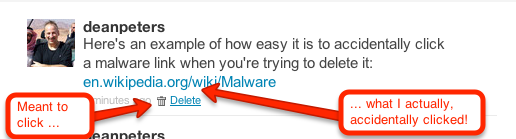
    How the Twitter delete DM links can sometimes be too close to a malware link

    A bit of context, earlier in the evening while watching the 1st quarter of the Packers/Falcon’s game, I received an obvious malware DM. I pulled up Twitter in my browser on my Droid rather than the mobile App because there’s less keystrokes to deleting such conversations. Unfortunately, I clicked the Malware link. I remember that happened because I quickly hit the back key and then deleted — not thinking anything would happen because of my miscue.

    I was wrong. Later, sometime during the 4th quarter while searching stats on the Pack’s stunning 2nd half comeback, I saw on my little Droid browser a page that looked like Twitter, asking me to log back in. I was busy with the game, I’d seen Twitter do this before. What I didn’t see that the link was  actually pointing to a misspelled site: Twittler.com!

    So despite all my talk about strong passwords, ignoring unsolicited candy from strangers, and other such stuff, I granted a 3rd party application permission to spam the h-e-double-toothpicks out of my followers. Worse, just about the time I was through deleting all the rogue messages, I received another communique that reminded me that followers who get email notifications of DMs were still going to see the link.

    So at about 2:45AM, I set out to write a script that would send DM notifications to all my Twitter Friends — technically, those individuals of whom I follow, who also follow me. I won’t go into too much gory detail, other than the resulting replies indicated grateful followers, who while suspicious, were glad to get the personalized Direct Message warning from me.

    I chose PERL, because while other languages may be better for long term projects, I knew I could field a solution within an hour and a half by taking advantage of the Net::Twitter module provided at the CPAN library; along with a fresh set of API consumer and access from the Twitter Developer’s page.

    I call this script “DM_mea_culprit.pl,” and since it can be used to send a bulk messages to all your Twitter followers, please resist temptation and limit its use it for good:

    #!/usr/bin/perl
    #
    # Summary:
    # --------------------------------------------
    # Sends a Direct Message to Friends - those people on Twitter
    # whom I follow who also follow me
    #
    # Arguments:
    # --------------------------------------------
    # none yet, we'll get that done on the next version
    #
    # Example Use:
    # ---------------------------------------------
    # perl DM_mea_culprit.pl > run01.log.txt
    
    use Net::Twitter;
    use Dumper;
    
    # NOTE: you will need to get consumer keys and access tokens from the
    # Twitter Development Center: https://dev.twitter.com/start
    my $nt = Net::Twitter->new(
    traits => [qw/API::REST OAuth/],
    consumer_key => $YOUR_CONSUMER_KEY,
    consumer_secret => $YOUR_CONSUMER_SECRET,
    access_token => $YOUR_ACCESS_TOKEN,
    access_token_secret => $YOUR_ACCESS_TOKEN_SECRET,
    );
    
    # this information is useful to log at the beinning of the script
    # .. it includes how many more messages you can send w/in the hour
    my $ratelimit = $nt->rate_limit_status();
    print Dumper($ratelimit);
    
    # construct the outgoing direct message
    my $omsg = "please do NOT open any URL you may have received from me last night as a DM. It was malware.";
    
    # get all the ID's of people I follow
    my @ids;
    for ( my $cursor = -1, my $r; $cursor; $cursor = $r->{next_cursor} ) {
    # for a larger net, consider followers_ids()
    $r = $nt->friends_ids({ cursor => $cursor });
    push @ids, @{ $r->{ids} };
    }
    
    # walk through all the IDs
    foreach my $id (@ids) {
    if($id) {
    
    # get an array that describes the friendship
    my $friend = $nt->lookup_friendships({ user_id => $id });
    
    # get their screen name
    my $screenname = $friend->[0]->{"screen_name"};
    
    # see how you're connected to this friend
    my $connections = $friend->[0]->{"connections"};
    
    # important -- do they follow you?
    my $isfollowedby = $connections->[1];
    
    if($isfollowedby) {
    my $dmsg = "\@$screenname, $omsg"; # personalize the DM
    my $smsg = $nt->new_direct_message($id, $dmsg); # send the DM
    if($smsg) {
    print "message '$dmsg' successfully sent to #ID".$id."\n";
    } else {
    print "WRN:".$id."\t@".$screenname."\texperienced a message fail\n";
    }
    sleep (2); # don't overrun Twitter
    }
    sleep(3); # don't get blacklisted
    }
    }
    
    # Now send out a generalized message to the peeps;
    my $res = $nt->update({ status => "TO MY FOLLOWERS: $omsg" });
    
    # last bit of logging
    print "This work is done\n";
    exit 1;
    

    All that said,  here are some things I’m doing to do moving forward to avoid such instances.

    1. continue to change my password periodically, using something very strong;
    2. periodically review my third-party application connections, removing anything that looks suspicious and/or is no longer in use;
    3. always use the Twitter Mobile App to delete DMs with bad looking URLs when on my Droid smartphone;
    4. take a harder look at the URL when asked to log back into Twitter (or Facebook for that matter);
    5. perfect the above script — adding logic to delete spammy DM’s while sending out the warning; and
    6. being the Social Media API junkie that I am, perhaps re-write this in Python.

    Please feel free to add your recommendations to the list above — and again — apologies to my Twitter followers for the hassle.

  • Fun with the Twitter Search API and jQuery

    During my job search last year, I admitted that “yeah, I’m a bit of an API junkie.” Anyone whose followed this site since 2002 probably has gone blind once or twice reading posts about SOAP, XML-RPC, RSS feed and other such programmer protocols and interfaces.

    So why should anyone be surprised that today I’m providing a quick how-to code snippet of some fun I’m having with the Twitter Search API, REST, jQuery and jSON?

    YES, I know I need to get back into providing posts about content management,  effective social media strategies and web campaigns … but for today … please indulge me with one more trip into the land of code.

    Some Context

    In the process of writing some WordPress plugins leveraging the Facebook API, I thought “why not twitter?

    However, there are already a multitude of plugins and widgets out there that’ll show my profile.  So I turned my eyes to Twitter Search.

    My first thought was to simply write this all up using not much else but the jQuery.getJSON() method.  However, this approach doesn’t lend itself well to caching – which in turn would lead to some of you with busy sites getting your widgets blacklisted by Twitter as <a href=”http://apiwiki.twitter.com/Rate-limiting” title=”Twitter API Wiki – Rate Limiting”>their default rate limit</a> for calls to the REST API is 150 requests per hour.

    So now I’m working on a PHP solution inspired in large part by Arron Jorbin’s post “More Twitter Shortcodes for WordPress.” Must read for anyone working with feeds or APIs in the WordPress arena.

    Hey, so where’s the jQuery & jSON?

    All that context aside, I did successfully write a short snippet that used jQuery to call the RESTFul Twitter Search API and then parses the jSON into a dynamic display.

    I did this in part because while I will employ some form of PHP or  Perl to cache the Twitter Search, I still might employ jQuery as the rendering mechanism for said cache. Here’s my test code so far:

    /* a counter outside the context of setCountdown() */
    var seconds2go = 0;
    
    /*
     * the method that sets the visual display of the countdown timer,
     * and triggers getTweet after 2 minutes
     */
    var setCountdown = function() {
      seconds2go--;
      if(seconds2go > 0) {
        $("#countdown").html("Seconds until the next refresh:' +
      ' <span>" + seconds2go + "</span>");
      } else {
        $("#countdown").html("Seconds until the next refresh:' +
      ' <span>0</span>");
        getTweet();
        seconds2go = 120;
      }
    }
    
    /*
     * the method goes out to the Titter A.P.I,
     * then parses the jSON block into the display
     */
    var getTweet = function() {
    
      /* set everything up */
      var url="http://search.twitter.com/search.json" +
           "?rpp=5&callback=?&q=";
      var query = escape( query=$("#twittersearch").val() );
      var display = '<div class="tweetDisplayContainer error">' +
           'no records found</div>';
      var urirex = /(https?):\/\/+([\w\d:#@%\/;$()~_?\+-=\\\.&]*)/g;
      var hashrex = /\#+([\w\d:#@%/;$()~_?\+-=\\\.&]*)/g;
      var thashuri = "http://search.twitter.com/search?q=%23";
      $("#twitterresults").html('');
    
      /*
       * A.J.A.X. happens here -> go get the data, then parse it
       */
      $.getJSON(url+query,function(json){
      $("#twitterresults").html('<h4><a class="searchlink" href="' +
      url.replace('search\.json','search')+query +
      '" title="see the search query via Twitter">Testing: ' +
      url+query + '</a></h4>');
      if(json) {
        display = '<div class="tweetsContainer">' +
      '<dl class="tweets clearfix">';
        $.each(json.results,function(i,tweet){
          ttext = tweet.text.replace(urirex,
      '<a href="$1://$2" title="">$2</a>');
          ttext = ttext.replace(hashrex,
      '<a href="' + thashuri  + '$1" title="">#$1</a>');
          display +=  '<dt class="tweet' + i + '">' +
                '<img src="' + tweet.profile_image_url + '"  />' +
              '</dt>' +
              '<dd class="tweet' + i + '">' +
                ttext + ' <strong>via:</strong>' +
                '<a href="http://twitter.com/' + tweet.from_user +
                '" title="tweets by ' + tweet.from_user +
                '">@' + tweet.from_user + '</a>'
              '</dd>';
            });
        display += '</dl></div>';
      }
        $("#twitterresults").append(display);
    
      });
    }
    
    /*
     * this is where we kick-it all off,
     * assumes seconds2go = 0 initially
     */
    setInterval(setCountdown, 1000);
    

    As you can see, the most difficult part was getting it all to fit in a readable format on this blog! Well, that and some additional fun with regular expressions.

    Well that and what you don’t see in the code are two html elements:

    <h2 id="countdown">Seconds until the next refresh: <span>120</span></h2>
    
    <input type="hidden" id="twittersearch" value="deanpeters #smm" />
    
    <div id="twitterresults">no results yet</div>
    

    Todo: I’m thinking the above script could use a bit of animation easing or some other effect so we don’t simply “flash” new results at the user. It also needs to be objectified and wrapped-up as a plugin. More on that as I work on the widget/plugin.

    Demo Stuff

    I did create a demo page – it’ s not pretty, but it effectively shows how to get it done. I’ll craft up some CSS for it later.

    It’s basically built off a search of  deanpeters  #smm as pictured below:

    twitter search criteria for jQuery test

    I’ve also created a .txt version of the file if you’re interested.

    Additional Reading

    In the meantime, I though I’d list some of the sites I visited while approaching this exercise. Some good people providing some good examples:

    FYI

    Thanks for all the emails and retweets of late. Good stuff!

  • Using Perl’s Net::Twitter to Harvest Keyword Searches

    So you’ve decided to dive into social media marketing on behalf of your church and/or charitable organization.

    In fact, you’ve been wisely leveraging bit.ly with Twitter or ow.ly with HootSuite to track and measure your outbound links — but you find yourself in need a more ‘industrial strength‘ means of tracking who is saying what about your organization or an upcoming event.

    You also want to speed up your WordPress blog as it’s been gagging when your Twitter RSS feed goes all 503 on you because Ashton Kutcher tweeted about his toenail clippings.

    Recipe for Success

    As I mentioned in my post last Tuesday entitled ‘Strategy vs. Tactics and your Social Media Activities ,’ I’ve been playing around with some of the cool social networking tools one can find in the CPAN library.

    Today I want to provide a quick snippet on how to use the Net::Twitter to write a simple PERL program to harvest a search.

    To do this, it mean installing the Net::Twitter library. You’ll likely need root or sudo privileges to make this happen. If you don’t know what root or sudo means, then you’ll want to contact your hosting provider.

    That said, once you get it installed, the next step is to go to the Twitter Search page and create an advanced search. From the resulting query string should give you all the parameters you need, for example:

    Based on the above example, I created the following script by using the nano editor for a file called ‘eastertweets.pl‘:

    #!/usr/bin/perl
    use Net::Twitter;
    use Net::Twitter::Search;
    use Scalar::Util 'blessed';
    # Just the Search API; exceptions thrown on error
    $nt = Net::Twitter->new(traits => [qw/API::Search/]);
    eval {
       # Parameters: q, callback, lang, rpp, page, since_id, geocode, show_user
       my $r = $nt->search({
          q=>"\"easter service\" OR \"sunrise service\"",
          lang=>"en",
          geocode=>"35.769804,-78.781622,40mi",
          rpp=>50,
          since=>"2010-03-21"
       });
       for my $status ( @{$r->{results}} ) {
          print "\@$status->{from_user}";
          print "\t$status->{created_at}\n";
          print "\t\t$status->{text}\n";
          print "-----------------------------------------------------\n";
       }
    };
    if ( my $err = $@ ) {
       die $@ unless blessed $err &amp;&amp; $err->isa('Net::Twitter::Error');
       warn "HTTP Response Code: ", $err->code, "\n",
       "HTTP Message......: ", $err->message, "\n",
       "Twitter error.....: ", $err->error, "\n";
    }


    Once I created the file, it was simply a matter of modifying it to execute, then calling it:

    chmod a+x eastertweets.pl
    $HOME/eastertweets.pl

    So Why Bother?

    Now this approach by itself is a lot of work for little return. However, here are some things you might want to do with the sample above that would provide some big return value:

    1. feed this into a SQL database history via Perl DBI;
    2. create comma separated values and pipe it into a running log file;
    3. aggregate the returns with other searches into a single RSS file on your server for both the sake of speed and feeding localized dashboards;
    4. grep the returns for other key words, sending email notifications on hot items, while deleting those spammy items that make your feed so noisy;
    5. create a RESTFul web service that dynamically feeds your WordPress blog of select queries using Ajax via jQuery.

    The point is, once the data is captured, you can pretty much do anything you want with it programatically.

    For me, I’m thinking it might be fun to grab user IDs and feed their demographic information into some sort of analytics engine; or at least have some fun with Google Maps.

    Anyway, enjoy the example. If you expand on it, don’t forget to come back and provide a link. I’d be interested to see how this snippet evolves.

  • The Facebook Like Button Plugin for WordPress

    Facebook rocked the internet yesterday with 5 new plugins, one of which is an API for the Facebook Like Button. After reading about it and playing a bit with the Facebook’s Like Button generator, I decided what’s needed is a WordPress plugin that allows folks to easily configure the look-and-feel of the Facebook Like Button, and then automatically add it the beginning and/or the end of their posts.

    Update 26-Apr-10

    FYI, I just released version  0.1 of the The Facebook Activity Widget Plugin for WordPress – yet another useful (and different) WordPress plugin for displaying Facebook Social plugins on your website.

    Update 25-Apr-10

    Version 0.4 just got released – it now has a preview feature built into the administrator panel … and I’m starting to get translation .po & .mo files from abroad (thanks!-). It’s also now being distributed via the WordPress Plugin Repository.

    Update 24-Apr-10

    Version 0.2 is released as of Saturday, April 24, 2010 7:14 Eastern Standard Time.

    Also after some excellent email and FB message feedback from some early adopters, you can now also decide whether or not you want the FaceBook Like Button to appear on the top and/or bottom of individual pages, individual posts and/or your front page.

    Installation & Use

    I also wanted to keep it simple, so here’s how it works — using the standard WordPress plugin installation process:

    1. Upload the ‘fblikebutton.zip’ file to the `/wp-content/plugins/` directory using wget, curl of ftp.
    2. ‘unzip’ the ‘fblikebutton.zip’ which will create the folder to the directory `/wp-content/plugins/fblikebutton`
    3. Activate the plugin through the ‘Plugins’ menu in WordPress
    4. Configure the plugin through ‘FBLikeButton’ submenu in the the ‘Settings’ section of the WordPress admin menu.
    5. Modify the fields to choice and save.

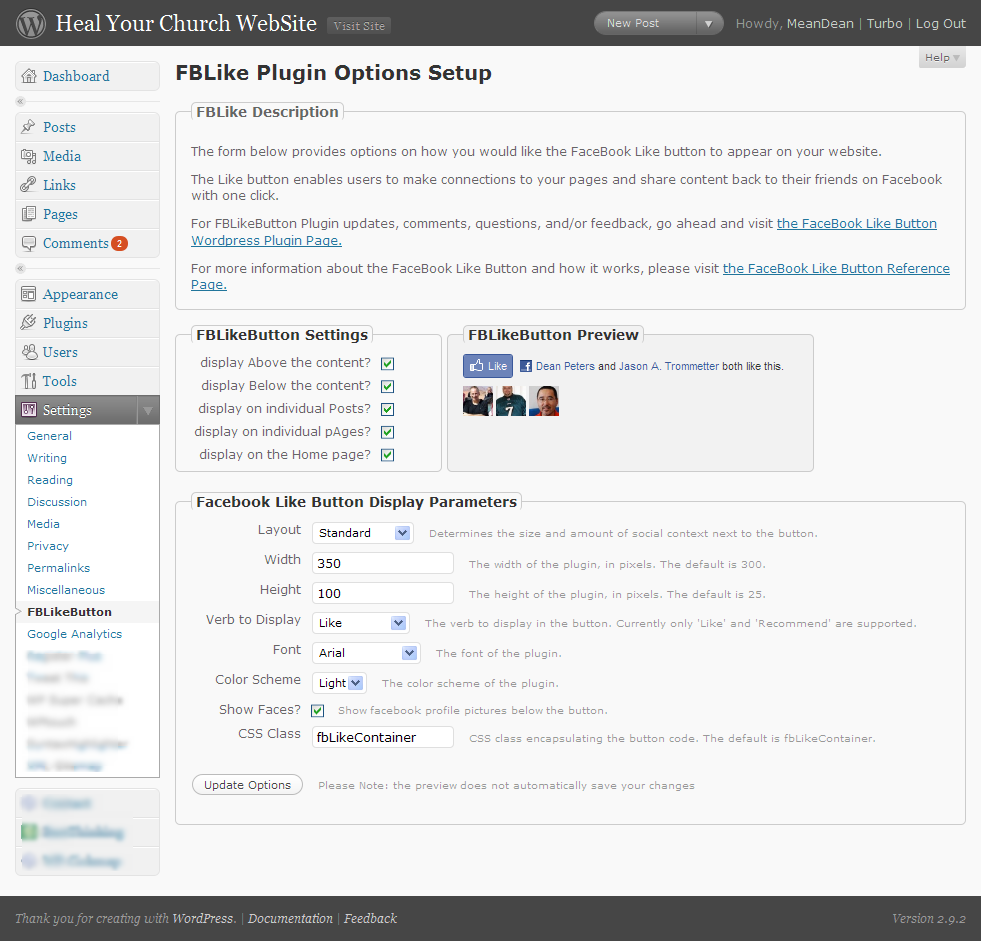
    Here’s a screen shot below of the administrator screen (you’ll want to click on it to see it full size):

    Screenshot of the FBLikeButton Admin Panel - now with preview

    Here’s how the FaceBook Like button appears on the bottom of this post:

    Screenshot of the FBLikeButton after fabulous formatting

    This being being version 0.1, you can bet your sweet bippee there’s more to come. Still, I wanted to get this out to the WordPress community as fast as possible.

    A bit more about the FaceBook Like Button

    What’s nice about the Facebook Like button is that no login to your site is required. Even if you’ve never visited HealYourChurchWebsite.com before, they can get social context starting with their very first visit.

    If you’re logged into FaceBook, then you can see which of your friends like a site — without the site knowing anything about you. Pretty neat, huh?

    Download It

    Also, I’m currently in the process of setting getting established with the WordPress SVN  and everything else that goes with publishing an official WordPress plugin.

    Until then, click here to download the latest fblikebutton, from the WordPress Plugin repository keeping in mind it is version 0.1 0.2 – so expect more to come!

    Download the FaceBook Like Button Plugin for WordPress

    Shout Outs and Thanks

    A shout–out of thanks for the immediate feedback goes out to Benjain, Julien, Tim, Jason, and Dave.

    Additional Reading

    FYI

    Oh, and hey, don’t forget to click the FaceBook Like Button for this post … I’d appreciate it.