Facebook rocked the internet yesterday with 5 new plugins, one of which is an API for the Facebook Like Button. After reading about it and playing a bit with the Facebook’s Like Button generator, I decided what’s needed is a WordPress plugin that allows folks to easily configure the look-and-feel of the Facebook Like Button, and then automatically add it the beginning and/or the end of their posts.
Update 26-Apr-10
FYI, I just released version 0.1 of the The Facebook Activity Widget Plugin for WordPress – yet another useful (and different) WordPress plugin for displaying Facebook Social plugins on your website.
Update 25-Apr-10
Version 0.4 just got released – it now has a preview feature built into the administrator panel … and I’m starting to get translation .po & .mo files from abroad (thanks!-). It’s also now being distributed via the WordPress Plugin Repository.
Update 24-Apr-10
Version 0.2 is released as of Saturday, April 24, 2010 7:14 Eastern Standard Time.
Also after some excellent email and FB message feedback from some early adopters, you can now also decide whether or not you want the FaceBook Like Button to appear on the top and/or bottom of individual pages, individual posts and/or your front page.
Installation & Use
I also wanted to keep it simple, so here’s how it works — using the standard WordPress plugin installation process:
- Upload the ‘fblikebutton.zip’ file to the `/wp-content/plugins/` directory using wget, curl of ftp.
- ‘unzip’ the ‘fblikebutton.zip’ which will create the folder to the directory `/wp-content/plugins/fblikebutton`
- Activate the plugin through the ‘Plugins’ menu in WordPress
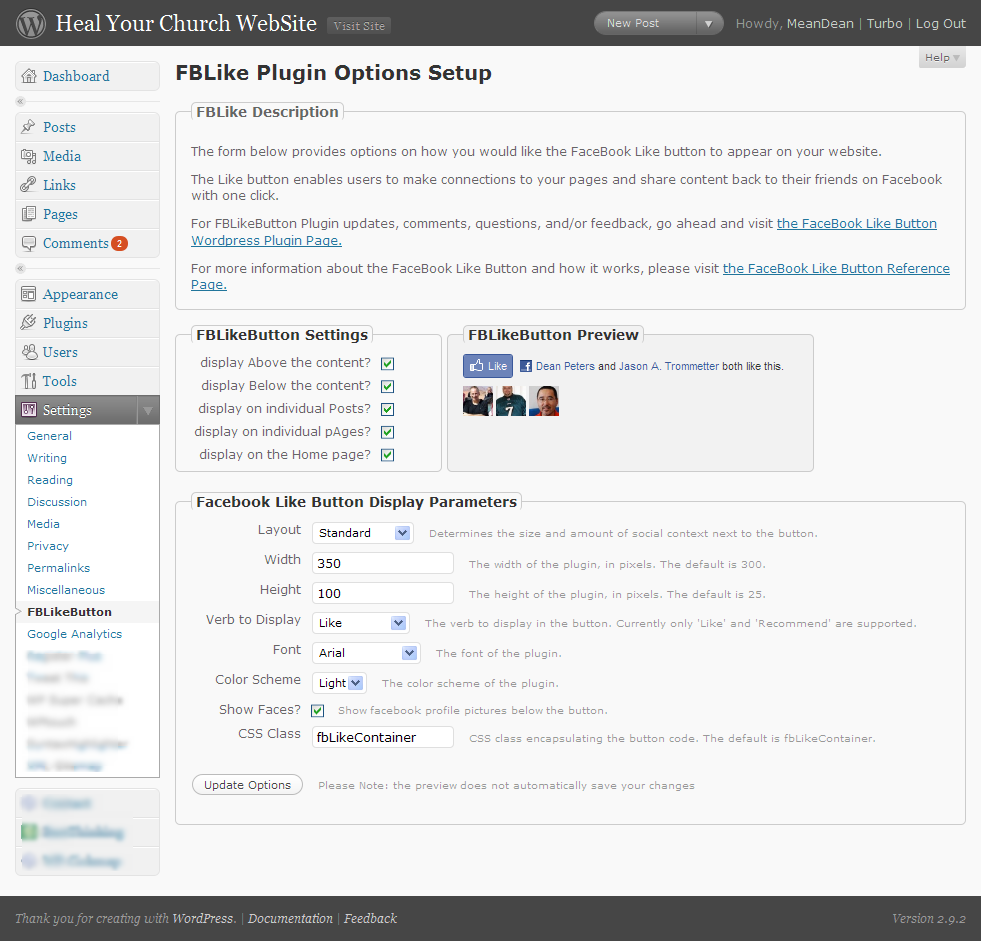
- Configure the plugin through ‘FBLikeButton’ submenu in the the ‘Settings’ section of the WordPress admin menu.
- Modify the fields to choice and save.
Here’s a screen shot below of the administrator screen (you’ll want to click on it to see it full size):
Here’s how the FaceBook Like button appears on the bottom of this post:

This being being version 0.1, you can bet your sweet bippee there’s more to come. Still, I wanted to get this out to the WordPress community as fast as possible.
A bit more about the FaceBook Like Button
What’s nice about the Facebook Like button is that no login to your site is required. Even if you’ve never visited HealYourChurchWebsite.com before, they can get social context starting with their very first visit.
If you’re logged into FaceBook, then you can see which of your friends like a site — without the site knowing anything about you. Pretty neat, huh?
Download It
Also, I’m currently in the process of setting getting established with the WordPress SVNÂ and everything else that goes with publishing an official WordPress plugin.
Until then, click here to download the latest fblikebutton, from the WordPress Plugin repository keeping in mind it is version 0.1 0.2 – so expect more to come!

Shout Outs and Thanks
A shout–out of thanks for the immediate feedback goes out to Benjain, Julien, Tim, Jason, and Dave.
Additional Reading
- Facebook Announces Open Graph API and 5 New Social Plugins at f8
- Integrate Facebook’s “Like†Plugin into WordPress
- How to – Add Facebook LIKE button to WordPress Posts
- What Facebook’s Open Graph Means for Marketers
- Facebook Blog: New Ways to Personalize Your Online Experience
- Facebook Dev: Like Button Plugin Page (and generator)
- USAToday: Facebook to let members share info on Web faves
- CNET: What Facebook’s latest means for the Web
FYI
Oh, and hey, don’t forget to click the FaceBook Like Button for this post … I’d appreciate it.
Comments
40 responses to “The Facebook Like Button Plugin for WordPress”
[…] heb ik na een aantal pogingen de plugin van Peter Dean uitgekozen. Als je binnen WordPress een nieuwe plugin installeert moet je zoeken naar […]
[…] ‘like’ button to this blog, which appears at the end of each post. It’s produced by the fbLikeButton plugin for WordPress, the easiest way I found to implement the button without having to do any coding in […]
[…] Natürlich werde auch ich diesen Trend folgen und habe den “Like” Button ebenfalls integriert. Dank WordPress ist der Einbau sehr einfach, Plugin installieren, konfigurieren und aktivieren. Fertig! Wenn ihr mehr über den Einbau des “Like” Buttons wissen möchted, datenschmutz.net hat dazu einen guten Beitrag geschrieben. In meinem Blog verwende ich das Plugin: The Facebook Like Button Plugin for WordPress. […]
[…] C’est un plugin WordPress, pour ceux que cela intéresse vous trouverez plus d’information à cette adresse. […]
[…] 「ã„ã„ãã€ãƒœã‚¿ãƒ³ã®ãƒ—ラグイン […]
[…] DOWNLOAD […]
[…] FaceBook Like Button Plugin for WordPress von Dean Peters erlaubt die Eiunbindung eines Facebook Like Buttons in das Blog. Je nach […]
[…] Najnowsza wersja pluginu jest dostÄ™pna na stronie autora: FaceBook Like Button Plugin for WordPress […]
[…] Auf den dritten Platz hat es das WordPress PlugIn “FaceBook Like Button Plugin for WordPress†geschafft. Es ist ähnlich dem Vorgänger aufgebaut, Jedoch gibt es hier kein CSS Feld, allerdings kann eine Klasse definiert werden über welche man ein eigenes Stylesheet ansprechen kann. Link: Hersteller Healyourchurchwebsite – FaceBook Like Button Plugin for WordPress […]
[…] 僕ãŒé¸ã‚“ã ã®ã¯The Facebook Like Button Plugin for WordPress(FBLikeButton)。 […]
[…] fbLikeButtonã¨ã„ã†ä¾¿åˆ©ãªwordpressã®ãƒ—ラグインãŒã‚ã‚Šã¾ã—ãŸã®ã§ã€è¨ç½®ã—ã¦ã„ã¾ã™ã€‚ […]
I have used the plugin on to my site and it is very useful. I think there are couple of suggestion that I feel must be added to your existing version:
1 . meta data og:image should be added so that user in facebook can see images in their profile in facebook.This will helpful for user with site like mine who have an image gallery
Link: http://developers.facebook.com/docs/reference/plugins/like
2. Like button shows only number, option should be enabled to show names of people who like.
I would like to edit the existing plugin to add the feature 1 above, can any one pease help me with codes.
Thanks for the great plug-in. However, I found a minor bug. It appears when a user has two language (English-us and German de-de), the “like and text” plugin autoamtically shows German text instead of English even though English is set as the primary (top-most).
[…] The Facebook Like Button Plugin for WordPress – Heal Your Church WebSite […]
[…] dig som har WordPress som bloggverktyg kan jag tipsa om den här pluginen som sköter Gillaknappen alldeles utmärkt i din blogg. Du kan själv göra ett gäng […]
I have ERROR when click on LIKE
The page at http://www.rtvbn.info/2010/05/31/optuznica-protiv-davinica-zbog-afere-satelit/ could not be reached.
[…] plugin button ‘Like’ ni adalah FBLikeButton. Click sini untuk install. Credit untuk Liliana Mardiana sebab bagitahu I pasal plugin ni. UPDATE ; Ini tutorial untuk buat […]
[…] Integration in mein Blog erfolgt mit Hilfe des Plugins fbLikeButton von Dean […]
Have the same error mentioned above when i click like …
Thoughts?
Hi.. Great plug-in. One issue I am having however is that it appears to be ignoring capabilities. I,e my users defined as ‘Contributors’ can see the FB Like plugin settings section…
(a) Lovely plug-in, thanks!
(b) It’s visible for Users who are not Administrators; is that on purpose?
(c) Minor typo: “display on individual pAges?”
I’m liking the plugin so far, but I have a couple issues:
-I tested it out by liking a post and having a friend like another post, but each post says “[name] and one other person like this.” I found this weird because only one person’s pressing the button and it’s registering two.
-Is there any way we’d be able to see the name and/or a link to the FB page of who’s liking these posts? If it’s someone I’m not FB friends with, it doesn’t even tell me who it is.
I don’t know why but when I activate this plugin, it doesn’t show up. I configure it to only show below individual posts and not on pages, and I’m on WP 2.9.2. Can you suggest any reason that might be happening (so I can use your cool plugin)? 😀
Thanks! I was looking at doing something similar and you saved me a lot of time. I’ll give this “like” thing a try and see how it goes!
Hey Dean, LOVE this plugin. It’s true awesome-sauce. I have stumbled across an instance where I do not want to have the Like Button on a private post (it’s for a specific client and not meant to be shared) how do I deactivate it for that post?
Thanks!
You are awesome! Thanks for this Dean!
Hi, great easy to install plug in.
Is there any way to tell who has liked your articles?
Hi, love this plugin! I have a coupel of pages where I DONT want the like button to show – like on a confirmation page after people give me their email addie – is there a way to turn it off on some pages?
thanks,
Sandy
Thanks! Can’t wait to put this to use on our website!
Hello,
I am using this plugin.
How i can get count number of Like for the URLs.
Hello, I have added your plugin for WordPress to my client’s site. It looks good and works well but I have a couple of questions.
1. Once I have selected “Display on the homepage?” and then deselect it, it does not remove the button off the homepage. What do I do to fix that?
2. How can I customize the button so that I can add more padding or a larger margin around the button?
Hello. I have added this plugin to my website and activated it. I clicked the like button and it says my name “likes” this site.
I then went to my facebook profile and can not find the site anywhere. or even an entry where the likes are displayed.
Can you help please?
Having the same issue as mentioned above. When like button is clicked it says the page xxx cannot be reached.
Seems to happen on articles I have to click on to read, but not the main articles on the main page that are already displayed.
Can you please help?
[…] nahodil plugin na sdÃlenà Älánků, pokud se Vám lÃbà a chcete jej stáhnout, můžete zde: fbLikeButton, pro jiné redakÄnà systémy jsou jistÄ› podobné […]
Awesome plugin. Works great. Thanks!
[…] start out with the very basic "Like" button. If you use WordPress, you’re in luck. There’s a Plugin for that. I use it and highly recommend it. If you want to take it to the next level, like I did, […]
Hi, Is there a way to track people who “liked” my posts?
This is the third FB Like WP plugin I’ve tried. It has more features than the other ones. I like the ability to place the button both at the beginning and the end of the post. My only suggestion is to add a note in the height field to let users know the default height of 25 will not allow pictures to display even if you have pictures checked. It took me awhile to figure this out.
[…] compartir los posts en Facebook, Twitter, Digg, Delicious, Google y linkedin. Nuevo plugin para “Me gusta” de Facebook, más ligero que el anterior, para una carga más rápida […]
great button… installation simple… is there a way of seeing who liked?