Tag: Facebook

  • Social Media is for engaging in dialogs, not a platform to pound the pulpit!

    Dear social media friends & circles, if you use Facebook & Google+ as you would a blog, then don’t get upset if I ‘defriend’ & ‘uncircle’ you.

    A Failed Social Media Strategy

    Last night I ran out of patience with an individual on Google Plus (G+), who though they meant well, were entering a series of multi-paragraph posts on their stream, with quotes, photos and all.

    • Basically, they were treating G+ like a blog.

    As Annoying as this was on my laptop, I ignored the situation. However, spending time on my new Samsung Droid Charge, I found right flicking finger blistered beyond belief as I had to page past several screens of this user’s tomes to see what anyone else was doing.

    As soon as I ‘uncircled’ them, my GPlus mobile user experience went from ARGH to Aaaahhhh.

    I’ve had similarly ‘defriend’ some on  Facebook as well, though for the most part, only in those cases, I’ve basically start out by ‘hiding’ all posts by an overzealous associate before going with the nuclear option.

    And for what-its-worth, I make good use of gmail’s filtering capability for spammy newsletters that don’t respect the ‘unsubscribe’ option hey offer.

    So what’s in it for me?

    So what can we learn from the above kvetch-fest? Plenty, glad you asked.

    Whether you engage in social media for personal fulfillment or as part of a larger digital marketing strategy, the point of social media is to ENGAGE others IN a DIALOG.

    If you want to get all preachy and pound the pulpit and/or go all prose on your organizations next big shindig, then may I recommend some of the following tactical approachs?

    • create a killer blog post to present your idea or event;
    • give the blog post a ‘pheromone infused’ title;
    • make sure the 1st paragraph has ‘crack-like’ compelling content;
    • add #hashtags to your blog post’s tags;
    • using the above, create a magnetic 100-120 character meme/excerpt to post on Facebook, G+, Twitter, LinkedIn, etc …; and
    • now go take a look at your work on a variety of platforms (mobile, laptop, tablet, etc …), and tweak those that appear annoying, ill formatted and/or ineffective.

    Finally, and more important than any of the above — make sure to follow-up with folks who post comments, re-tweet and/or reach-out to you based on your awe-inspiring words of wisdom.

    Bottom Line

    So here’s my call to action:

    • use blogs for providing compelling content;
    • use social media to engage others in dialog;
    • develop a tactical approach that uses the right tool for the job for your digital marketing strategy; and
    • have a digital marketing strategy.

    Agree, disagree, have an opinion? Why not force me to practice what I preach and leave a comment?

  • Digital Marketing is about Vision, Strategy, Tactics and Activity – in that order

    Digital Marketing is about Vision, Strategy, Tactics and Activity – in that order

    Successfully marketing your church or charity in the digital domain is more than adding a “Like Button” to your blog.

    Social media icons galore!I’ve become aware of this after the popularity of my “Facebook Like Button Plugin for WordPress.”
    In the past year, I’ve received a number emails requesting features and implementation requests that seem to think that this Facebook service can solve all their social media marketing needs.

    So it pains me when I have to reply with a ‘no’ to some very nicely worded requests.

    I generally spare such a request of the technical limitations of Facebook’s API. I also spare them the bitter reality that there is no “magic bullet” when it comes to digital marketing.

    So to make up for the latter omission, I’ve written below what I believe it takes for a church or charity to survive their drive along the information highway – specifically in terms of online outreach and ministry:

    1. Vision;
    2. Strategy;
    3. Tactics; and
    4. Activities

    … in that order.

    Problem is, most organizations I’ve seen fail on the web do so because they jump into activities without understanding that success needs to have:

    • measurable objectives;
    • focused, targeted audiences;
    • feasible short, medium and long term plans; and
    • return on investment.

    I’ll blog later about these “haves” in a future post. For now, let’s define what I mean by Vision, Strategy, Tactics and Activities … in that order.

    Vision:

    1. Grow organization that …
    2. … serves their local community of Lutherans …
    3. … by feeding their faith; and…
    4. … equipping them to feed others.

    Strategy:

    1. Bring in more visitors.
    2. Get visitors to become members.
    3. Get members to become active participants.
    4. Get active participants to become evangelists.

    Tactics:

    1. Attracts more visitors through popular digital venues.
    2. Provide online content that allow visitors to comfortably explore your organization.
    3. Provide online tools that help members plug-in to programs and collaborate.
    4. Provide online training and services that help evangelists get the word out.

    Activities:

    1. Get the sermons, lessons online, videos and photos onine; and track it all with Google Analytics.
    2. Create a community presence via a Facebook and/or LinkedIn group, and don’t forget Disqus.
    3. Integrate tools such as BaseCamp for program management and Google Apps for document processing.
    4. Enlist tools such as SurveyMonkey and MailChimp to equip individuals in the field.

    If you’re finding that your organization is not getting anything but a passing interest from your online activities, then why not take a step back and consider the above?

    If you still feel that a rocking WordPress theme for your church website is the key to your organization’s digital marketing management, then I’d ask you to consider what measurable results you received from similar efforts in the past?

    As always, comments, questions and criticisms are welcome, so long as their couched in love.

  • The Facebook Like Button Plugin for WordPress

    Facebook rocked the internet yesterday with 5 new plugins, one of which is an API for the Facebook Like Button. After reading about it and playing a bit with the Facebook’s Like Button generator, I decided what’s needed is a WordPress plugin that allows folks to easily configure the look-and-feel of the Facebook Like Button, and then automatically add it the beginning and/or the end of their posts.

    Update 26-Apr-10

    FYI, I just released version  0.1 of the The Facebook Activity Widget Plugin for WordPress – yet another useful (and different) WordPress plugin for displaying Facebook Social plugins on your website.

    Update 25-Apr-10

    Version 0.4 just got released – it now has a preview feature built into the administrator panel … and I’m starting to get translation .po & .mo files from abroad (thanks!-). It’s also now being distributed via the WordPress Plugin Repository.

    Update 24-Apr-10

    Version 0.2 is released as of Saturday, April 24, 2010 7:14 Eastern Standard Time.

    Also after some excellent email and FB message feedback from some early adopters, you can now also decide whether or not you want the FaceBook Like Button to appear on the top and/or bottom of individual pages, individual posts and/or your front page.

    Installation & Use

    I also wanted to keep it simple, so here’s how it works — using the standard WordPress plugin installation process:

    1. Upload the ‘fblikebutton.zip’ file to the `/wp-content/plugins/` directory using wget, curl of ftp.
    2. ‘unzip’ the ‘fblikebutton.zip’ which will create the folder to the directory `/wp-content/plugins/fblikebutton`
    3. Activate the plugin through the ‘Plugins’ menu in WordPress
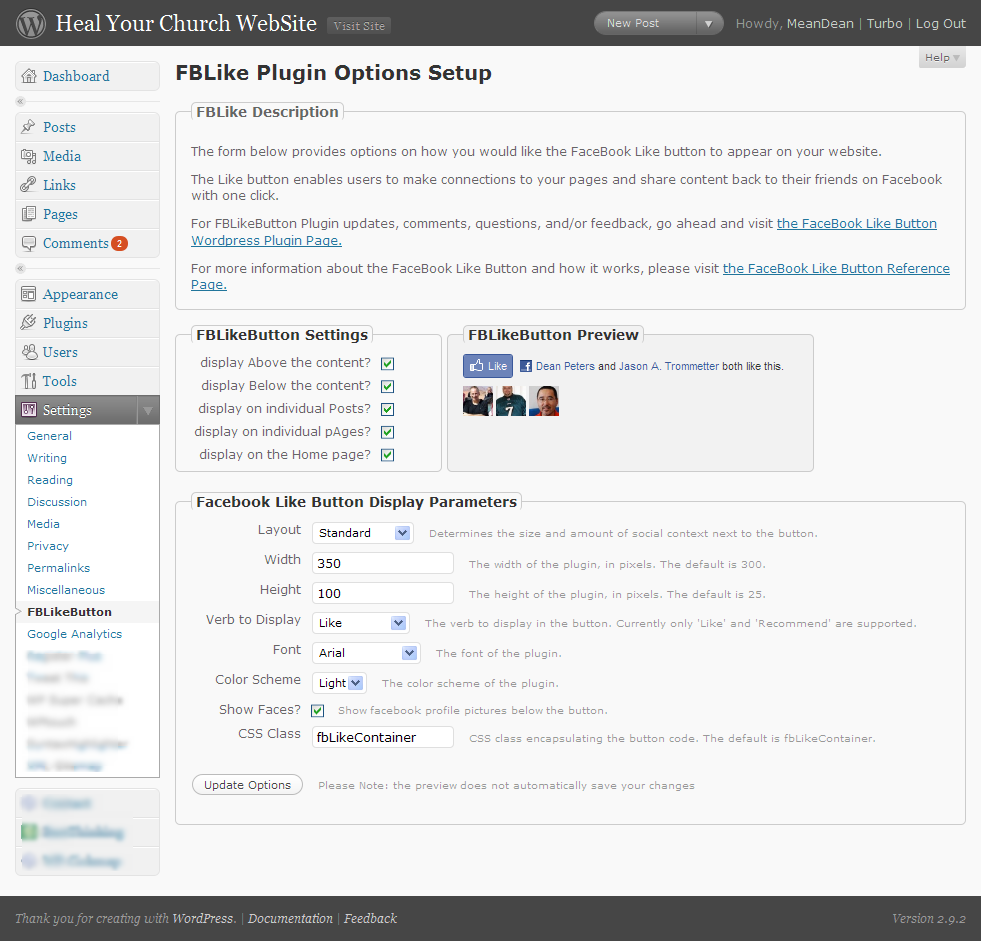
    4. Configure the plugin through ‘FBLikeButton’ submenu in the the ‘Settings’ section of the WordPress admin menu.
    5. Modify the fields to choice and save.

    Here’s a screen shot below of the administrator screen (you’ll want to click on it to see it full size):

    Screenshot of the FBLikeButton Admin Panel - now with preview

    Here’s how the FaceBook Like button appears on the bottom of this post:

    Screenshot of the FBLikeButton after fabulous formatting

    This being being version 0.1, you can bet your sweet bippee there’s more to come. Still, I wanted to get this out to the WordPress community as fast as possible.

    A bit more about the FaceBook Like Button

    What’s nice about the Facebook Like button is that no login to your site is required. Even if you’ve never visited HealYourChurchWebsite.com before, they can get social context starting with their very first visit.

    If you’re logged into FaceBook, then you can see which of your friends like a site — without the site knowing anything about you. Pretty neat, huh?

    Download It

    Also, I’m currently in the process of setting getting established with the WordPress SVN  and everything else that goes with publishing an official WordPress plugin.

    Until then, click here to download the latest fblikebutton, from the WordPress Plugin repository keeping in mind it is version 0.1 0.2 – so expect more to come!

    Download the FaceBook Like Button Plugin for WordPress

    Shout Outs and Thanks

    A shout–out of thanks for the immediate feedback goes out to Benjain, Julien, Tim, Jason, and Dave.

    Additional Reading

    FYI

    Oh, and hey, don’t forget to click the FaceBook Like Button for this post … I’d appreciate it.

  • 5 things more things about Christian spam email bombing runs

    Ever get that annoying email from a church, friend, and/or family member who ‘accidentally‘ sent a rant to everyone in their address book and/or a group-related email directory? With the recent election, my wife and I have been getting more than our fair share.

    And while I’ve written about how to address ‘Christian SPAM‘ in the recent past, I wanted to share with you my most recent response to what I sub-categorize as Christian SPAM email bombing runs (CSEBRs):

    – – – § – – –

    Hi {name withheld to protect the guilty};

    Next time we get together, make sure I spend about 5 minutes on my laptop showing you 5 cool — and free — things about the web that don’t rock like it’s 1995. For example:

    • Twitter – a “microblog” mechanism that lets you post 140 characters on any topic you want as often as you want. This is especially great as you’re standing around bored, upset, amused, and/or excited about things while equipped with nothing more than your cell phone. For an example, check mine out at http://twitter.com/deanpeters – no great shakes, but I’ve got enough subscribers whom seem interested.
    • Facebook – a social networking service where friends and families can subscribe where you can post thoughts like the ones below and then engage people in dialog and/or banter as they can post comments, etc .. It’s also a nice place to throw out some family pix. If you’d like, I can also show you how to “plug-in” a Facebook app that update to your “wall” every time you post on Twitter (synchronization is an amazing thing). Here’s a link to my profie http://is.gd/6MgW … note how I used the http://is.gd mechanism to shorten the URL.
    • Blogger.com – now I know Twitter and FaceBook have obviated bloggery to some degree, but I still love it as it allows me to venture deep into topics I enjoy such as healing church websites and the Hashemite Kingdom of Jordan. Moreover, less constraints on what I can post – and if you like, you can make some buck$ via instruments like Google’s adsense. Oh BTW, I’ve got my WordPress-driven blogs set up with the ‘twitter tools plugin‘ to update my Twitter and Facebook pages when I post. Best thing, again, people can subscribe to your blog’s RSS feed to keep up to date.
    • Google Reader – note I’ve mentioned subscribe 3 times now. All of the above allow individuals to subscribe either through the site’s syndication feed (RSS) and/or through email alerts with links to the juicy and compelling content. And not just from annoying friends like me, but any blog, news wire, newspaper, microblog and/or social network to which you’re inclined to observe.
    • BCC – finally … and I can’t stress this enough … if you must use email, that’s cool. But please, do me and others on your distribution one favor – use the BCC mechanism to distribute the email. Blind Carbon Copy is cool in that it’ll protect your friends, family and loved ones from nasty spammers and idiots like me from exposing their email addresses “into the wild.“Oh, and if you use a free email service like gMail, you can create categories for both incoming and outgoing email addresses – which is really handy when you quickly send out email broadcats to select groups of your address book (using BCC of course).

    Anyway, have a great Sunday – and give  {spouse name withheld to protect the innocent} a hug from us.

    Your (annoying) friend;

    Dean

    – – – § – – –

    Feel free to use any portion of this email to respond to Christian SPAM email bombing runs aimed in your direction. Or better yet, just send them a link here.

    I’ll be glad to respond to their rationalizations and excuses by explaining how the are endangering the tax exempt status of their church by dumping a political kvetch on the Sunday school rolls.