 I just overheard a useful conversation between two vending machine operators while loading up our office junk food dispenser with a bunch of products that didn’t sell last week. It is if nothing else, an object lesson in contrast to my oft quoted aphorism “solve their problems, don’t tell them yours.” Here are 5 things we can in turn do in contrast to improve the user experience on our church and/or charity websites …
… but first a bit of context.
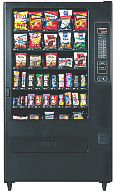
Last week I was working late, so I went to the vending machine to purchase some sugar-free Dentyne chewing gum. The machine was out – so were most the low-cal, low-carb consumables. The next day I noted the machine restocked, only the empty slots instead of offering snack solutions for my health conscious office mates, instead the replenished racks included:
- M&M’s – plain & peanut
- Spicy Sweet Chili flavored Doritos
- Mrs. Freshley ‘Original’ Jumbo Honey Buns
- Mr. Piggy Fried Pork Rinds (I’m not making this up)
Today, while capping off my coffee cup by the adjacent caffeine delivery device, I noted two gentlemen again restocking the junk food dispenser when one of the machine operators – possibly in training – asked the other “how do you decide what to refill it with?” the other immediately replying “... with whatever I have too much of, that’s how I decide.”
No, no, no, no, NO!
Now granted, both these individuals are likely a bit more than minimum wage employees to a large, regional vending concern, so I don’t expect them to understand what’s wrong with said answer. However, the proprietor for whom they work should – and should train and equip these hard workers with information to become smart workers – that is provide them with data sheets on what’s hot and what’s not for a given office vending machine.
Same rules apply for our church and charity websites. Here are 5 quick ones off the top of my head:
- Collect useful usage data – does your site have a mechanism for collecting useful usage data? Note, I said useful usage data. There are some counters and stats services that provide little more than a “hit count,” which in today’s age of search engines, aggregators, and spammers can give lead you down a path to decision perdition by including counts of visits by automated systems not interested in filling your pews.If you don’t know where to start, may I suggest incorporating Google’s Analytics on your website. Though not real-time, at the end of the day, it does provide you with a great idea on both what humans and bots are banging away at your site.
- Understand where the traffic is coming from – that is understand:
- What search engines are sending the most traffic?
- What keywords are being used with said search engines?
- What keywords are being used on your own website’s search tool?
- What other websites are sending you traffic?
- How much direct traffic is there?
- How much traffic is being driven from email applications?
- How much traffic is being driven from aggregators?
- Understand what pages are hot – and also understand why pages are not. This should be pretty straight forward, but along with asking which page gets the most visits, also ask:
- Entry pages – which page is the first e viewed by a visitor and/or which are the pages most attracting visitors?
- Exit pages – from which page do visitors leave the most
- Average visit duration – what is the total length of a user’s visit?
- Average page duration – how long are pages is viewed?
- Top path – what is the leading sequence of pages viewed by visitors from entry to exit?
- Bounce rate – are there pages which users leave without visiting any other pages before a specified session-timeout occurs?
- Error messages – where is the user experiencing some level of frustration due to errors? Information which could explain your high exit/bounce rates.
- Understand why pages are hot – In other words, regardless of which analytics tool you use, most can only point out WHAT pages are popular. That’s only half the picture. What you need to do is figure our WHY said pages are hot.Two examples: are two blogs I run, each of which have pages that appear to be popular due to their relevance to recent events:
- HealYourChurchWebite’s most popular article is “How I fixed my Windows XP Stop c000021a {Fatal System Error} with Knoppix Linux” with the largest amount of traffic being driven in from Google searches on the keyword/phrase “Stop c000021a” … probably in response to she several crashes caused by a recent Windows XP SP 3 release that some speculate is responsible for said error.
- BlogJordan.com ‘s most popular article is “The Petra Treasury Indiana Jones didn’t show you” – usually by means of Google and YouTube searches on the keyword/phrase “Petra Indiana Jones” and/or “Indiana Jones Petra” .. probably in response to recent showings of “Indiana Jones and the Last Crusade” on cable in response and anticipation for the release of “Indiana Jones and the Kingdom of the Crystal Skull.“
- Establish and track conversion goals – I’m not talking about instances of baptisms or individuals asking Christ into their lives – though that is the ultimate goal here – rather I’m talking in this case of establishing goals and objectives for the website such as getting visitors to:
- subscribe to the RSS feed for your sermon titles/series;
- import your events calendar into your;
- link your site on theirs;
- fill out a “send me more information” form;
- print your page that displays both directions and times of services; and/or
- visit again, and again … and again.
In other words, it doesn’t matter how cool, how Flashy, how seeker-centric, how Y-generation, how usable, nor how XHTML compliant your pages are … if you don’t collect useful metrics on your church and/or charity online presence you’re as good as flying blind …
… which is okay until you crash into the mountain side of “no website visitors because you’re wasting gifts and talents on the wrong things …” or perhaps none at all as described in Matthew 25:
“… he who had received the five talents came forward, bringing five talents more, saying, ‘Master, you delivered to me five talents; here I have made five talents more.’ His master said to him, ‘Well done, good and faithful servant. You have been faithful over a little; I will set you over much. Enter into the joy of your master.’ …
… ‘Master, I knew you to be a hard man, reaping where you did not sow, and gathering where you scattered no seed, so I was afraid, and I went and hid your talent in the ground. Here you have what is yours.’ But his master answered him, ‘You wicked and slothful servant!”
Don’t be like sloth-boy, add and analyze your web usage now – unless of course you want your web vending machine full of stuff nobody is buying.