Category: Luke 6:42

  • Blogging your studies and sermon using Google Docs

    This scenario sound familiar: your pastor nicely insists you publish his sermons online, but sends you his work in MS Word files that were converted via an old version of WordPerfect for Windows. Yeah, talk about cruft! Fortunately, I think Google may have an affordable and easy answer for all parties involved in this processing paradigm; it’s called Docs & Spreadsheets.

    Leveraging a webblog application or a blogging service as a low-cost, low-bandwidth content management system for a church web site is solid solution – provided you can get church staff and volunteers to submit content. Yeah, the devil is always in the details ain’t it?-)

    That’s the problem I ran into at my last church. The sermons were the killer content that not only reached site conversion goals of getting local individuals into the pews – but also had a global appeal to pastors and seekers world wide. Problem was, the pastor was stuck in one of the early offerings of WordPress for Windows which made categorizing and posting said content a bit of an uphill climb in terms of online content management that included the following steps:

    1. pastor writes sermon in WordPerfect using a home spun outline format (markup) provided by the web servant
    2. pastor saves sermon as MS Word and emails it to the web servant
    3. web servant spends 30 minutes to 2 hours cleaning up breakages to the home spun outline format
    4. web servant submits RTF file to a Perl program specifically designed to slice, dice and post and catalog the sermon in a standardized format that is both print and search-engine friendly
    5. web servant pleads with pastor to change word processors and/or learn how to blog
    6. cycle repeats itself every week

    Had I been able to offer a no-to-low cost online document collaboration system, which is what one gets with Google Docs & Spreadsheets – then I think I could have gotten said pastor over the pain factor involved with changing one’s writing tools. All he would need to do is learn how to use the online editor and either hit the share or the publish button.

    Personally, I would have preferred the share button so I could go in and double check things – perhaps remove some personal references to members of the congregation, perhaps run the spell check and/or make other minor tweaks that make the sermon more search engine centric.

    This way I only have to set-up the Google Doc’s Publish to Blog XML-RPC settings in one place and as depicted in the screenshot below:

    Note how I opted for the MetaWeblog API as opposed to the MoveableType API as instructed by Google’s “Click Here for Yours” instructions – this is because I like to have the title of the Google document appear on the blog as well.

    Then I hit the publish button, perhaps login to the blog to make any other adjustments, or perhaps just spend the rest of my lunch hour eating lunch!-)

    Your mileage may vary … though I’d be interested if you also have a similar success story/solution.

    And yes, this post was created and published using Google Docs (& Spreadsheets).

  • Why your cool church web site needs (the new) Google Analytics

    Back in November of 2005, Google release Analytics, a high popular and free service to help you measure the effectiveness of your church web site. Yesterday, at the Emetrics Summit in San Francisco, Brett Crosby and Jeff Veen announced a re-factored version of Google Analytics that is more accessible and easier to use; begging the question – why haven’t you plugged this service into your church or charity’s web presence?

    So what’s different?

    • Email and export reports: Schedule or send ad-hoc personalized report emails and export reports in PDF format.
    • Custom Dashboard: No more digging through reports. Put all the information you need on a custom dashboard that you can email to others.
    • Trend and Over-time Graph: Compare time periods and select date ranges without losing sight of long term trends.
    • Contextual help tips: Context sensitive Help and Conversion University tips are available from every report.
    • Report Finder Tool: will help you see where data from the previous interface is located within the new version

    So what does it look like?

    Here’s a thumbnail of a screenshot of the dashboard:

    Screenshot of the Google Analytics Dashboard

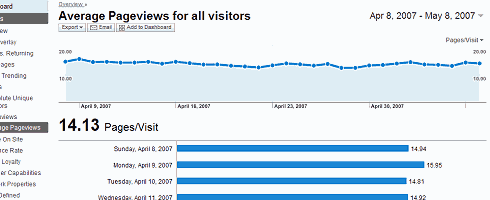
    I’ve also got partial screenshots of the Average Pageviews and Traffic Sources Overview pages for your viewing pleasure.

    So what’s in it for me?

    How about a nice, clean customizable and centralized heads-up display that presents the data that is important to you in a way you can understand it, share it, and customize it so you can make informed decisions about what works on your church website and what doesn’t.

    In other words, find out why your church website succeeds or fails in its goals to:

    • communicate your organizations’s personality and purpose
    • field better search engine optimization of your pastor’s sermons/studies
    • to get seekers and/or new neighbors in the door through compelling content
    • to get your lay ministries participating online by finding out what works and what doesn’t

    So what do I do next?

    If you’re not familiar with Google Analytics, I’d suggest starting with their demo page, and then work your way over the Analytics product page.

    For those of you who’ve been either using or aware of this service, I’d suggest perhaps adding the Google Analytics Blog to your aggregator.

    Old salt or newbie, keep in mind a few these factors as you visit the new version (demo):

    • The new version works best with Flash 7 or higher – if you don’t have it, you can get it at Adobe.com.
    • Google Analytics now uses the same geo-data source as AdWords, therefore, map and geo-location report results may vary slightly between the previous interface and the new interface (For those of you with filters designed for geo-data, you may want to verify the results and edit if necessary).
    • Limiting the Available Reports for a profile by specifying which Report Dashboards and Report Categories are available has been removed from the product in favor of the new customizable Google Analytics dashboard.
    • The ability to limit the availability of data within a certain profile for certain users (through removing those users from the profile instead of via email scheduling).

    So what!? Big deal?! Why Bother?!

    I know you’re busy, but if the above information isn’t enough to light a fire under you to figure out how to plug in this service to let your church, charity and/or community’s web light shine, then perhaps this paraphrase based upon Matthew 5:14-16 will help put it in a context that is meaningful to you:

    14 “You are the light of the world. A city set on a hill cannot be hidden. 15 Nor do people light a lamp and put it under a basket, but on a stand, and it gives light to all in the house. 16 In the same way, let your light shine before others, so that they may see your good works and give glory to your Father who is in heaven.

    Put another way, no matter how ‘cool’ your church web site may be, if you don’t know what a bounce rate is – let alone your church web site’s bounce rate – then you need to get busy with adding Google Analytics to measure the effectiveness of your organization’s web presence.

  • Good Technical Reason

    It’s been a while since we had a “yank-the-plank outtta Dean’s eye post.” Well fear not, as our buddy Mike Boyink correctly points out that while I may have the correct solution for a Church running on an Apache/Linux server, it is NOT the right solution for The Forbidden Church :

    Uhh…guys I think this is one of those times when getting the whole story about why the site is down might be appropriate. There might actually be a good technical reason for the site not being available (what would happen if the database for your database-driven site went corrupt?).

    And Mike’s right! Using the Sam Spade safe browser, we see two things.

    1. this site is running Website version 2.3 – a PC based web server (now known as VisNetic WebSite)
    2. We see a comment we couldn’t see via our own browser that reads “http://www.CoolFusion.com – inFusion Error Processor”>

    Meaning, this as Mike says, most like a database error, a ColdFusion database error if I were to guess (help me out here Mike).

    Mike also makes one other valid point in an email exchange regarding this issue:

    Not every church has the skilled technical types who tend to post here…maybe we should be offering our services to help get them back up instead?

    Okay Mike, that’s twice you’re correct in one day. That’s all your allowed for the rest of the week. Meanwhile, I’ve emailed the good folks at Our Lady of Lourdes informing them that their system is down. Now word back yet.

  • Some time too much a good thing …

    For the next 12 hours, I’m leaving this mistake up on the Events and Opportunities at Redland Baptist Church, Rockville Maryland page.

    Can you guess what went wrong? Here’s a hint.

    Yes, that’s me laughing at myself in the background.

    * UPDATE * – okay, most of you caught the time stamp … one especially funny comment about not being able to ‘stomach our fellowship meal times’ [LOL]

    Okay , now there’s one more error … or should I say ‘deficiency of excess‘ I need to address. Any takers? Solutions in SQL are acceptable.

    * UPDATE *
    Yup – a maximum date range might be nice. Not that we don’t want to tell people what we’re doing, but there is a concept at churches known as “too much information” … anyone who’s worked with you ministry will get it !-)

  • Global replace using find & xarg

    I’m part of an lively Yahoo group run by Tony Whittaker called ChurchSite-Chat.
    There, I learned about Rachel Cunliffe who runs a very cool bbs that offers Church Website Critiques. And from both sites, I’ve learned just how big of a plank I have to yank out of my own eye before I can go about piling heavy burdens burdens upon the shoulders of other church web servants.

    One of the problems pointed out to me were some broken links on my own church’s page, RedlandBaptist.org. I originally built this site using DreamWeaver 3, and being the code-monkey type of guy I am, relied heavily on server-side includes (SSI) to reduce my work. As I’ve stated in an earlier article, SSI’s can save you beaucoup time because you can write a file once, and include it often. Similarly, using DreamWeaver, you can create stock templates so all your pages look and feel the same.

    There’s only one big fat caveat with this approach …
    (more…)