Category: Disruptive Innovation

  • The Facebook Like Button Plugin for WordPress

    Facebook rocked the internet yesterday with 5 new plugins, one of which is an API for the Facebook Like Button. After reading about it and playing a bit with the Facebook’s Like Button generator, I decided what’s needed is a WordPress plugin that allows folks to easily configure the look-and-feel of the Facebook Like Button, and then automatically add it the beginning and/or the end of their posts.

    Update 26-Apr-10

    FYI, I just released version  0.1 of the The Facebook Activity Widget Plugin for WordPress – yet another useful (and different) WordPress plugin for displaying Facebook Social plugins on your website.

    Update 25-Apr-10

    Version 0.4 just got released – it now has a preview feature built into the administrator panel … and I’m starting to get translation .po & .mo files from abroad (thanks!-). It’s also now being distributed via the WordPress Plugin Repository.

    Update 24-Apr-10

    Version 0.2 is released as of Saturday, April 24, 2010 7:14 Eastern Standard Time.

    Also after some excellent email and FB message feedback from some early adopters, you can now also decide whether or not you want the FaceBook Like Button to appear on the top and/or bottom of individual pages, individual posts and/or your front page.

    Installation & Use

    I also wanted to keep it simple, so here’s how it works — using the standard WordPress plugin installation process:

    1. Upload the ‘fblikebutton.zip’ file to the `/wp-content/plugins/` directory using wget, curl of ftp.
    2. ‘unzip’ the ‘fblikebutton.zip’ which will create the folder to the directory `/wp-content/plugins/fblikebutton`
    3. Activate the plugin through the ‘Plugins’ menu in WordPress
    4. Configure the plugin through ‘FBLikeButton’ submenu in the the ‘Settings’ section of the WordPress admin menu.
    5. Modify the fields to choice and save.

    Here’s a screen shot below of the administrator screen (you’ll want to click on it to see it full size):
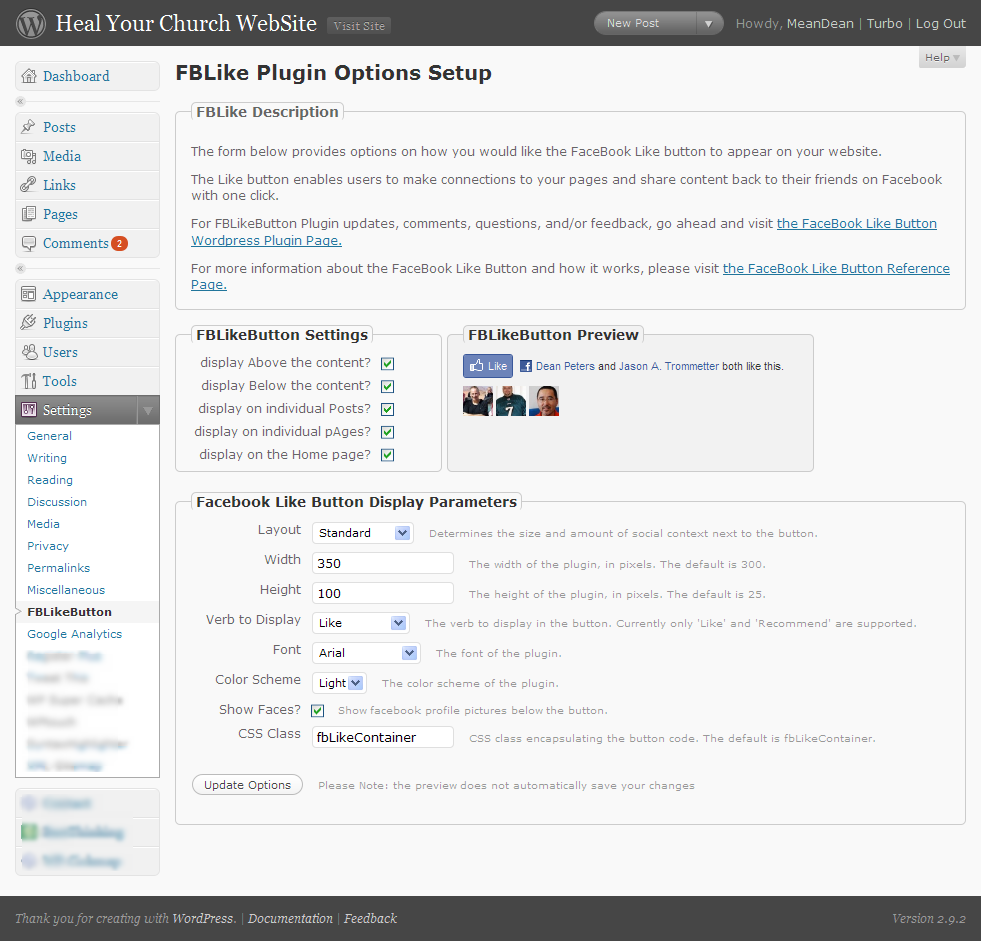
    Screenshot of the FBLikeButton Admin Panel - now with preview

    Here’s how the FaceBook Like button appears on the bottom of this post:

    Screenshot of the FBLikeButton after fabulous formatting

    This being being version 0.1, you can bet your sweet bippee there’s more to come. Still, I wanted to get this out to the WordPress community as fast as possible.

    A bit more about the FaceBook Like Button

    What’s nice about the Facebook Like button is that no login to your site is required. Even if you’ve never visited HealYourChurchWebsite.com before, they can get social context starting with their very first visit.

    If you’re logged into FaceBook, then you can see which of your friends like a site — without the site knowing anything about you. Pretty neat, huh?

    Download It

    Also, I’m currently in the process of setting getting established with the WordPress SVN  and everything else that goes with publishing an official WordPress plugin.

    Until then, click here to download the latest fblikebutton, from the WordPress Plugin repository keeping in mind it is version 0.1 0.2 – so expect more to come!

    Download the FaceBook Like Button Plugin for WordPress

    Shout Outs and Thanks

    A shout–out of thanks for the immediate feedback goes out to Benjain, Julien, Tim, Jason, and Dave.

    Additional Reading

    FYI

    Oh, and hey, don’t forget to click the FaceBook Like Button for this post … I’d appreciate it.
  • What Record Sales of the Amazon Kindle Means to Your Church Website

    Yesterday , I was attracted by the Wired Magazine Gadget Labs  headline “Amazon: Kindle Books Outsold Real Books This Christmas.” According to a release cited in the article:

    “[the] Kindle has become the most gifted item in Amazon’s history …

    … On Christmas Day customers purchased more Kindle books than physical books.”

    Now unlike my good friend Vincent Flanders, I’m not ready to tweet:

    “RT @VincentFlandersThe bookstore is dead says Seth Godin http://bit.ly/8StlpZ

    Kindle 2That said, when I look at all the paper my own church consumes on a weekly basis, I have to wonder if we don’t have as a mission initiative keeping the fine folks at Dunder Mifflin employed (let the reader understand).

    This all got me to thinking, even though I’m not the type of guy who is going to chain himself to a tree – I do think judicious of resources falls under good stewardship – and that includes both natural resources as well as financial.

    Meaning, as we continue to see the emergence of digital media devices, such as the Kindle and/or smart phones, why not consider providing and/or publishing more and more of your organizations information in supported by such devices?

    Providing: let’s say you want to study Os Guinness’ “Dining with the Devil: The Megachurch Movement Flirts with Modernity”. The Paperback version is $12.82 not including the cost of shipping. The Kindle price for the same is $9.99. That’s about a 33% difference, again not including the cost of shipping.

    Publishing: each Christmas and Easter, I see many churches publish multi-page pamphlets that contain all the bulletins for all the services. These are nice as they provide continuity, but I can also see where they’re going to run the church and/or charity a few bucks – especially as people forget to bring with them their nicely stapled paper pile from the previous week.

    Yes, Amazon does get to keep about $0.65 of every dollar, but I do think there is a cost savings and possibly cost recovery even if your organization only charges the minimum $0.99 cents to sell your Advent Season bulletin on the Kindle.

    Similarly, what would be the cost of simply pushing out to your organization’s website the average, weekly bulletin out to PDF or HTML for consumption by those in your congregation armed with BlackBerry’s and/or iPhones? Other than setting up the router? Especially since they can then also use the same network to follow-along Scripture readings with the mobile version of the ESV Bible?

    Point is, I think it’s time to look around your church and/or charity’s offices and meeting rooms and see just how much paper could be saved by simply publishing the temporal stuff online.

    What are your thoughts?

  • The real reason Twitter beat the snot out of Pownce

    Twitter gives our mundane lives meaning, that’s why it beat the snot out of a more ‘feature-rich’ Pownce.

    To prove my point, let’s rewind about a year and a half ago to Tamar Weinberg’s comparison entitled ‘Twitter vs. Pownce: Who Pwns?‘ Dutifully she does what many of us do while shopping for software, cars, and food processors – she compares and scores the features of one product against another to a conclusion that reads:
    Pownce 5, Twitter 3. Pownce wins!

    There’s only one problem with that approach, while features may sell a product, it is ultimately functionality that sustains a product; software or otherwise.

    Which is why I think Scoble succinctly hits the nail on the head while unwittingly predicting Pownce’s demise in his Twitter vs. Pownce post also from early July 2007:

    “But, anyway, I still like Twitter the best. Why? No complications. It does only one thing. I find that on my cell phone I go back to Twitter before I go back to any of the others. It’s lightweight.”

    Put another way, when it comes to microblogging, Twitter has it all over Pownce because it makes it easy to do the one thing we all want from microblogging – making the mundane instances of our lives meaningful, while learning new things about our friends without coming off like a stalker.

    Disagree as some “new media marketeers” might, the reason we like Twitter is the same reason we fell in love with Blogger, it got out of the way and let us opine reflectively about how our cats would join us in contemplating the lint in our navels.

    For example, why anyone would follow my own Twitter page is beyond me, yet some find the fact that I fertilize my lawn in December and enjoy smash-mouth football entertaining and interesting.

    And like blogging, Twitter easily allows our friends and relatives to quickly comment at their convenience – only with the excellent 140 character excuse for not engaging in exposition and detailed explanations.

    All this while providing others context about ourselves that may not come out in our blogs, lectures, books and top-rated podcasts. This latter point is nicely explained in this 2:25 YouTube video from the good folks at the CommonCraft Show aptly entitled ‘Twitter in Plain English.’

    Pownce unfortunately lost sight of these primal purposes for microblogging, and in the process ‘featured-creeped‘ their product to death. Not an uncommon instance for software in any era. Especially when said offering described its services with a church-speak-like mission statements:

    “… Pownce is a lightweight productivity app, built on top of the stream, and it has all the pluses and minuses of a productivity app (including that you can use it to share music with friends!)”  – Pownce is competing with 37Signals, not Twitter!

    Any wonder we all stopped using Pownce around 160 days ago?

    So what has this got to do with your church and/or charity website? Glad you asked.

    Remember, software features are only relevant to the primary activities you’re trying to accomplish with the assistance of automation.

    Put another way, when you’re picking or designing a program to get something done – ignore all the fluff-n-stuff that has little or no bearing on what you want to get done.

    For example, if all you want to do is post 1-up snips of your daily life, then Twitter is just enough software to get it done. No need to worry about file storage, groups, rooms, etc …

    … which is also why I’m thinking Twitter is also likely to eventually beat the snot out of FriendFeed; but I digress … so more on that topic latter.

    For now, here are some related links on this topic:

    Your mileage may vary on this one, but deep in your heart, you know I’m right about making the mundane meaningful vs. marketing appeal of Twitter.

    Now please, if you don’t mind, link this post in your next tweet, add it to all your social network links so I can be proven wrong about the marketing thingie. A simple @deanpeters reply is all it takes!-)

    Do you not know that in a race all the runners run, but only one receives the prize? So run that you may obtain it. Every athlete exercises self-control in all things. They do it to receive a perishable wreath, but we an imperishable. So I do not run aimlessly; I do not box as one beating the air. – 1 Corinthians 9:24-26

  • 5 things more things about Christian spam email bombing runs

    Ever get that annoying email from a church, friend, and/or family member who ‘accidentally‘ sent a rant to everyone in their address book and/or a group-related email directory? With the recent election, my wife and I have been getting more than our fair share.

    And while I’ve written about how to address ‘Christian SPAM‘ in the recent past, I wanted to share with you my most recent response to what I sub-categorize as Christian SPAM email bombing runs (CSEBRs):

    – – – § – – –

    Hi {name withheld to protect the guilty};

    Next time we get together, make sure I spend about 5 minutes on my laptop showing you 5 cool — and free — things about the web that don’t rock like it’s 1995. For example:

    • Twitter – a “microblog” mechanism that lets you post 140 characters on any topic you want as often as you want. This is especially great as you’re standing around bored, upset, amused, and/or excited about things while equipped with nothing more than your cell phone. For an example, check mine out at http://twitter.com/deanpeters – no great shakes, but I’ve got enough subscribers whom seem interested.
    • Facebook – a social networking service where friends and families can subscribe where you can post thoughts like the ones below and then engage people in dialog and/or banter as they can post comments, etc .. It’s also a nice place to throw out some family pix. If you’d like, I can also show you how to “plug-in” a Facebook app that update to your “wall” every time you post on Twitter (synchronization is an amazing thing). Here’s a link to my profie http://is.gd/6MgW … note how I used the http://is.gd mechanism to shorten the URL.
    • Blogger.com – now I know Twitter and FaceBook have obviated bloggery to some degree, but I still love it as it allows me to venture deep into topics I enjoy such as healing church websites and the Hashemite Kingdom of Jordan. Moreover, less constraints on what I can post – and if you like, you can make some buck$ via instruments like Google’s adsense. Oh BTW, I’ve got my WordPress-driven blogs set up with the ‘twitter tools plugin‘ to update my Twitter and Facebook pages when I post. Best thing, again, people can subscribe to your blog’s RSS feed to keep up to date.
    • Google Reader – note I’ve mentioned subscribe 3 times now. All of the above allow individuals to subscribe either through the site’s syndication feed (RSS) and/or through email alerts with links to the juicy and compelling content. And not just from annoying friends like me, but any blog, news wire, newspaper, microblog and/or social network to which you’re inclined to observe.
    • BCC – finally … and I can’t stress this enough … if you must use email, that’s cool. But please, do me and others on your distribution one favor – use the BCC mechanism to distribute the email. Blind Carbon Copy is cool in that it’ll protect your friends, family and loved ones from nasty spammers and idiots like me from exposing their email addresses “into the wild.“Oh, and if you use a free email service like gMail, you can create categories for both incoming and outgoing email addresses – which is really handy when you quickly send out email broadcats to select groups of your address book (using BCC of course).

    Anyway, have a great Sunday – and give  {spouse name withheld to protect the innocent} a hug from us.

    Your (annoying) friend;

    Dean

    – – – § – – –

    Feel free to use any portion of this email to respond to Christian SPAM email bombing runs aimed in your direction. Or better yet, just send them a link here.

    I’ll be glad to respond to their rationalizations and excuses by explaining how the are endangering the tax exempt status of their church by dumping a political kvetch on the Sunday school rolls.

  • Pastors and Lay Persons and BlackBerrys, Oh My!

    With the debut of the now consolidated Google Mobile Apps for BlackBerry also arrives yet another reason why your church and/or charity should consider moving off the desktop and onto the web space.

    This is because yesterday Google has officially launched its Google Mobile Apps for BlackBerry, which integrates all those separate applications on your handy handset into a single interface that provides single-sign, single-click access to:

    • Google Mail,
    • Google Maps,
    • Google Sync,
    • Google News,
    • Google Reader,
    • Google Calendar,
    • Google Docs,
    • Picasa Web albums, and
    • Google notebook.

    So what has this got to do with running your church and/or charity website? Glad you asked

    Think of it in these terms: you get an idea for a sermon, study, budget, and/or praise song while standing in the line at the grocery store. You start your outline document on your trusty BlackBerry – then email your wife, your co-teacher, your committee chair that you’re now sharing this new document with them and that you’ll be able to work on it in about an hour.

    You get home, fire up your browser, and now your great outline is on its way to becoming a great presentation that you’ll also post on your blog-driven church website, without you having to worry about floppy disks, USB keys, FTP depots and other vestiges of the ‘sneakernet‘ technology that desktop applications have used to chain us to our desks.

    And for those of you asking, but I’ve already got the individuals apps on my BlackBerry, why upgrade? Glad you asked, here’s why …

    • Fast Google search – enter queries without waiting for a browser to load
    • Search history – easily access and amend your previous queries
    • Google Suggest – complete queries with less typing
    • Easy access to Google products for your phone – click once to download and install our applications for BlackBerry, and get immediate access to our web-based services
    • Google Apps support – get direct links to your Google Apps Calendar and Documents/Spreadsheets (select Menu, Options, Use Google Apps Domain: yes, and then enter your domain name)
    • Update alerts – learn about new versions of downloadable Google mobile applications and upgrade with just one click (Google Mobile App replaces Google Updater for BlackBerry)

    If you’re a BlackBerry owner, go to m.google.com to download the conoslidated office ‘sweet’ …

    … as I will this weekend, hopefully reporting nothing but good news later next week.

  • Pastors – wouldja please stop using WordPerfect 5.1?

    Too many pastors are still tethered to their office via their desktop word processor – at least if we can assume the numbers from a recent ReadWriteWeb are any reflection of how too few are taking advantage of online options such as Zoho Writer, ThinkFree Write, or Google Docs.

    In fact, according to the recent RWW poll & analysis entitled ‘Word Processing: Most of You Still Use Desktop Software,’ less than 25% of their tech-savvy readers use an online word processor as their main documentation tool.

    Here are the results from RWW‘s 2008 poll:

    • OpenOffice 16% (374 votes)
    • Microsoft Word 50% (1162 votes)
    • StarOffice (Sun) <1% (11 votes)
    • Another desktop word processor (please comment) 5% (109 votes)
    • A Text Editor (e.g. Notepad, Emacs) 7% (166 votes)
    • Buzzword (Adobe online wp) 1% (28 votes)
    • Google Docs 16% (374 votes)
    • ThinkFree 2% (42 votes)
    • Zimbra <1% (5 votes)
    • Zoho 1% (26 votes)
    • Another browser-based word processor (please comment) <1% (11 votes)
    • Other tool (please comment) 2% (36 votes)

    Results made all the more interesting when compared to a similar 2007 poll taken this time last year, which indicates use of MS Word is up 2%, while Open Office is down 2% … that said, Google Docs enjoyed a bump up from 11% last year to 16% this year.

    What has this got to do with my church and/or charity website? Glad you asked …

    One of the questions I would have like to have seen answered was “what version of Word are you using?” I ask this because the poll reminds me of the frustration I had at one church where I’d get weekly sermons to post online … sent to me by a pastor stuck on WordPerfect 5.1 … until later he got stuck on another loser in the desktop arena, WordPerfect for Windows.

    I’d spend an hour or two per sermon banging it into something resembling HTML , unable to convince the this excellent student of Scripture that the world was chaning, his word processor along with it.

    All of which makes me wonder here and now, I wonder how many of you out there are dealing with old operating systems running old versions of old word processors? Then I wonder, how much time is lost in getting the important and compelling content in sermons that could draw in literally draw in thousands of visitors and dozens of new members … if only it weren’t so doggone hard to get them from the old desktop application to the webspace.

    If you’re feeling the same pain or wondering the same thing, here are 5 quick points to consider:

    1. online word processing systems such as Google Docs have a publish feature, that can send a document straight to a sermons blog using any publishing software that supports XML-RPC;
    2. several online word processing systems have a shared/collaboration feature – meaning a pastor with a Windows 2000 based PC can work on the same document as his editor layperson equipped with a Mac at their office;
    3. moving from the desktop to the webspace means avoiding the confiscatory licensing and upgrade costs associated with desktop applications;
    4. a number of online word processing have import and export capabilities, allowing a pastor to revise an old sermon written in Word back in 2002, saving the new version back to their hard drive in Word, HTML, PDF or Word;
    5. you can go home for dinner … meaning staff need not stay at the office all night to work on a church budget, but instead can save the unfinished document just before leaving the office … then pick up right were they left off from the comfort of their home computer and browser.

    Yes, there are some concerns about privacy, ownership, and backups – but there are similar problems that exist with desktop applications as well – meaning there’s no SaaS substitute for good contingency planning.

    Oh and one other argument I might pose a pastor permanently stuck on dead desktop apps … “what % of the features on Word do you actually use?

  • 5 ways to save fuel and staff costs by screencasting webinars

    One of the more painful big money issues facing churches and charities are upcoming energy costs that will consume more funds once allocated to other endeavors; while forcing some locations to have black-out dates to reduce the high cost of heating a facility during off-hours. Not to mention the rising costs to staff and laypersons to drive to said locations during the week.

    With such exorbitant expenses in mind, there are many online technologies now available to an ever growing bandwidth-enabled congregations that will allow them to save money by moving mid-week meetings and classes out of bricks-n-mortar places and into the web space.

    Screencasting

    Save fuel & frustration by Screencasting webinarsA good example of this is Screencasting, which the WikiPedia defines as:

    “… a digital recording of computer screen output, also known as a video screen capture, often containing audio narration … recent products support more compact file formats such as Adobe Flash and have more sophisticated editing features allowing changes in sequence, mouse movement, and audio.

    Just as a screenshot is a picture of a user’s screen, a screencast is essentially a movie of what a user sees on their monitor.”

    However, it is an ‘how-to-screencast’ article I found over at Smashing Magazine that finally got me inspired to post on the topic of remote learning – especially when the author of the article asserts:

    “Some companies have made a living creating a sort of “virtual classroom,” allowing members to learn at their own pace when they have the time using video tutorials. The advantages of the classroom setting stem from a one on one experience and the ability of the instructor to show the ideas and theories rather than simply explain them.”

    More on how you would apply this in a moment, but first, let’s talk about what we’re screencasting …

    Webinars

    Also known as web-conferences, webinars allow groups to conduct live meetings or presentations over the Internet. In a webinar, each participant sits at his or her own computer and is connected to other participants via the internet. This can be either a downloaded application on each of the attendees computers or a web-based application where the attendees will simply enter a URL (website address) to enter the conference.

    In some cases, the audio is conveyed over a dial-in phone conference channel, though I’ve heard of cases where small conferences reduce costs by employing Skype for the audio portion – be warned though that such alternatives fall into the perilous category of “you get what you pay for.

    Some companies that offer some moderately priced webcast solutions are (in no particular order):

    Recite live once, record and re-use often
    Some of the above systems also provide easy methods for “hitting the record button” to create screencasts of your webinar … allowing you to present once, but view often anywhere, at any time. That said, make sure you can move such videos off their storage (for which they charge) and onto a plaftform like YouTube.

    That said, you may want to employ the tools cited in the Smashing Magazine Article including Snapz Pro X, iShowU, and Screenflow for the Mac or Camtasia Studio 5, CamStudio, Adobe Captivate, and Wink for Windows, or Screencast.com that works on both.

    There are also some other high-end webinar solutions that certainly “have it all” but are as a result are more expensive to use are: WebEx, LiveMeeting, Adobe Connect Pro, and Elluminate.

    Putting it altogether

    Now start thinking along these lines:

    1. Screencasting the slides and audio from last Sunday’s sermon and/or Sunday school class for those who may be physically impaired or otherwise unable to attend in person;
    2. Providing a study series of Bible studies and/or how-to-lessons that you present once online live, then offer for view over and over and over again to anyone at any place on the planet at any time of day or night;
    3. Record an online tour of what a visitor can expect when they arrive, where to register, where to take the kids, and where to find the free donuts and coffee (.… mmmmm …. donutsssss);
    4. Leverage the relatively inexpensive international conference calling capabilities of some of these services to hold in-the-field meetings with missionaries and/or on-the-road lay-staff (like I should have done via ReadyTalk last year while in Jordan or Malaysia); and/or
    5. Hold committee and staff meetings – even if you don’t record them – allow staff and laypersons to simply conference in from the comfort of their den, library, kitchen table, man-cave, etc …

    It’s not as expensive as one might think, and compared to the cost of heating an entire building wing to hold a single, 30-minute committee meeting in a single room, it might be a real steal.

    (Oh who am I kidding? Who ever heard of a 30-minute church committee meeting? Gad, I crack myself up sometimes!)

    There’s also the saving in gas and time realized by not having everyone – especially staff members – come (back) to the church during the evening for such weekday meetings.

    With all these cost vs. savings issues cited, I strongly recommend you at least read the advice offered in the Smashing Magazine article entitled ‘Screencasting: How To Start, Tools and Guidelines‘ as a matter of of stewardship.

  • A Conference Apart – where Dean gets to meet Zeldman, Meyer & Fried!

    A ticket Apart, sign up now for your own!You bet I’m stoked! This coming October 13–14, 2008, I’ll get to rub usability elbows with Eric Meyer, Jason Fried, Jeffrey Zeldman, along with several other web standards rock stars at the An Event Apart 2008 conference held at the at the Sheraton Chicago.

    Along with annoying you with bloggery over meeting my UI idols, there I’ll gain a deeper understanding of web standards and emerging best practices. Be inspired by fresh ideas and new directions. Join the greatest minds and hottest talents in web design today.

    You can too!

    Sign up by September 15, and not only do you get an early-bird discount, but you can either apply a discount for a stay at the Sheraton. Or do what I did, sign-up now to insure a room at the nearby Hampton Inn at a AAA rate that’s $25 cheaper, offers free breakfast, and most importantly – FREE WIFI (whoohoo!)!!!!!

    Moreover, your conference pass includes admission to all sessions at the two-day Chicago conference, snacks and lunch on both days, access to all social events, and a bag of schwag … and most importantly … a chance to meet your cult leader, DEAN PETERS!

    Now if I can just convince Vincent Flanders to go so that there is an earthquake of usability genius in a solitary Chicago-based epicenter this coming October!

    Meanwhile, here’s a link to some JZ’s posts from last year’s Chicago Event Apart.