Month: July 2007

  • How church website design documentation (doesn’t) get done

    At some point, some savvy steward in a church raises the question “What happens if our all-knowing, über church web design geek leaves? We should have them teach us how it works.” At which point even more hilarity ensues as the following process begins innocently enough in the form of an ‘educational’ ad-hoc Internet committee meeting:

    1. Committee chair: brings the ‘how the church website design works meeting’ to order
    2. Pastor/staff member: sheepishly asks the webmaster how the blessed thing works
    3. Church webmaster: disdainfully glares at the council members … wondering why no one else has read the WordPress Codex
    4. Committee meeting: sound of crickets chirping can heard in background
    5. Adjacent hallway: little kids gather hoping to snarf down a left-over donut when the meeting adjourns
    1. Committee chair: passes a note to pastor to ask a specific question on a specific aspect of the website
    2. Pastor/staff member: sheepishly asks the webmaster how a specific element of the website design works
    3. Church webmaster: disdainfully glares at the council members … visibly upset how badly everyone missed the point of everything
    4. Committee members: the webmaster berates them, in between insults throwing off valuable nuggets of technical information
    5. Adjacent hallway: little kids waiting outside the door for left-over donuts begin to cry
    1. Committee chair: collect the valuable nuggets, knowing they are the only reliable technical information they’ll ever receive
    2. Pastor/staff member: sheepishly ducks out into the hallway claiming to want to calm down the crying kids
    3. Church webmaster: disdainfully glares at the council members … moodily awaiting next question …
    4. Committee members: try like dickens to weave together the informational nuggets dispensed in between insults into something enlightening and technically accurate
    5. Adjacent hallway: enraged parents of crying children begin to gather with torches and pitchforks
    1. Goto step 6 until church webmaster is summarily ex-communicated

    Here’s my point:

    To my beloved church website design gurus out there, please spare yourself the shame of said scenario and either install a and/or sign-up with wiki service. Then when you have a spare moment, document some of the things you do.

    The wording may not be perfect but it’s enough of a start that would allow others less … how shall we say … technically adept but more gifted in word-smithing to collaborate said documents into perfection.

    As I’ve noted before, WikiSpaces is free (and easy), so you have no excuse – other than wanting to spread His love and your knowledge through the ministry of disdainful glares.

    Credits:

    Today’s silly scenario was inspired by the following post on Jeff Atwood Coding Horror blog entitled
    How to Write Technical Documentation.’

  • Craigslist Down proves the need to plan for failure

    What does the PG&E induced craigslist outage have to do with your church or charity website? How about a reminder of the tired but true adage that reads ‘Those who fail to plan, plan to fail.’ Specifically using mysqldump, crontab and perhaps ftp or rsync to insure you’re data isn’t dead in the water when your host goes down.

    • One of the big advantages of running a web services company out of the San Francisco area is that you’re located where the majority of action is – at least in the U.S.
    • One of the big disadvantages of running a web services company out of the San Francisco area is that when the Bay area takes a power hit – you’re down with the best of them.

    This power-packed paragraph from the Boston Herald exemplifies the scope of the situation:

    Cool black light, or dim bulb? You decide with your plan of attackAT&T Park, home of the Giants, was also affected hours before a scheduled night game. Six Apart Inc., a blog-hosting service, said its sites began failing shortly before 2 p.m., and the company sent an e-mail to customers blaming the city’s “power issues.” Several other Internet sites with San Francisco offices had problems, including Craigslist, Technorati, Yelp, Red Envelope and CNet. It was unclear whether the problems were related to the outage.

    Now while I suspect the ‘big guys’ have contingency plans to quickly relocate had this been a long-term failure, I also speculate that your church and/or charity’s emergency plans may not be so robust as to handle something such as a hosting provider that goes belly-up due to either natural and/or financial disasters.

    That said, there are some no-cost, low-bandwidth solutions are already available to those of you opting to manage your site’s content on a LAMP platform using an application such as WordPress or Drupal.

    Here’s all you need to cook-up your own recipe for success:

    • putty for shell access to your website/host
    • access to the mysqldump command
    • optional access to the gzip command
    • your database username
    • your database password
    • your database server name
    • optional access to the crontab utility

    So if nothing else, with the above you could set up a nightly job that backs up and then gzips your database all in one fell swoop:

    $ mysqldump -uMYSQLUSERNAME -h localhost -pMYSQLPASSWD wp_MYDB | gzip -9 > wp_MYDB-db.sql.gz

    This approach is of course not without its downside, specifically:

    • you could be potentially overwriting a good backup with a corrupted data backup
    • you still have your backup on a server that could go down
    • you have no real report as to the validity of the backup

    Instead, it’s probably advisable to create a script and/or perhaps write a PERL program to enhance this process to:

    1. first grandfather the last good archive backup
    2. then archive the last good backup
    3. then add a date stamp to the file
    4. then make a copy of a successful backup to another location
    5. finally, email you and/or log the results

    But who as time to write a script you ask? Well, fear not, one of the reasons I’ve filed this article under ‘resource filled’ is because I found a wonderful little service entitled: the FTP backup script generator.

    You simply enter the parameters, it generates a script that you then copy and paste onto your system – then crontab to run on a nightly basis.

    And if that doesn’t float your boat, here are a few other articles on the topic of how to use crontab, MySql and FTP or rSync to keep your data safe and sound now matter how badly the power fluctuates about your backup-savvy server.

    • NixCraft – How to backup MySQL databases, web server files to a FTP server automatically
    • How to have automatic backups of your mySQL database – ThemeBot
    • How To Forge: Create Incremental Snapshot-style Backups With rSync And SSH
    • MySQL backups using mysqldump by CrazyToon
    • Peter’s Blog: rSync articles by tag
    • Automated Backups on Tiger Using rsync – O’Reilly MacDev Center
    • VoorBurg: Backup script for Linux using tar and find
    • How to backup your MySQL tables and data every night using a bash script and cron – CGI Interactive
    • Old Guy’s Scripts: MySqlDump database backup script

    I know we’re all busy, and I said, this approach is a mere pittance in light of true disaster recovery. That said, it is up to make sure you have at least taken the above precautions … and from there add more points and detail … for as it is written (with apologies to the inspirational text of Romans 10):

    How can they restore the data without knowing how?
    And how can they know how without having practiced?
    And how can they practice without someone teaching them?
    And how can someone teach without documentation?
    As it is written, “How beautiful are the webmasters who have planned ahead!”

  • Simpsonized Server Unavailable – an unsuccessful lesson in success

    Late last week, several national newspapers and e-zines published several stories about a silly little promotion for an upcoming, onscreen ‘Homeric’ tale : SimpsonizeMe.com. Unfortunately those coming late to the party may have to wait a bit as the popularity of this interactive Flash-based toy created enough buzz and traffic to crush the server on which it was hosted.

    I write quite a bit about planning contingencies for failure, but I think the quick little lesson here is to also have in your back pocket an alternative route for popularity.

    A bit rarer a problem with church and charity web sites, but here are five things the ‘Simpsonize Me’ server failure teaches us consider regarding the management of successful web sites in order of magnitude:

    1. more monthly bandwidth – is a measure of data transfer, the trick here is to increase your monthly allotment ahead of time so you’re not paying a penalty premium when you get pounded
    2. a dedicated server – a type of Internet hosting where the client leases an entire server not shared with anyone, before your hosting provider kicks you off for hogging all the shared resources
    3. server farm – a collection of computer servers to accomplish server needs far beyond the capability of one machine
    4. load balancing – a technique to spread processing between many computers, which is another way to maximize multiple machines
    5. throttled input – last resort, but a cut-off point where your server nicely but firmly says “no mas

    Point is: be like Ned and not like Homer – plan ahead – or at least have a clue of what to do if things become wildly successful.

    Some articles to read while the computing crew at Burger King figure out how best to deal with the new found popularity their ‘Simpsonize Me’ game has garnered:

  • What to do when your homepage becomes an splash page

    What does it profit your church or charity’s website to have the most beautiful web pages ever designed if it doesn’t convince people to visit your church, engage in your ministries, or at least inquire for more information? Today I review a graphically and technically impressive church website that is more an entertaining art project than effective ministry tool.

    In an article entitled “Turning visitors into users,” Gillian Carson asserts:

    Thousands of people may be visiting your site every day, but if you don’t convince them that they should be using your product, subscribing to your service, or registering in some way, then your web app’s homepage is simply not doing its job.

    Amen sister! Point well stated, and one that immediately came to my mind when I was recently emailed a link to a church website by a talented graphic designer excited with their work. The site is beautiful to behold, displays advanced CSS and Flash techniques, and certainly the result of hours of pain-staking labor.

    Unfortunately, somewhere in the process, this art project has also functionally rendered most of the web pages into a series of eye-candy splash pages.

    Art Project versus Functionality

    I’m talking about the Northside Christian Church of New Albany, Indiana church web site (herein NCC-ws).

    Unlike most sites I review here, this labor of love obviously ‘breaks a vase’ … unfortunately it also appears to pour its contents onto the feet of potential parish participants, instead preaching to a choir of cool people. Perhaps this sentiment from Jeffrey Eisenberg, the author of “Call to Action: Secret Formulas to Improve Online Results” who writes:

    You have goals for your business. You have goals for your prospects, whether those prospects are businesses or consumers. You want them to make purchases, or subscribe, or register, or become a lead online or have your online presence compliment your offline efforts. Your goals should be reflected in your conversion rate;…

    Meaning, Christ uniquely charged the Body with the task of serving one another in our efforts to save one another through the mercy and grace of His sacrifice on the Cross. This happens when we get to know one another, and getting to know one another doesn’t happen until we meet one another many times until we understand how to serve one another.

    Hip-hop versus Classic Rock

    As someone who not to long ago himself moved to a new community – I cannot described in words the functional frustration I felt when encountering gorgeous graphic design sites such as the NCC-ws.

    IE6 Ooops on the Northside Christian Church ministries page

    Perhaps because along with alot of ‘pop’ presented also made me feel like they were calling me ‘pop’ … in the pejorative. That is that I was not young, hip nor cool enough to be part of such Christian bodies.

    Here are just some of the factors on the NCC-ws that brings me to this opinion:

    • Assumption that 1280×1024 resolution rules the roost;
    • Assumption that everyone has a high-speed connection;
    • Assumption everyone’s installation of Explorer is version 7;
    • Menus and context include quite a bit of NCC-specific church speak;
    • None of the 800×342 images on each page show anyone over age of 30;
    • Employs tiny dark gray text against black background is hard for those of us over 30 to read;
    • Home Page uses Flash-animated slide show on the home page to deliver search-engine type information;
    • Puts the most compelling content is below the fold, rendering location & service time information at the very bottom, using graphics to display text.

    There are other elements, but these are the ones that jumped out at me within the first 90 seconds … fifteen of which were spent waiting for the page to load, another 15 figuring out that there was actual context hidden below the huge, splash-page like graphics atop each page … and this only after switching browsers to accommodate the Flash animation on the home page.

    Graphic Design versus Web Development

    Considering that close to 50% of the New Albany population is over the age of 25 … I think the NCC-ws needs to reconsider it’s online approach in terms of conversion goals.

    That’s actually not going to be so hard for NCC because it’s obvious to me that there’s a talented graphic designer at work here. That said, there is also quite a bit of compelling content whose light at this time is unfortunately hidden beneath a Flash-driven basket.

    Below is a generic list of conversion goals I’d suggest the folks at NCC-ws tweak to meet the needs of their particular community:

    1. get seekers in the door
    2. get relocated visitors in the door
    3. get casual visitors to dig into the web site
    4. provide online support for lay ministries
    5. provide online support for staff ministries
    6. provide a provide a platform for congregation-wide communications

    Once these goals have been refined, I’d spend some time considering how to better highlight the large body of content that already exists. It took some time, but I found it – yet like a light hidden under a bowl – its utility was minimized by the overuse of over-sized imagery.

    I’d see if there was a way of adding sermon notes to accompany the podcasts. Not everyone has an iPod yet, let alone understand how to lock-n-load last week’s sermon via iTunes. Some compelling textual content would help such individuals understand the theology of the church, while making it much more visible to search engines than it currently is currently the case. Oh, and don’t forget to link up the RSS feeds for both those information streams.

    I think employing some more direct metaphors for essential information would help. Don’t be clever with the times of the service, rather as dull as it sounds, use an unordered list block so that information is easy to easy to cut, paste, SMS and/or print. Likewise, leverage some Google API goodness, deliverng a calendar for events, and maps for the directions page.

    The small white text against a black background is almost as unreadable as the gray menus against the black background. Be kind to us older laptop users – I know the new gamer generation is more visually oriented – but some of us still prefer printed text when it comes to making important decisions such as which church to attend.

    As for all the Flash – don’t force it on the user – rather put them in control. If the object here is to provide fresh content, do it with excerpts describing upcoming events, studies, and sermons. That said, I see a ‘graphics’ page here, so make that a place to view the ‘Animation’ of the week. Syndicate that as well.
    Finally, a bit of testing wouldn’t hurt. For example: using one of the browser testing tools I wrote about the other day, I see that the Ministries page has some issues with the still popular Microsoft Internet Explorer 6.n.

    Moreover, I’d not make the mistake of assuming I’m the user – but rather have the site functionally vetted by having members across all ages and platforms give the site a whirl. I’d implement this both in the comfort of their homes, but also by pulling some aside into a classroom one Wednesday night to observe them attempt to accomplish simple-but-common tasks associated with the site’s conversion goals.

    Additional Reading

    As always, I’m not offering these ideas in a vacuum, but rather as a result of 25 years experience and alot of reading. Here are some interesting related links I came across while putting together this post:

    Got an opinion? Don’t’ be shy. Register once, comment often!

  • How to test your site across multiple browsers

    Before you write a single line of HTML, before you render curved menu tabs using CSS, before you Flashinate your users with slideshows … remember one thing: unless you’re designing a church website for a bunch of over-clocked, Mac-inspired, graphic artists then your users’ browsing platform, configuration and/usage isn’t the same as yours. Probably not even close.

    My apologies for the artistic license applied to FTPOnline author Terrence O’Donnell who quoted, David S. Platt, president of Rolling Thunder Computing as saying:

    “Unless you’re writing programs for a bunch of burned out computer geeks, your user isn’t you. … This is very hard to get through somebody’s head; it’s very hard to get rid of this notion that what you like your user is going to like … Again, your user is not you”

    Yet both statements ring true. Let me spell that out in case you didn’t the gist of what I said the first two times, this time in the logical stylings of modus tollens:

    1. If your users were exactly like you, they’d configure their computer exactly like you
    2. Your users are not exactly like you
    3. Therefore, your users do not own a computer configured exactly like yours

    Putting this logical truth into action, we are faced with the dilemma:

    If my users are not me, and their configuration not like mine, how do I insure my users’ browser renders my church’s web site similar to mine?

    Good question, glad you asked – especially as the answer is easy as cake:

    • Test, testing, and yet more testing. In this case, testing across as many browser platforms as possible.

    How do I cross-browser test thee you ask? Let me count the ways:

    • The hard wayinstall and manage multiple operating systems with multiple browsers, made a bit easier via commercial products such as VMWare or MS Virtual PC.
    • The even harder way – download and install as many browsers as you can, mangling your registry (for those on Windows) as often as you need, making sure you have a Mac and Linux imbued buddy do the same on theirs.
    • The easy way – let someone else sweat the details by employing a software as a service offering which usually requires you submit your URL, select the target browsers, and asks for an email address it can use to notify you when all the screenshots are done and are available online.

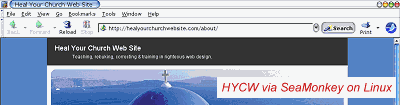
    Yes, the hard ways are arguably less expensive – provided you either want to put your development platform through all that, or have the spare machines and bandwidth available , but the easy way does get the job done for you just as fast, often with results shareable with the rest of your crack development team located anywhere on the planet. Just like I’m about to share some screenshots of this site with you:
    See Screenshots of HYCW on via SeaMonkey 1.1.2 on PLD Linux

    For those who’d rather work the smart-n-easy way, here are some services you might want to consider:

    BrowserCam
    a Screen Capture Service lets you submit multiple URL’s, choose the browsers and operating systems you want to see, and in about a minute returns screen captures of your webpage loaded in the different browsers and operating systems you selected. It costs $19.95 for one day, $59.95 for a month, $399.95 for a year, $999.95 for priority/premium service per year
    BrowsrCamp.com
    A place to test your websites on the MacOSX platform. $3 for 2 days testing, $7 for a week, $19 for a month, $99 for a year.
    BrowserPool
    a service for testing different browsers on a number of Mac, Windows and Linux platforms. About $40.41 (29.99 Euros) per month for 40 hours testing per month, about $471.50 (350 Euros) per year for 40 hours testing per month.
    BrowserShots
    a free open-source online service created by Johann C. Rocholl. When you submit your web address, it will be added to the job queue. A number of distributed computers will open your website in their browser. Because it’s free, there the results aren’t instant
    IE NetRenderer
    allows you to check how a website is rendered by Internet Explorer 7, 6 or 5.5, as seen from a high speed datacenter located in Germany. Just type in a URL in the field above and try it out – it’s free!
    iCapture
    a free, user-supported service developed by Dan Vine that captures and displays your web site using OS X 10.4.8 and Safari 2.0.4 (419.3)
    ieCapture
    a free, more user-supported service developed by Dan Vine that captures and displays your web site using Microsoft Internet Explorer, versions unknown at this time as the queue seems hours longin rendering
    SiteVista
    See how your entire pages look in a wide range of different web browsers, at different screen resolutions, and different color depths. You receive two screen captures for each test – one of the browser window. $9 for one day of 25 tests, $19 for week of 100 tests, $29 for a month of unlimited tests, $299 for a year. A test is one screenshot/per browser.

    Personally, I’d strongly recommend either BrowserCam or SiteVist as if they’d offer a 501(c) price tier … though I did find IENetRenderer and BrowserShot got enough of the job done provided I didn’t try test against all browsers during peak times. Still, you most certainly get what you pay for in this arena.

    All that said, I know some of you propeller-headed geeks out there are just champing at the bit to shoot your foot clean off … so here are a few other related articles I visited while putting this post together:

    • Link Thumbnail – a little javascript to see your site on some popular browsers
    • Taming Your Multiple IE Standalones – mangling your registry for fun and profit
    • SiteWizard – How to Check Your Website with Multiple Browsers on a Single Machine (Cross-Browser Compatibility Checking)
    • IEs4Linux is the simpler way to have Microsoft Internet Explorer running on Linux (or any OS running Wine).
    • BrowserTesting – an incutio.com discussion on ‘How do you test in many browsers?’
    • Cross browser testing using VMWare’s MultiBrowser Appliance.

    Got another service or product to suggest? Share the love, leave a comment and let us know.