Tag: social networks

  • Using Perl’s Net::Twitter to Harvest Keyword Searches

    So you’ve decided to dive into social media marketing on behalf of your church and/or charitable organization.

    In fact, you’ve been wisely leveraging bit.ly with Twitter or ow.ly with HootSuite to track and measure your outbound links — but you find yourself in need a more ‘industrial strength‘ means of tracking who is saying what about your organization or an upcoming event.

    You also want to speed up your WordPress blog as it’s been gagging when your Twitter RSS feed goes all 503 on you because Ashton Kutcher tweeted about his toenail clippings.

    Recipe for Success

    As I mentioned in my post last Tuesday entitled ‘Strategy vs. Tactics and your Social Media Activities ,’ I’ve been playing around with some of the cool social networking tools one can find in the CPAN library.

    Today I want to provide a quick snippet on how to use the Net::Twitter to write a simple PERL program to harvest a search.

    To do this, it mean installing the Net::Twitter library. You’ll likely need root or sudo privileges to make this happen. If you don’t know what root or sudo means, then you’ll want to contact your hosting provider.

    That said, once you get it installed, the next step is to go to the Twitter Search page and create an advanced search. From the resulting query string should give you all the parameters you need, for example:

    Based on the above example, I created the following script by using the nano editor for a file called ‘eastertweets.pl‘:

    #!/usr/bin/perl
    use Net::Twitter;
    use Net::Twitter::Search;
    use Scalar::Util 'blessed';
    # Just the Search API; exceptions thrown on error
    $nt = Net::Twitter->new(traits => [qw/API::Search/]);
    eval {
       # Parameters: q, callback, lang, rpp, page, since_id, geocode, show_user
       my $r = $nt->search({
          q=>"\"easter service\" OR \"sunrise service\"",
          lang=>"en",
          geocode=>"35.769804,-78.781622,40mi",
          rpp=>50,
          since=>"2010-03-21"
       });
       for my $status ( @{$r->{results}} ) {
          print "\@$status->{from_user}";
          print "\t$status->{created_at}\n";
          print "\t\t$status->{text}\n";
          print "-----------------------------------------------------\n";
       }
    };
    if ( my $err = $@ ) {
       die $@ unless blessed $err && $err->isa('Net::Twitter::Error');
       warn "HTTP Response Code: ", $err->code, "\n",
       "HTTP Message......: ", $err->message, "\n",
       "Twitter error.....: ", $err->error, "\n";
    }


    Once I created the file, it was simply a matter of modifying it to execute, then calling it:

    chmod a+x eastertweets.pl
    $HOME/eastertweets.pl

    So Why Bother?

    Now this approach by itself is a lot of work for little return. However, here are some things you might want to do with the sample above that would provide some big return value:

    1. feed this into a SQL database history via Perl DBI;
    2. create comma separated values and pipe it into a running log file;
    3. aggregate the returns with other searches into a single RSS file on your server for both the sake of speed and feeding localized dashboards;
    4. grep the returns for other key words, sending email notifications on hot items, while deleting those spammy items that make your feed so noisy;
    5. create a RESTFul web service that dynamically feeds your WordPress blog of select queries using Ajax via jQuery.

    The point is, once the data is captured, you can pretty much do anything you want with it programatically.

    For me, I’m thinking it might be fun to grab user IDs and feed their demographic information into some sort of analytics engine; or at least have some fun with Google Maps.

    Anyway, enjoy the example. If you expand on it, don’t forget to come back and provide a link. I’d be interested to see how this snippet evolves.
  • The Facebook Like Button Plugin for WordPress

    Facebook rocked the internet yesterday with 5 new plugins, one of which is an API for the Facebook Like Button. After reading about it and playing a bit with the Facebook’s Like Button generator, I decided what’s needed is a WordPress plugin that allows folks to easily configure the look-and-feel of the Facebook Like Button, and then automatically add it the beginning and/or the end of their posts.

    Update 26-Apr-10

    FYI, I just released version  0.1 of the The Facebook Activity Widget Plugin for WordPress – yet another useful (and different) WordPress plugin for displaying Facebook Social plugins on your website.

    Update 25-Apr-10

    Version 0.4 just got released – it now has a preview feature built into the administrator panel … and I’m starting to get translation .po & .mo files from abroad (thanks!-). It’s also now being distributed via the WordPress Plugin Repository.

    Update 24-Apr-10

    Version 0.2 is released as of Saturday, April 24, 2010 7:14 Eastern Standard Time.

    Also after some excellent email and FB message feedback from some early adopters, you can now also decide whether or not you want the FaceBook Like Button to appear on the top and/or bottom of individual pages, individual posts and/or your front page.

    Installation & Use

    I also wanted to keep it simple, so here’s how it works — using the standard WordPress plugin installation process:

    1. Upload the ‘fblikebutton.zip’ file to the `/wp-content/plugins/` directory using wget, curl of ftp.
    2. ‘unzip’ the ‘fblikebutton.zip’ which will create the folder to the directory `/wp-content/plugins/fblikebutton`
    3. Activate the plugin through the ‘Plugins’ menu in WordPress
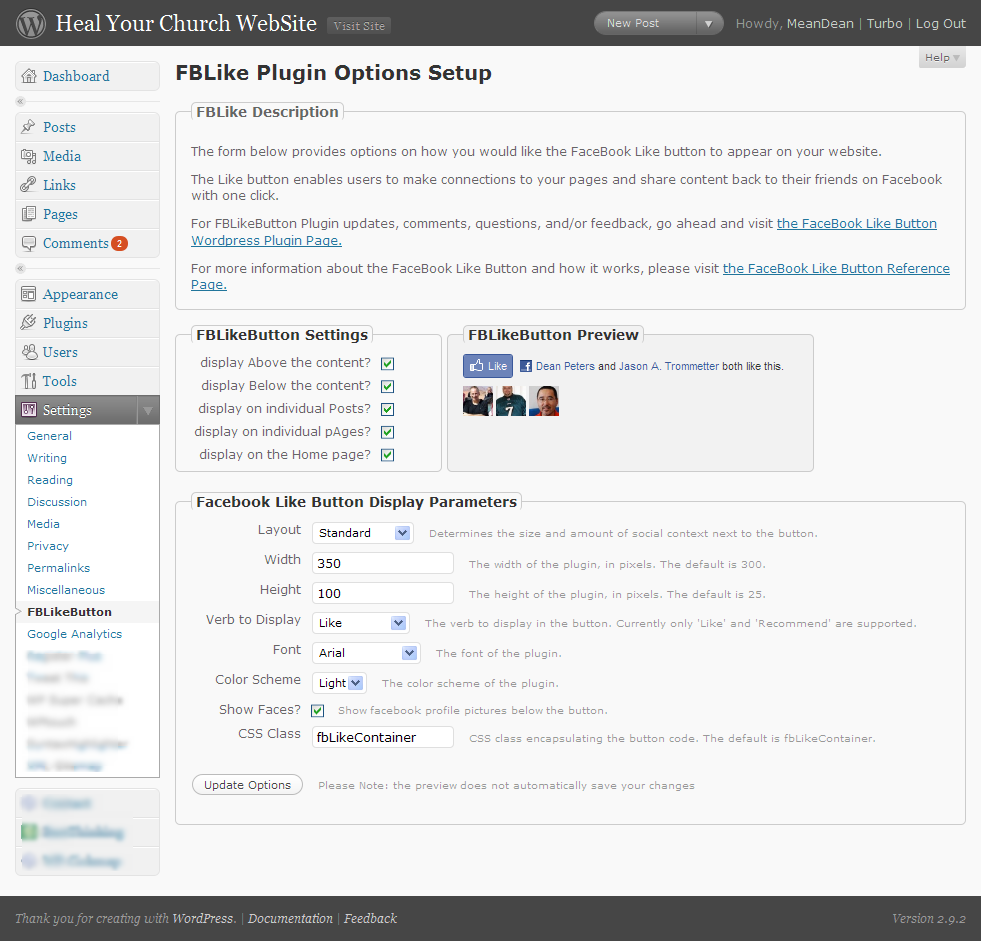
    4. Configure the plugin through ‘FBLikeButton’ submenu in the the ‘Settings’ section of the WordPress admin menu.
    5. Modify the fields to choice and save.

    Here’s a screen shot below of the administrator screen (you’ll want to click on it to see it full size):

    Screenshot of the FBLikeButton Admin Panel - now with preview

    Here’s how the FaceBook Like button appears on the bottom of this post:

    Screenshot of the FBLikeButton after fabulous formatting

    This being being version 0.1, you can bet your sweet bippee there’s more to come. Still, I wanted to get this out to the WordPress community as fast as possible.

    A bit more about the FaceBook Like Button

    What’s nice about the Facebook Like button is that no login to your site is required. Even if you’ve never visited HealYourChurchWebsite.com before, they can get social context starting with their very first visit.

    If you’re logged into FaceBook, then you can see which of your friends like a site — without the site knowing anything about you. Pretty neat, huh?

    Download It

    Also, I’m currently in the process of setting getting established with the WordPress SVN  and everything else that goes with publishing an official WordPress plugin.

    Until then, click here to download the latest fblikebutton, from the WordPress Plugin repository keeping in mind it is version 0.1 0.2 – so expect more to come!

    Download the FaceBook Like Button Plugin for WordPress

    Shout Outs and Thanks

    A shout–out of thanks for the immediate feedback goes out to Benjain, Julien, Tim, Jason, and Dave.

    Additional Reading

    FYI

    Oh, and hey, don’t forget to click the FaceBook Like Button for this post … I’d appreciate it.

  • The real reason Twitter beat the snot out of Pownce

    Twitter gives our mundane lives meaning, that’s why it beat the snot out of a more ‘feature-rich’ Pownce.

    To prove my point, let’s rewind about a year and a half ago to Tamar Weinberg’s comparison entitled ‘Twitter vs. Pownce: Who Pwns?‘ Dutifully she does what many of us do while shopping for software, cars, and food processors – she compares and scores the features of one product against another to a conclusion that reads:

    Pownce 5, Twitter 3. Pownce wins!

    There’s only one problem with that approach, while features may sell a product, it is ultimately functionality that sustains a product; software or otherwise.

    Which is why I think Scoble succinctly hits the nail on the head while unwittingly predicting Pownce’s demise in his Twitter vs. Pownce post also from early July 2007:

    “But, anyway, I still like Twitter the best. Why? No complications. It does only one thing. I find that on my cell phone I go back to Twitter before I go back to any of the others. It’s lightweight.”

    Put another way, when it comes to microblogging, Twitter has it all over Pownce because it makes it easy to do the one thing we all want from microblogging – making the mundane instances of our lives meaningful, while learning new things about our friends without coming off like a stalker.

    Disagree as some “new media marketeers” might, the reason we like Twitter is the same reason we fell in love with Blogger, it got out of the way and let us opine reflectively about how our cats would join us in contemplating the lint in our navels.

    For example, why anyone would follow my own Twitter page is beyond me, yet some find the fact that I fertilize my lawn in December and enjoy smash-mouth football entertaining and interesting.

    And like blogging, Twitter easily allows our friends and relatives to quickly comment at their convenience – only with the excellent 140 character excuse for not engaging in exposition and detailed explanations.

    All this while providing others context about ourselves that may not come out in our blogs, lectures, books and top-rated podcasts. This latter point is nicely explained in this 2:25 YouTube video from the good folks at the CommonCraft Show aptly entitled ‘Twitter in Plain English.’

    Pownce unfortunately lost sight of these primal purposes for microblogging, and in the process ‘featured-creeped‘ their product to death. Not an uncommon instance for software in any era. Especially when said offering described its services with a church-speak-like mission statements:

    “… Pownce is a lightweight productivity app, built on top of the stream, and it has all the pluses and minuses of a productivity app (including that you can use it to share music with friends!)”  – Pownce is competing with 37Signals, not Twitter!

    Any wonder we all stopped using Pownce around 160 days ago?

    So what has this got to do with your church and/or charity website? Glad you asked.

    Remember, software features are only relevant to the primary activities you’re trying to accomplish with the assistance of automation.

    Put another way, when you’re picking or designing a program to get something done – ignore all the fluff-n-stuff that has little or no bearing on what you want to get done.

    For example, if all you want to do is post 1-up snips of your daily life, then Twitter is just enough software to get it done. No need to worry about file storage, groups, rooms, etc …

    … which is also why I’m thinking Twitter is also likely to eventually beat the snot out of FriendFeed; but I digress … so more on that topic latter.

    For now, here are some related links on this topic:

    Your mileage may vary on this one, but deep in your heart, you know I’m right about making the mundane meaningful vs. marketing appeal of Twitter.

    Now please, if you don’t mind, link this post in your next tweet, add it to all your social network links so I can be proven wrong about the marketing thingie. A simple @deanpeters reply is all it takes!-)

    Do you not know that in a race all the runners run, but only one receives the prize? So run that you may obtain it. Every athlete exercises self-control in all things. They do it to receive a perishable wreath, but we an imperishable. So I do not run aimlessly; I do not box as one beating the air. – 1 Corinthians 9:24-26

  • 5 things more things about Christian spam email bombing runs

    Ever get that annoying email from a church, friend, and/or family member who ‘accidentally‘ sent a rant to everyone in their address book and/or a group-related email directory? With the recent election, my wife and I have been getting more than our fair share.

    And while I’ve written about how to address ‘Christian SPAM‘ in the recent past, I wanted to share with you my most recent response to what I sub-categorize as Christian SPAM email bombing runs (CSEBRs):

    – – – § – – –

    Hi {name withheld to protect the guilty};

    Next time we get together, make sure I spend about 5 minutes on my laptop showing you 5 cool — and free — things about the web that don’t rock like it’s 1995. For example:

    • Twitter – a “microblog” mechanism that lets you post 140 characters on any topic you want as often as you want. This is especially great as you’re standing around bored, upset, amused, and/or excited about things while equipped with nothing more than your cell phone. For an example, check mine out at http://twitter.com/deanpeters – no great shakes, but I’ve got enough subscribers whom seem interested.
    • Facebook – a social networking service where friends and families can subscribe where you can post thoughts like the ones below and then engage people in dialog and/or banter as they can post comments, etc .. It’s also a nice place to throw out some family pix. If you’d like, I can also show you how to “plug-in” a Facebook app that update to your “wall” every time you post on Twitter (synchronization is an amazing thing). Here’s a link to my profie http://is.gd/6MgW … note how I used the http://is.gd mechanism to shorten the URL.
    • Blogger.com – now I know Twitter and FaceBook have obviated bloggery to some degree, but I still love it as it allows me to venture deep into topics I enjoy such as healing church websites and the Hashemite Kingdom of Jordan. Moreover, less constraints on what I can post – and if you like, you can make some buck$ via instruments like Google’s adsense. Oh BTW, I’ve got my WordPress-driven blogs set up with the ‘twitter tools plugin‘ to update my Twitter and Facebook pages when I post. Best thing, again, people can subscribe to your blog’s RSS feed to keep up to date.
    • Google Reader – note I’ve mentioned subscribe 3 times now. All of the above allow individuals to subscribe either through the site’s syndication feed (RSS) and/or through email alerts with links to the juicy and compelling content. And not just from annoying friends like me, but any blog, news wire, newspaper, microblog and/or social network to which you’re inclined to observe.
    • BCC – finally … and I can’t stress this enough … if you must use email, that’s cool. But please, do me and others on your distribution one favor – use the BCC mechanism to distribute the email. Blind Carbon Copy is cool in that it’ll protect your friends, family and loved ones from nasty spammers and idiots like me from exposing their email addresses “into the wild.“Oh, and if you use a free email service like gMail, you can create categories for both incoming and outgoing email addresses – which is really handy when you quickly send out email broadcats to select groups of your address book (using BCC of course).

    Anyway, have a great Sunday – and give  {spouse name withheld to protect the innocent} a hug from us.

    Your (annoying) friend;

    Dean

    – – – § – – –

    Feel free to use any portion of this email to respond to Christian SPAM email bombing runs aimed in your direction. Or better yet, just send them a link here.

    I’ll be glad to respond to their rationalizations and excuses by explaining how the are endangering the tax exempt status of their church by dumping a political kvetch on the Sunday school rolls.