Despite employing strong passwords that I change regularly, despite deleting unsolicited Direct Messages (DM) and mentions with links to unknown destinations, a simple “fat finger faux pas” event lead to me granting a 3rd party Twitter application permission to spam my followers. For that I apologize — and as part of my penance, have provided some useful advice, images and even a script to help you remedy that situation if you should ever similarly fall victim so such malware.
I woke up a little after 1:30AM last night because I though I had heard some racoons helping themselves to my trash can as if it were a salad bar. Once that venture into suburban sanitation security was resolved, I checked my Samsung Droid Charge for any incoming notifications. One that caught my attention read:
Strange link via DM from you just now.
As I dug in, I realized that my Twitter Followers were being sent a DM with a link to a third party Twitter Application, which when clicked, would begin the process of similarly turning their Twitter account into a spam-sending zombie.
First thing first, I read the instructions on Twitter’s help page entitled “My Account Has Been Compromised, ” which advised me to:
- Change your password (go ahead, make it a strong password)
- Revoke connections (to any 3rd party application you think suspicious &/or are no longer used)
- Update your new password in your trusted third-party applications
Which I did immediately. I then went into Twitter and began to manually delete the messages the pusilanimous 3rd party program had sent. It wasn’t long into this tedious process that I realized “… this is how I got hacked, the malware link is WAY too close to the delete link.” I’ve attached a screenshot of a test DM to demonstrate the usability issue I’m trying to describe:
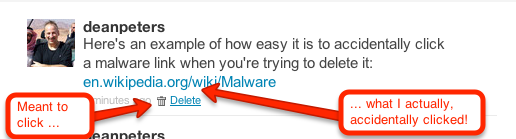
A bit of context, earlier in the evening while watching the 1st quarter of the Packers/Falcon’s game, I received an obvious malware DM. I pulled up Twitter in my browser on my Droid rather than the mobile App because there’s less keystrokes to deleting such conversations. Unfortunately, I clicked the Malware link. I remember that happened because I quickly hit the back key and then deleted — not thinking anything would happen because of my miscue.
I was wrong. Later, sometime during the 4th quarter while searching stats on the Pack’s stunning 2nd half comeback, I saw on my little Droid browser a page that looked like Twitter, asking me to log back in. I was busy with the game, I’d seen Twitter do this before. What I didn’t see that the link was actually pointing to a misspelled site: Twittler.com!
So despite all my talk about strong passwords, ignoring unsolicited candy from strangers, and other such stuff, I granted a 3rd party application permission to spam the h-e-double-toothpicks out of my followers. Worse, just about the time I was through deleting all the rogue messages, I received another communique that reminded me that followers who get email notifications of DMs were still going to see the link.
So at about 2:45AM, I set out to write a script that would send DM notifications to all my Twitter Friends — technically, those individuals of whom I follow, who also follow me. I won’t go into too much gory detail, other than the resulting replies indicated grateful followers, who while suspicious, were glad to get the personalized Direct Message warning from me.
I chose PERL, because while other languages may be better for long term projects, I knew I could field a solution within an hour and a half by taking advantage of the Net::Twitter module provided at the CPAN library; along with a fresh set of API consumer and access from the Twitter Developer’s page.
I call this script “DM_mea_culprit.pl,” and since it can be used to send a bulk messages to all your Twitter followers, please resist temptation and limit its use it for good:
#!/usr/bin/perl
#
# Summary:
# --------------------------------------------
# Sends a Direct Message to Friends - those people on Twitter
# whom I follow who also follow me
#
# Arguments:
# --------------------------------------------
# none yet, we'll get that done on the next version
#
# Example Use:
# ---------------------------------------------
# perl DM_mea_culprit.pl > run01.log.txt

use Net::Twitter;
use Dumper;

# NOTE: you will need to get consumer keys and access tokens from the
# Twitter Development Center: https://dev.twitter.com/start
my $nt = Net::Twitter->new(
traits => [qw/API::REST OAuth/],
consumer_key => $YOUR_CONSUMER_KEY,
consumer_secret => $YOUR_CONSUMER_SECRET,
access_token => $YOUR_ACCESS_TOKEN,
access_token_secret => $YOUR_ACCESS_TOKEN_SECRET,
);

# this information is useful to log at the beinning of the script
# .. it includes how many more messages you can send w/in the hour
my $ratelimit = $nt->rate_limit_status();
print Dumper($ratelimit);

# construct the outgoing direct message
my $omsg = "please do NOT open any URL you may have received from me last night as a DM. It was malware.";

# get all the ID's of people I follow
my @ids;
for ( my $cursor = -1, my $r; $cursor; $cursor = $r->{next_cursor} ) {
# for a larger net, consider followers_ids()
$r = $nt->friends_ids({ cursor => $cursor });
push @ids, @{ $r->{ids} };
}

# walk through all the IDs
foreach my $id (@ids) {
if($id) {

# get an array that describes the friendship
my $friend = $nt->lookup_friendships({ user_id => $id });

# get their screen name
my $screenname = $friend->[0]->{"screen_name"};

# see how you're connected to this friend
my $connections = $friend->[0]->{"connections"};

# important -- do they follow you?
my $isfollowedby = $connections->[1];

if($isfollowedby) {
my $dmsg = "\@$screenname, $omsg"; # personalize the DM
my $smsg = $nt->new_direct_message($id, $dmsg); # send the DM
if($smsg) {
print "message '$dmsg' successfully sent to #ID".$id."\n";
} else {
print "WRN:".$id."\t@".$screenname."\texperienced a message fail\n";
}
sleep (2); # don't overrun Twitter
}
sleep(3); # don't get blacklisted
}
}

# Now send out a generalized message to the peeps;
my $res = $nt->update({ status => "TO MY FOLLOWERS: $omsg" });

# last bit of logging
print "This work is done\n";
exit 1;
All that said, here are some things I’m doing to do moving forward to avoid such instances.
- continue to change my password periodically, using something very strong;
- periodically review my third-party application connections, removing anything that looks suspicious and/or is no longer in use;
- always use the Twitter Mobile App to delete DMs with bad looking URLs when on my Droid smartphone;
- take a harder look at the URL when asked to log back into Twitter (or Facebook for that matter);
- perfect the above script — adding logic to delete spammy DM’s while sending out the warning; and
- being the Social Media API junkie that I am, perhaps re-write this in Python.
Please feel free to add your recommendations to the list above — and again — apologies to my Twitter followers for the hassle.